
Simple Death Coordinates
Never lose your items again. Logs your death coordinates and distance in chat, click to copy for quick navigation.
Über diese Mod
Never lose your items again.
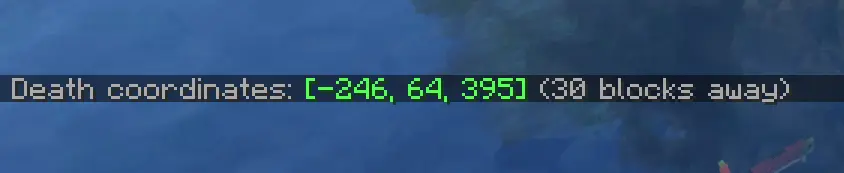
This lightweight mod automatically logs your death coordinates and distance in chat upon respawn, featuring a click-to-copy function for quick and easy navigation.
✨ Features
Vanilla Style Integration: The notifications are designed to mimic the look and feel of native /locate or game system messages. Keeping your HUD clean and authentic.
Instant Coordinates: Automatically displays your exact XYZ location the moment you respawn.
Distance Tracker: Shows exactly how far you are from your death point so you can plan your recovery.
Click-to-Copy: Simply click the chat message to copy your coordinates to the clipboard for easy use with waypoints or teleports.
Lightweight: No extra menus, no clutter—just the information you need, exactly when you need it.
🧩 How to use
Die in the game while exploring or building.
Upon respawning, check your chat for the automatically generated death message, styled just like a standard system notification.
Click on the coordinates in the chat to copy them to your clipboard.
Paste the coordinates into your favorite waypoint mod, map tool, or use them to teleport back if you have the necessary permissions!
⚙️ Compatibility & Technical Details
Vanilla-Friendly: The UI does not use custom inventory screens or complex pop-ups. It utilizes the standard Minecraft chat component system, ensuring full compatibility with other mods and custom chat interfaces.
Performance: Optimized for minimal resource usage, ensuring zero impact on your FPS or game logic.
Version Support: Works on any server (even if it's not installed on the server-side), making it the perfect tool for survival multiplayer and single-player worlds alike.
Verfügbare Versionen
Simple Death Coordinates auf deinem Client installieren
Mod-Loader lokal installieren
Installiere fabric für deine lokale Minecraft-Version.
Passende Datei herunterladen
Wähle die Simple Death Coordinates-Datei für fabric und Minecraft 26.2.
Mod installieren
Lege die .jar-Datei in deinem lokalen .minecraft/mods-Ordner ab und starte Minecraft neu. Eine Installation auf dem Server ist nicht nötig.
Kompatibilität
Mod-Loader
Minecraft-Versionen
26.2, 26.1.2
Server-seitig
✗ Nicht unterstütztEmpfohlener RAM
4 GB(min. 3 GB)Häufige Fragen
Muss Simple Death Coordinates auf dem Minecraft Server installiert werden?
Nein. Modrinth kennzeichnet Simple Death Coordinates serverseitig als nicht unterstützt. Installiere die Mod nur im lokalen Minecraft-Mods-Ordner. Dein Server kann unverändert bleiben, sofern die Mod-Seite keine zusätzliche Abhängigkeit nennt.
Welche Version und welchen Loader braucht Simple Death Coordinates?
Nutze eine Datei für fabric, neoforge, quilt und exakt deine Minecraft-Version. Unterstützte Versionen sind unter anderem 26.2, 26.1.2. Loader-Dateien sind nicht untereinander austauschbar.
Simple Death Coordinates funktioniert nicht – was kann ich prüfen?
Prüfe zuerst Minecraft-Version, Loader-Version und erforderliche Abhängigkeiten. Lege die .jar-Datei im lokalen .minecraft/mods-Ordner ab und entferne ältere Duplikate. Da die Mod clientseitig ist, löst mehr Server-RAM dieses Problem nicht.
Ähnliche Mods






Minecraft Server für deine Gruppe
Simple Death Coordinates bleibt auf deinem Client. Hoste dazu eine kompatible Welt für deine Mitspieler.