
Simple World Anti-Lag
Clears entities from the world without affecting your farms and other improvements
Screenshots

Über diese Mod
📑 Information
A lag-cleaner for your Minecraft worlds, fully optimized without consuming ticks by running asynchronously. This data pack was specially designed to improve game performance in your saturated worlds, reducing tick consumption by junk entities and some blocks without affecting your farms.
😛 Some features:
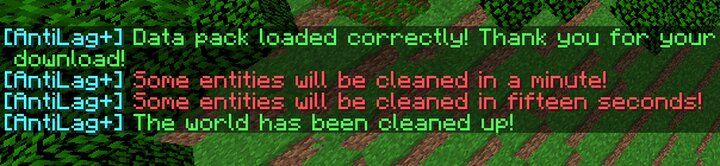
- Despawn junk entities every five minutes (Adjustable to 3 and 10 minutes), including useless entities like bats, squid drops waiting to be despawned and some monsters out of nearby chunks (Excluding pet/farm entities and entities generated by other data packs), fixing the Minecraft's most common saturations in large worlds or with many entities.
- You can change the format of the cleaning warning messages or even change the time each cleaning will be performed using /function antilagplus:settings (Requires administrator if you are in a server).
- Does not consume ticks as it works asynchronously, it only releases more.
- If you are not English speaking, you can change the language of the cleaning messages to Spanish using /function antilagplus:settings! - Si eres hispanohablante, ¡puedes cambiar el idioma de los mensajes de limpieza usando /function antilagplus:settings!
- It's compatible with any other data pack or mod.
Verfügbare Versionen
Simple World Anti-Lag auf dem Server installieren
Server bestellen
Bestelle einen Minecraft Java Server mit mindestens 3 GB RAM (4 GB empfohlen).
datapack Loader setzen
Wähle im Panel unter "Egg" den datapack-Loader und die passende Minecraft-Version (1.21.8).
Mod installieren
Öffne den Mod-Browser im Dashboard und suche nach "Simple World Anti-Lag". Klicke "Installieren" – fertig! Alternativ: Lade die .jar via SFTP in den /mods Ordner.
Kompatibilität
Mod-Loader
Minecraft-Versionen
1.21.8, 1.21.7, 1.21.6 (+1 weitere)
Server-seitig
✓ ErforderlichEmpfohlener RAM
4 GB(min. 3 GB)Häufige Fragen
Simple World Anti-Lag Server crasht beim Start – was tun?
Häufigste Ursache: falsche datapack-Version oder zu wenig RAM. Prüfe im Server-Log (latest.log), ob ein "OutOfMemoryError" oder "Mixin"-Fehler auftritt. Bei Mado Hosting: Stelle sicher, dass mindestens 3 GB RAM zugewiesen sind und der Loader zur Mod-Version passt (1.21.8). Über das Panel kannst du den Loader mit einem Klick wechseln.
Ist Simple World Anti-Lag mit datapack und fabric und forge und neoforge und quilt kompatibel?
Simple World Anti-Lag unterstützt offiziell datapack, fabric, forge, neoforge, quilt für Minecraft 1.21.8, 1.21.7, 1.21.6. Achtung: Forge- und Fabric-Mods sind NICHT untereinander kompatibel – wähle einen Loader und bleibe dabei. Im Mado Dashboard werden inkompatible Loader-Kombinationen automatisch erkannt.
Server laggt mit Simple World Anti-Lag – wie optimiere ich die Performance?
Empfohlener RAM: 4 GB (+1 GB pro 8 Spieler). Prüfe mit /spark profiler, ob Simple World Anti-Lag den meisten Tick-Time verbraucht. Häufige Fixes: Server-View-Distance auf 8-10 reduzieren, bei Forge "performant" oder "starlight" als Zusatz-Mod installieren. Bei Mado Hosting läuft dein Server auf NVMe-SSDs mit dedizierten CPU-Kernen für minimale Latenz.
Ähnliche Mods


Modded Server mieten
Installiere Simple World Anti-Lag mit nur einem Klick auf deinem Server.
Details
- Lizenz
- Creative Commons Attribution Non Commercial No Derivatives 4.0 International
- Server-seitig
- Erforderlich