Modrinth · Fabric, Forge, NeoForge, Quilt
Sit Anywhere! auf deinem Minecraft Server
Sit Anywhere! läuft auf Minecraft Servern mit Fabric oder Forge oder NeoForge oder Quilt. Bestell deinen Server, stell den Loader im Panel ein und installiere die Mod mit einem Klick im Mod-Browser.
Sit anywhere you want! Look down, double tap sneak and right click and you sit. As easy as that. Or you can just sit on stair/slab or via "/trigger sit". Work on vanilla servers, or any other setup.
- Downloads
- 389.4K
- Autor
- SozoKa
- Loader
- Fabric, Forge, NeoForge, Quilt
- Minecraft
- 1.19.4 – 26.3
- Aktualisiert
- –
Screenshots
So sieht Sit Anywhere! aus
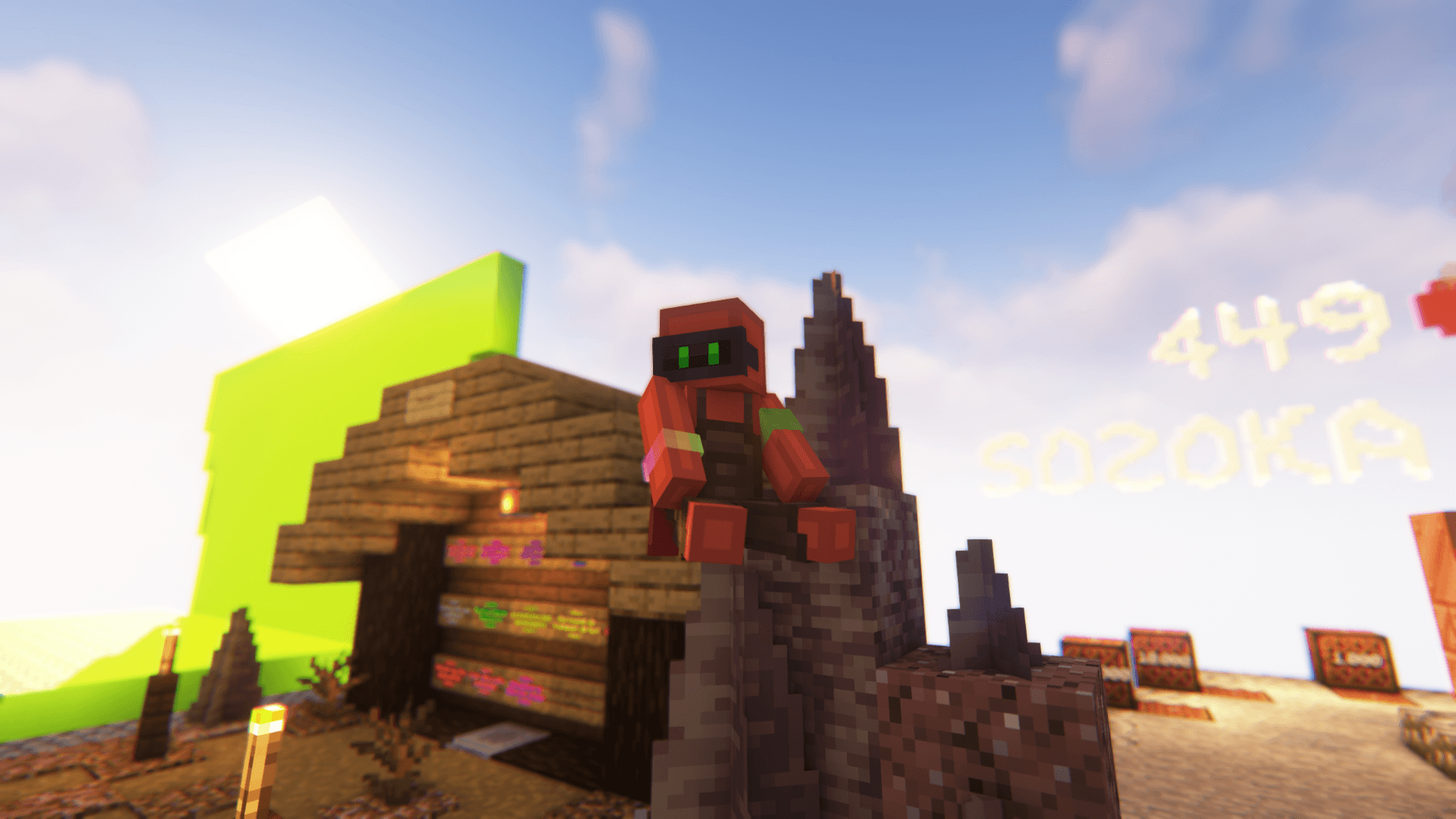
 Sit on spike.
 Sit on bookshelves.
 Sit to kiss one of your "FRIEND SHEEP" (lol u got it?)
 Sit in fire.
 Sit alone at home waiting for a friend to send you a message.
Bilder: Sit Anywhere! auf Modrinth, vom Projektteam veröffentlicht.
Einrichtung
Sit Anywhere! auf dem Server installieren
Server und Spieler brauchen denselben Loader und dieselbe Minecraft-Version. Sichere die Welt, bevor du Mods hinzufügst oder aktualisierst.
- 01
Konfigurieren
4 GB RAM sind vorausgewählt. Laufzeit und Add-ons wählst du selbst, bezahlt wird per Kreditkarte oder PayPal.
- 02
Loader einstellen
Stell im Panel die Serversoftware auf Fabric oder Forge oder NeoForge oder Quilt und wähl die passende Minecraft-Version, zum Beispiel 26.3-snapshot-9.
- 03
Mod installieren
Such im Mod-Browser nach „Sit Anywhere!“ und installiere die Version für deinen Loader. Alternativ lädst du die .jar per SFTP in den Ordner mods. Erforderliche Abhängigkeiten stehen auf der Projektseite.
- 04
Verbinden
Sit Anywhere! ist auf dem Client optional. Spieler verbinden sich über die Serveradresse aus dem Panel.
- Auf dem Server
- Erforderlich
- Auf dem Client
- Optional
- Loader
- Fabric, Forge, NeoForge, Quilt
- Minecraft
- 26.3-snapshot-9, 26.3-snapshot-7, 26.3-snapshot-6 +34 weitere
- Lizenz
- LicenseRef-All-Rights-Reserved
Das Panel
Mods installieren, Fehler finden.
Echte Screenshots aus dem Mado Panel. Beides ist bei jedem Minecraft Server enthalten.
Mod-Browser
Modrinth und CurseForge direkt im Panel.
Der Browser filtert nach deiner Minecraft-Version. Mods installierst du mit einem Klick, ohne .jar-Dateien hochzuladen.

KI-Crash-Analyse
Wenn ein Mod crasht, liest die Analyse das Log.
Mods scheitern oft an einer falschen Loader-Version, Java-Version oder fehlenden Abhängigkeit. Die Analyse nennt eine wahrscheinliche Ursache und einen Lösungsvorschlag.

Versionen
Veröffentlichte Versionen
Nimm die Datei, die zu Loader und Minecraft-Version deines Servers passt. Server und Spieler brauchen dieselbe Version.
Sit Anywhere! · Modrinth- For Modloaders v3.1.0 (1.19.4 - 26.3)19. August 2026Minecraft 1.19.4, 1.20, 1.20.1, 1.20.2, 1.20.3, 1.20.4, 1.20.5, 1.20.6, 1.21, 1.21.1, 1.21.10, 1.21.11, 1.21.2, 1.21.3, 1.21.4, 1.21.5, 1.21.6, 1.21.7, 1.21.8, 1.21.9, 26.1, 26.1.1, 26.1.2, 26.2, 26.3 · Fabric, Forge, NeoForge, Quilt
- Datapack v3.1.0 (1.19.4 - 26.3)19. August 2026Minecraft 1.19.4, 1.20, 1.20.1, 1.20.2, 1.20.3, 1.20.4, 1.20.5, 1.20.6, 1.21, 1.21.1, 1.21.10, 1.21.11, 1.21.2, 1.21.3, 1.21.4, 1.21.5, 1.21.6, 1.21.7, 1.21.8, 1.21.9, 26.1, 26.1.1, 26.1.2, 26.2, 26.3 · datapack
Originalbeschreibung des Projektautors
🪑 Sit Anywhere!
Sit on stairs, slabs, or literally any surface in Minecraft!
✨ Key Features
- Server-Side Only: Install it on your server or LAN. Players don't need to install anything to join and use it.
- Datapack & Mod Available: Use the datapack for specific worlds, or the mod for global activation across all worlds.
- Accident-Proof: Smart triggers prevent you from sitting down unintentionally.
- Future-Proof: Designed as a lightweight datapack logic, making it less likely to break with Minecraft updates. (But I'll make sure to fix it if it ever happens!
📖 How to Use
- On Stairs & Slabs: Stand on top of the block and right-click it.
- Anywhere Else: Look straight down, double-tap sneak (Shift), and right-click.
- Via Command: Type /trigger sit.
⤵️ Installation
📦 Datapack
- Download the
.zipfile. - Place it into your world's
datapacks/folder.
🌐 Translations: Also place the same
.zipfile into yourresourcepacks/folder (and enable it) to get translated texts.
⚙️ Mod
- Download the
.jarfile. - Place it into your Minecraft
mods/folder.
🌐 Translations: Built-in automatically, no extra steps needed!
Available languages (9): English (US), Français (France), Español (España), Deutsch (Deutschland), Português (Portugal), Italiano (Italia), 日本語 (日本), 한국어 (대한민국), 简体中文 (中国大陆).
The translation may be inaccurate as I only speak English and French. If you notice any errors, please let me know! If you would like to translate this project into your own language, feel free to create the translation file and send it to me!
💬 Feedback & Support
Have questions, suggestions, or found a bug? Join the community on Discord in the #mods-and-datapacks channel:
👉 Join Discord Server
Sit Anywhere! Server crasht beim Start – was tun?
Häufige Ursachen: Loader- oder Minecraft-Version passen nicht zur Mod-Datei, eine Abhängigkeit fehlt oder der RAM reicht nicht. Such im Log (latest.log) nach „OutOfMemoryError“, „Mixin“ oder fehlenden Mods. Bei Mado wertet die KI-Crash-Analyse das Log aus und schlägt eine Ursache vor. Loader und Version änderst du im Panel.
Mit welchem Loader läuft Sit Anywhere!?
Laut Modrinth unterstützt Sit Anywhere! Fabric, Forge, NeoForge, Quilt für Minecraft 26.3-snapshot-9, 26.3-snapshot-7, 26.3-snapshot-6. Forge- und Fabric-Dateien sind nicht untereinander austauschbar: Wähl einen Loader für Server und Clients.
Wie viel RAM braucht ein Server mit Sit Anywhere!?
Als Orientierung 3–4 GB für einen Server mit dieser Mod. Das ist eine Schätzung, keine gemessene Mindestanforderung. Weitere Mods, viele Spieler und große Sichtweiten brauchen mehr. Ob eine Mod die Tick-Zeit belastet, siehst du mit dem spark-Profiler.
Ähnliche Mods
Beliebte Mods aus derselben Kategorie
 Server-fähig

VeinMiner
von Miraculixx
Mine the whole vein on mining a single ore/block. Make the tedious mining experience to something satisfying and fun! FTB Ultimine alternative
 Server-fähig

Geckolib
von Gecko
A 3D animation library for entities, blocks, items, armor, and more!
 Nur Client

VeinMiner Hotkey
von Miraculixx
Veinminer Addon - Use a hotkey to veinmine with a dynamic crosshair & block highlighting
 Server-fähig

Fzzy Config
von fzzyhmstrs
Config API with automatic GUIs, powerful validation options, server-client sync, and more!
Bereit für deinen Server mit Sit Anywhere!?
4 GB RAM ab 8,00 € im Monat. 35 % auf den 1. Monat mit MADO35.