
Sky Book
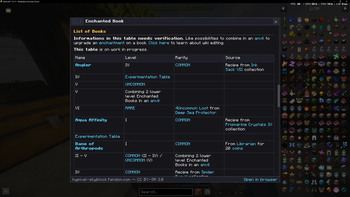
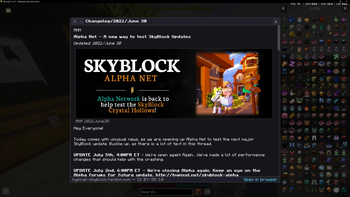
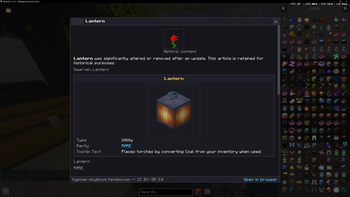
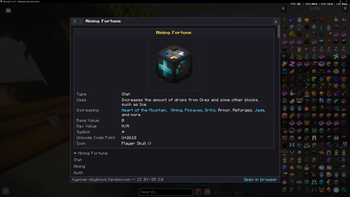
SkyBook is a Fabric client-side Minecraft mod for 1.21.11 (Java 21) that brings the Hypixel SkyBlock WIKI into the game without ever leaving a container screen.
Screenshots
Über diese Mod
SkyBook - Summary
SkyBook is a Fabric client-side Minecraft mod for 1.21.11 (Java 21) that brings the Hypixel
SkyBlock wiki into the game without ever leaving a container screen.
What it does
Middle-click any SkyBlock item (in a chest, your inventory, a REI/JEI entry list, anywhere)
and an in-game overlay panel slides in over the current screen, showing that item's page from
the Hypixel SkyBlock Fandom wiki. The underlying container stays open and fully interactive
behind it.
Feature highlights
- Smart item resolution: reads ExtraAttributes NBT to extract the SkyBlock ID, then looks up
the canonical wiki title via the NEU item repo (handles pets, enchanted books, potions,
runes, reforges) - Rich wiki rendering: infoboxes, tables, headings, images, and tab groups (e.g. Wither armor
variants), parsed from live Fandom API responses and rendered in MC's GUI - Link navigation + history: clickable wiki links, mouse-4/5 back/forward, /skybook
command - Caching: disk cache with 24h TTL + lightweight revid revalidation; never hammers the wiki
- REI + JEI integration: intercepts hovered entries in both recipe viewers
- Hypixel-safe: middle-clicks are only consumed, never synthesized; glass-pane clicks pass
through untouched; complies with Hypixel's client mod rules
Tech stack
Fabric Loader 0.18.5 | Fabric API 0.140.0 | jsoup (bundled) | NEU item repo (ZIP-mounted,
no extraction) | Fandom action=parse API | Mojang mappings
Current status
v0.1.0 is built and packaged (skybook-0.1.0+1.21.11.jar, 602 KB). All 12 unit tests pass.
Smoke-tested in the dev client (boots clean, REI/JEI registered, repo ETag caching works).
Awaiting first in-game interactive test.
Verfügbare Versionen
Sky Book auf dem Server installieren
Server bestellen
Bestelle einen Minecraft Java Server mit mindestens 3 GB RAM (4 GB empfohlen).
fabric Loader setzen
Wähle im Panel unter "Egg" den fabric-Loader und die passende Minecraft-Version (1.21.11).
Mod installieren
Öffne den Mod-Browser im Dashboard und suche nach "Sky Book". Klicke "Installieren" – fertig! Alternativ: Lade die .jar via SFTP in den /mods Ordner.
Kompatibilität
Mod-Loader
Minecraft-Versionen
1.21.11
Server-seitig
✗ Nicht unterstütztEmpfohlener RAM
4 GB(min. 3 GB)Häufige Fragen
Sky Book Server crasht beim Start – was tun?
Häufigste Ursache: falsche fabric-Version oder zu wenig RAM. Prüfe im Server-Log (latest.log), ob ein "OutOfMemoryError" oder "Mixin"-Fehler auftritt. Bei Mado Hosting: Stelle sicher, dass mindestens 3 GB RAM zugewiesen sind und der Loader zur Mod-Version passt (1.21.11). Über das Panel kannst du den Loader mit einem Klick wechseln.
Ist Sky Book mit fabric kompatibel?
Sky Book unterstützt offiziell fabric für Minecraft 1.21.11. Im Mado Dashboard werden inkompatible Loader-Kombinationen automatisch erkannt.
Server laggt mit Sky Book – wie optimiere ich die Performance?
Empfohlener RAM: 4 GB (+1 GB pro 8 Spieler). Prüfe mit /spark profiler, ob Sky Book den meisten Tick-Time verbraucht. Häufige Fixes: Server-View-Distance auf 8-10 reduzieren, bei Forge "performant" oder "starlight" als Zusatz-Mod installieren. Bei Mado Hosting läuft dein Server auf NVMe-SSDs mit dedizierten CPU-Kernen für minimale Latenz.
Ähnliche Mods




![[ETF] Entity Texture Features](https://cdn.modrinth.com/data/BVzZfTc1/af683d206d50b05258d865b0d6e4aa2f2cee12f2_96.webp)

Modded Server mieten
Installiere Sky Book mit nur einem Klick auf deinem Server.