
Skyblock Infinite
Skyblock for any seed with Infinite void generation.
Screenshots

Über diese Mod
Skyblock Infinite
The next generation of the classic Skyblock we all know and love!
Infinite Void:
No terrain will generate no matter how far you travel! No world border will stop you from exploring and finding new structures or biomes!
Note: This uses Custom Terrain Generation, which is not compatible with Minecraft Realms, Bedrock Edition, and some modded clients.
If you are looking for a compaitble server host, .
Structure Generation:
All important structures generate floating in the void! Witch Huts, Nether Fortresses, Strongholds, and many more all generate in the empty void.
Config Menu:
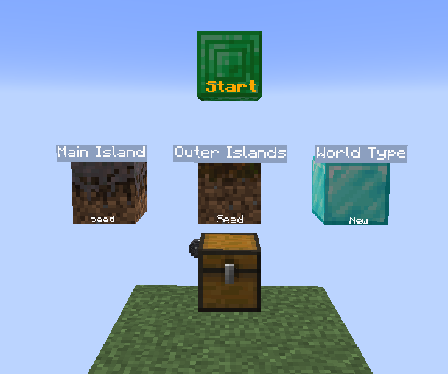
Select how you want islands to generate. You can either pick Seed based islands or the Classic islands.
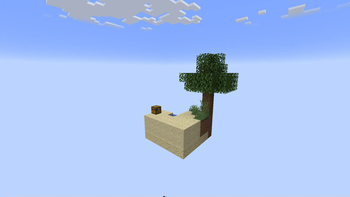
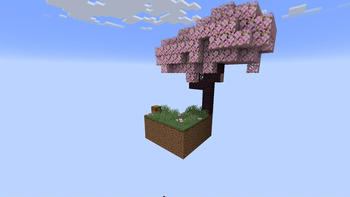
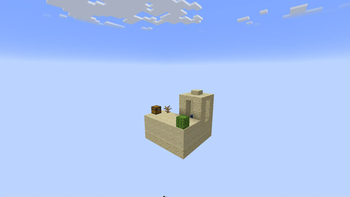
Seed: Islands generate based on the biome you are in.
Classic: The Skyblock island [grid/layout] you all know and love.
There will be more options added to this menu in the future, so keep an eye out.
How to Install
- Start creating a new world and click the More tab at the top left
- Click the "Data Packs" button
- Click the "Open Pack Folder" button
- Drag and drop the datapack into the folder
- Click on the Skyblock Infinite datapack in the "Available" list
- Finish creating your world!
Join the Community
Join the discord to get help with your Skyblock questions, or just come and hang out with other Skyblockers!
Island Design Contributers:
- Doovid: Jagged Peaks, Swamp, Badlands, Dark Forest
- PandaX: Mangrove, Lush Cave, Windswept Gravelly Hills, Desert, Savanna, Birch, Dripstone Cave
- Porg Collector: Deep Frozen Ocean
- Andergamez: Beach
- MrAmericanMike: Mushroom Fields
- WolfButterCup: Ice Spikes
- Anathra: Sulfur Caves
Verfügbare Versionen
Skyblock Infinite auf dem Server installieren
Server bestellen
Bestelle einen Minecraft Java Server mit mindestens 4 GB RAM (6 GB empfohlen).
datapack Loader setzen
Wähle im Panel unter "Egg" den datapack-Loader und die passende Minecraft-Version (26.3).
Mod installieren
Öffne den Mod-Browser im Dashboard und suche nach "Skyblock Infinite". Klicke "Installieren" – fertig! Alternativ: Lade die .jar via SFTP in den /mods Ordner.
Kompatibilität
Mod-Loader
Minecraft-Versionen
26.3, 26.2, 26.2-pre-5 (+89 weitere)
Server-seitig
✓ ErforderlichEmpfohlener RAM
6 GB(min. 4 GB)Häufige Fragen
Skyblock Infinite Server crasht beim Start – was tun?
Häufigste Ursache: falsche datapack-Version oder zu wenig RAM. Prüfe im Server-Log (latest.log), ob ein "OutOfMemoryError" oder "Mixin"-Fehler auftritt. Bei Mado Hosting: Stelle sicher, dass mindestens 4 GB RAM zugewiesen sind und der Loader zur Mod-Version passt (26.3). Über das Panel kannst du den Loader mit einem Klick wechseln.
Ist Skyblock Infinite mit datapack und fabric und forge und neoforge und quilt kompatibel?
Skyblock Infinite unterstützt offiziell datapack, fabric, forge, neoforge, quilt für Minecraft 26.3, 26.2, 26.2-pre-5. Achtung: Forge- und Fabric-Mods sind NICHT untereinander kompatibel – wähle einen Loader und bleibe dabei. Im Mado Dashboard werden inkompatible Loader-Kombinationen automatisch erkannt.
Server laggt mit Skyblock Infinite – wie optimiere ich die Performance?
Empfohlener RAM: 6 GB (+1 GB pro 5 Spieler). Prüfe mit /spark profiler, ob Skyblock Infinite den meisten Tick-Time verbraucht. Häufige Fixes: Server-View-Distance auf 8-10 reduzieren, bei Forge "performant" oder "starlight" als Zusatz-Mod installieren. Bei Mado Hosting läuft dein Server auf NVMe-SSDs mit dedizierten CPU-Kernen für minimale Latenz.
Ähnliche Mods




Modded Server mieten
Installiere Skyblock Infinite mit nur einem Klick auf deinem Server.