
Modrinth · Fabric · Client-Mod
SkyOcean
SkyOcean ist eine clientseitige Mod. Du installierst sie auf deinem Rechner, auf dem Server ist sie nicht nötig.
A lightweight Hypixel SkyBlock QOL mod that aims to improve the experience without modifying too heavily
- Downloads
- 2.2M
- Autor
- –
- Loader
- Fabric
- Minecraft
- 1.21.10 – 26.3
- Aktualisiert
- –
Screenshots
So sieht SkyOcean aus


Bilder: SkyOcean auf Modrinth, vom Projektteam veröffentlicht.
Einrichtung
SkyOcean auf deinem Client installieren
Clientseitige Mods laufen nur auf deinem Rechner. Mehr Server-RAM ändert an ihrer Leistung nichts.
- 01
Loader lokal installieren
Installiere Fabric für deine Minecraft-Version in deinem Launcher.
- 02
Datei herunterladen
Lade die SkyOcean-Datei für deinen Loader und exakt deine Minecraft-Version herunter, zum Beispiel 26.3.
- 03
In den Mods-Ordner legen
Lege die .jar-Datei in den lokalen Ordner .minecraft/mods und entferne ältere Duplikate.
- 04
Starten
Starte Minecraft mit dem Loader-Profil. Auf dem Server musst du nichts ändern.
- Auf dem Server
- Nicht nötig
- Auf dem Client
- Erforderlich
- Loader
- Fabric
- Minecraft
- 26.3, 26.2, 26.1.2 +9 weitere
- Lizenz
- LicenseRef-SkyOcean
Versionen
Veröffentlichte Versionen
Nimm die Datei, die zu Loader und Minecraft-Version deines Servers passt. Server und Spieler brauchen dieselbe Version.
SkyOcean · Modrinth- SkyOcean 1.18.217. Oktober 2026Minecraft 26.3 · Fabric
- SkyOcean 1.18.217. Oktober 2026Minecraft 26.2 · Fabric
- SkyOcean 1.18.217. Oktober 2026Minecraft 26.1, 26.1.1, 26.1.2 · Fabric
- SkyOcean 1.16.12. Juni 2026Minecraft 1.21.11 · Fabric
- SkyOcean 1.13.210. März 2026Minecraft 1.21.10, 1.21.9 · Fabric
Originalbeschreibung des Projektautors
SkyOcean


SkyOcean is a mod that aims to improve the playing experience while staying true to the Hypixel SkyBlock style, meaning that we aim to integrate with the base game in a
seamless way.
Installation Guide
- Prerequisites: Fabric Language Kotlin
- Download into your favourite launcher or into your mods folder directly
Features
Screens
- Item Value Screen
- When hovering over an item in any inventory, you can press
Jto open the item value screen. - This screen shows a breakdown of item value sources by category, such as item stars, recombs, and more.
- When hovering over an item in any inventory, you can press
- Item Search Screen
- Press
oor run/skyocean searchto open the item search screen. - Allowing you to search through the following:
- Island Chests
- Storage (Backpack/Enderchest)
- Wardrobe
- Sacks
- Accessory Bag
- Forge
- Inventory (overworld)
- Vault
- Museum
- Rift (Inventory/Enderchest)
- Drill & Rod upgrades (upgrade parts that are applied)
- and way more...
- Using Right Click on any sack item will open an input to get that item from the sack.
- Press
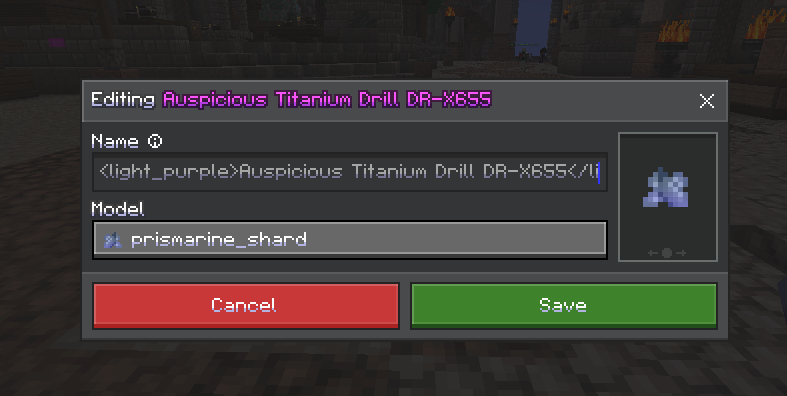
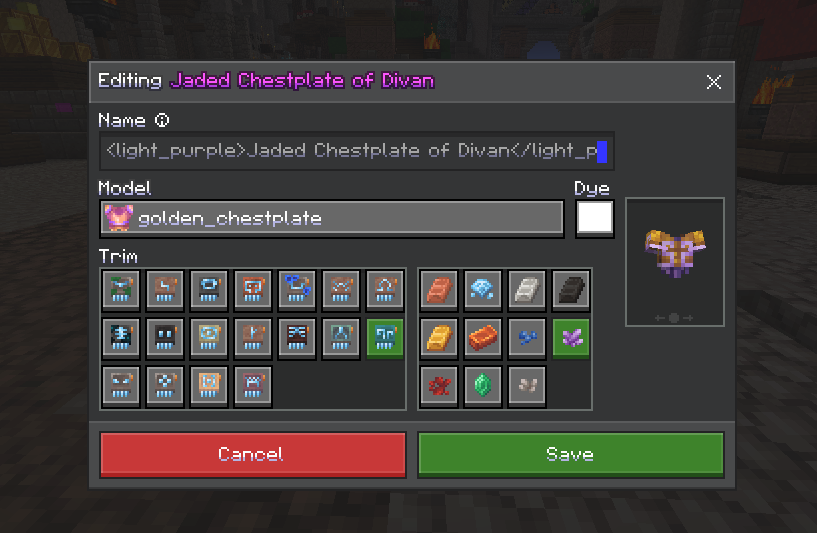
- Item Customisation Screen
- Run
/skyocean customizewhile having an item selected to either customize it with subcommands or a gui - Allows you to customize the following attributes:
- Name (with custom colors and gradients)
- Item Model
- Item Color (static or gradients)
- Armor Trim
- Enchantment Glint
- Skins (static and animated)
- Run
Commands
- /skyocean calc <equation> - performs a mathematical equation and prints the result
- /skyocean sendcoords - sends the current coordinates in all chat
- /skyocean search - opens the item search screen
- /skyocean recipe <recipe> [<amount>] - Sets the selected recipe as the active Craft Helper Item.
- /skyocean recipe amount <amount> - Sets the amount of items to craft for the Craft Helper.
- /skyocean recipe skyshards - Sets the SkyShards Tree as the active Craft Helper Tree from your clipboard.
- /skyocean recipe clear
General config
- Option to disable text shadows for all SkyOcean messages.
- Prefix gradient
- SkyOcean Item Modify Indicator
Chat Config
- Profile In Chat
- Adds a bingo/ironman/stranded icon next to a player's chat message.
- Piggy Bank Repair Helper
- When you die and the piggy bank breaks, you can click on the chat message to get 8 Enchanted Pork from your sacks.
- Sack Notification
- Specify for which sack items you want to receive a notification when you gain them, e.g.
Glossy Gemstone.
- Specify for which sack items you want to receive a notification when you gain them, e.g.
- White non mesages
- Makes messages from players without rank white.
Slayer Config
- Highlight own slayer boss
- Highlight mini bosses
- Extra option to change color for high tier minis
- Highlight blaze in attunement color
Fishing Config
- Trophy Fish Numbers
- Shows the number of Trophy Fish you have caught in the chat message of the specific fish you caught.
- Best used with the SkyBlock Profile Viewer mod to update your data when out of sync.
- Hook Text Scale
- Change the scale of the text that appears when you're about to hook a fish.
- Lava Replacement
- Visually replace lava with water in the Crimson Isle.
- Bobber Fix
- Fixes fishing bobbers rubberbanding when fishing.
- Bobber Timer
- Shows a timer above your bobber to indicate how long it has been in the liquid.
- Hide other Bobbers
- Hides other players' fishing bobbers, so you can see your own bobber more clearly.
- Hotspot Highlight
- Highlights hotspots with a color fitting to their type.
- Renders a circle around the hotspot and fills it with the color.
Foraging Config
- HOTF
- Show level as amount
- Show total progress
- Show shift-click cost
- Show total amount left
- Galatea
- Mute the Phantoms
- Shulker Overwrite
- Allows you to overwrite the Shulker's color with a custom one.
Garden Config
- Pest Bait Type
- While in a Trap inventory, view what bait type attracts what pests.
- Desk Pest Highlight
- In the "Configure Plots" screen, highlight what plots have pests on them.
Inventory Config
- Sack Value
- View what item is worth how much in each sack.
- Choose between Bazaar or NPC prices.
- Inventory Buttons
- Customizable buttons at the top and bottom of your inventory, like the creative inventory tabs.
Lore Modifier Config
- Drill Lore
- Removes the Abilities of each drill component, keeping just the component's name.
- Dungeon Quality
- Adds the Dungeon Quality to the lore of dungeon items.
- Compact Level Bar
- Compacts the bars in the skyblock levels menu into one line, making them fit on smaller screens.
- Storage Preview
- Previews the contents of your backpacks and ender chest in the tooltip.
Mining Config
- Modify Commissions
- Modifies commission items to show the progress you've made.
- HOTM
- Show level as amount
- Show total progress
- Show shift-click cost
- Show total amount left
- Mineshaft
- Announce mineshaft enter
- Corpse waypoints
- Corpse key information
- Retexture
- Retexture carpets
- Retexture Glacite Tunnel blocks
- Retexture mist
- Retexture gemstones
- Retexture Crystal Hollows blocks
- Crystal Hollows Area Walls
- Puzzler Solver
- Metal detector solver
Dungeon Config
- CSGO Gambling Screen
- Plays the CSGO Gambling animation when opening any Obsidian and Bedrock Chest.
- Also works in Croesus.
Misc Config
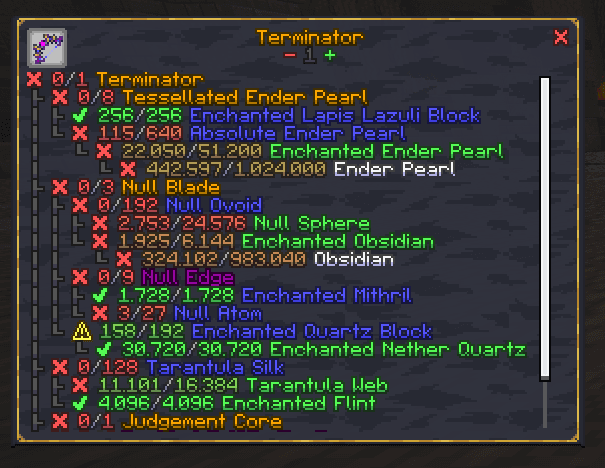
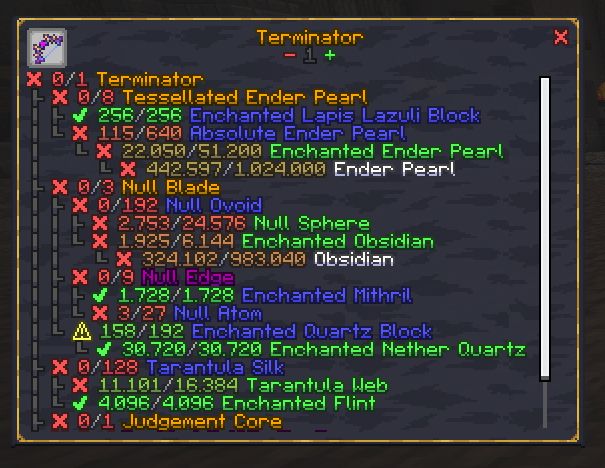
- Craft Helper
- Creates a Tree of the item you want to craft, showing the progress of each sub item.
- Also accessible through
/skyocean recipe <recipe> [<amount>]
- Mob Icons
- Replaces the default hypixel mob icons with a custom texture, also has texturepack support.
- Minister in Calendar
- Previous server notifications
- Anvil helper
- Hide lightning bolts and flashes
- Full Text Shadow
- Show Hidden Pet Candy
- Readds pet candy that Hypixel hides for pets that are level 100.
- Transparent armour
- On yourself and others, configurable transparency.
- Hide entity fire
- Removes the fire effect from all entities
- Cloud hider for specific islands
Muss SkyOcean auf dem Minecraft Server installiert werden?
Nein. Modrinth kennzeichnet SkyOcean serverseitig als nicht unterstützt. Installiere die Mod nur im lokalen Mods-Ordner. Dein Server kann unverändert bleiben, sofern die Projektseite keine zusätzliche Abhängigkeit nennt.
Welche Version und welchen Loader braucht SkyOcean?
Nutze eine Datei für Fabric und exakt deine Minecraft-Version. Unterstützt werden unter anderem 26.3, 26.2, 26.1.2. Dateien für verschiedene Loader sind nicht austauschbar.
SkyOcean funktioniert nicht – was kann ich prüfen?
Prüfe zuerst Minecraft-Version, Loader-Version und erforderliche Abhängigkeiten. Da die Mod clientseitig ist, löst mehr Server-RAM das Problem nicht.
Ähnliche Mods
Beliebte Mods aus derselben Kategorie
 Server-fähig

FerriteCore
von malte0811
Memory usage optimizations
 Nur Client

Mod Menu
von Prospector
Adds a mod menu to view the list of mods you have installed.
 Server-fähig

YetAnotherConfigLib (YACL)
von isxander
A builder-based configuration library for Minecraft!
 Server-fähig

Xaero's Minimap
von thexaero
Displays a map of the nearby world terrain, players, mobs, entities in the corner of your screen. Lets you create waypoints which help you find the locations you've marked.
Mods für deinen eigenen Server gesucht?
Im Katalog findest du Mods, die auf Minecraft Servern laufen.