
Sky's Overworld Netherite
A simple mod that adds a new method for obtaining Netherite in the overworld! 🪨
Screenshots
Über diese Mod
What is Sky's Overworld Netherite? 💭
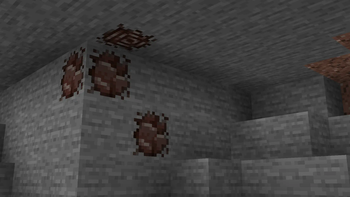
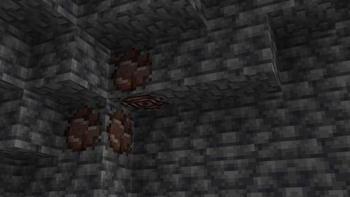
▪ This mod adds Ancient Debris ore to the Overworld! It's rare and drops Ancient Shards when mined. You can either get a normal shard or, with a 10% chance, a large shard. You'll need 9 normal shards or 4 large shards to craft one Ancient Debris. However, you can increase your chances of getting large shards with Fortune!
New Items & Blocks 🪨
- Ancient Debris ore & Deepslate Ancient Debris ore
▪ These two new ores spawn from Y level 32 down to Y level -59 and drop Ancient Debris Shards when mined. The chance of obtaining a large shard increases with the Fortune enchantment.
- Ancient Debris Shard (Small and Large)
▪ These shards drop from Ancient Debris Ore and are used to craft Ancient Debris. You'll need 9 Small Shards or 4 Large Shards to craft one Ancient Debris. You can also craft 2 Small Shards from one Large Shard.
Compatibility ⚙️
▪ This mod is compatible with both Forge and NeoForge, and updates are usually released simultaneously on both loaders.
▪ This mod also supports the Create mod and adds two Crushing Wheel recipes!
Usage 🧪
▪ YOU MAY use this in your modpack on CurseForge / Modrinth with or without credit.
▪ YOU MAY use this mod in your video with credit!
▪ YOU MAY NOT redistribute this mod on other websites.
Verfügbare Versionen
Sky's Overworld Netherite auf dem Server installieren
Server bestellen
Bestelle einen Minecraft Java Server mit mindestens 4 GB RAM (6 GB empfohlen).
fabric Loader setzen
Wähle im Panel unter "Egg" den fabric-Loader und die passende Minecraft-Version (1.21.4).
Mod installieren
Öffne den Mod-Browser im Dashboard und suche nach "Sky's Overworld Netherite". Klicke "Installieren" – fertig! Alternativ: Lade die .jar via SFTP in den /mods Ordner.
Kompatibilität
Mod-Loader
Minecraft-Versionen
1.21.4, 1.21.1, 1.20.1 (+1 weitere)
Server-seitig
✓ ErforderlichEmpfohlener RAM
6 GB(min. 4 GB)Häufige Fragen
Sky's Overworld Netherite Server crasht beim Start – was tun?
Häufigste Ursache: falsche fabric-Version oder zu wenig RAM. Prüfe im Server-Log (latest.log), ob ein "OutOfMemoryError" oder "Mixin"-Fehler auftritt. Bei Mado Hosting: Stelle sicher, dass mindestens 4 GB RAM zugewiesen sind und der Loader zur Mod-Version passt (1.21.4). Über das Panel kannst du den Loader mit einem Klick wechseln.
Ist Sky's Overworld Netherite mit fabric und forge und neoforge kompatibel?
Sky's Overworld Netherite unterstützt offiziell fabric, forge, neoforge für Minecraft 1.21.4, 1.21.1, 1.20.1. Achtung: Forge- und Fabric-Mods sind NICHT untereinander kompatibel – wähle einen Loader und bleibe dabei. Im Mado Dashboard werden inkompatible Loader-Kombinationen automatisch erkannt.
Server laggt mit Sky's Overworld Netherite – wie optimiere ich die Performance?
Empfohlener RAM: 6 GB (+1 GB pro 5 Spieler). Prüfe mit /spark profiler, ob Sky's Overworld Netherite den meisten Tick-Time verbraucht. Häufige Fixes: Server-View-Distance auf 8-10 reduzieren, bei Forge "performant" oder "starlight" als Zusatz-Mod installieren. Bei Mado Hosting läuft dein Server auf NVMe-SSDs mit dedizierten CPU-Kernen für minimale Latenz.
Ähnliche Mods




Modded Server mieten
Installiere Sky's Overworld Netherite mit nur einem Klick auf deinem Server.