
Sleep Rework
Sleep Rework is a mod designed to fix some issues with Vanilla sleep mechanics
Screenshots

Über diese Mod
Sleep Rework
What
Sleep Rework is a mod designed do solve some issues I had with the Minecraft sleep system:
- Sleep is always available to the player, allowing them to avoid night, thus avoiding all potential challenge
- Sleep is almost required due to Phantoms
I know some people may disagree, so this mod may not be for you, but it is fairly configurable so you may be able to tweak it to your liking.
Requirements
Fabric Requires: Fabric API, Architectury API
Forge Requires: Architectury API
Community
Come join our Discord Server, if you have any questions, comment or suggestions. We love to see what people are doing with our mods.
Bug Reporting
Please report any bugs or issues in our Discord or on our Github Repository.
TL:DR
Here's the quick rundown:
- The player can not sleep until they reach 100% tiredness.
- Tiredness increases over time
- Potions can be brewed to speed up or slow down tiredness accumulation
- Phantoms will start to spawn when the player reaches 300% (by default) tiredness
Mechanics
Tiredness
Tiredness is a value attached to every player.
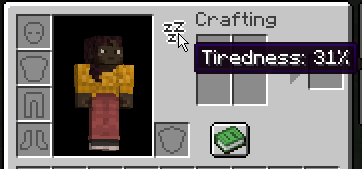
Your current Tiredness level can be seen within your inventory by hovering over the "Zzz" icon.
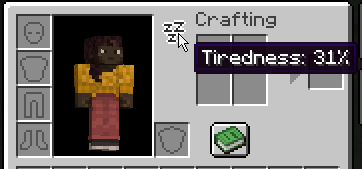
When your Tiredness level reaches 100%, you will be able to sleep. At 0 - 99%, you will recieved a "You may not rest now; You are not tired enough" message when attempting to use a bed.

After successfully sleeping, your tiredness will be reset to 0%.
The maximum level of Tiredness is 500%.
Phantoms
When your tiredness level reaches 300% (by default), Phantoms have a chance to spawn on you.
As your tiredness level increases, more Phantoms will spawn at once.
Potions
Sleep Rework adds two new types of potion:
Liveliness
Liveliness will decrease your Tiredness gain by 0.5x (by default) per potion level.
Liveliness Potions can be brewed with an Awkward Potion and a Honeycomb.
Drowsiness
Drowsiness will increase your Tiredness gain by 2x (by default) per potion level.
Drowsiness Potions can be brewed by corrupting a Liveliness Potion with a Fermented Spider Eye
See More on our Mechanics wiki page
Configuration
Verfügbare Versionen
Sleep Rework auf dem Server installieren
Server bestellen
Bestelle einen Minecraft Java Server mit mindestens 3 GB RAM (4 GB empfohlen).
fabric Loader setzen
Wähle im Panel unter "Egg" den fabric-Loader und die passende Minecraft-Version (1.20.1).
Mod installieren
Öffne den Mod-Browser im Dashboard und suche nach "Sleep Rework". Klicke "Installieren" – fertig! Alternativ: Lade die .jar via SFTP in den /mods Ordner.
Kompatibilität
Mod-Loader
Minecraft-Versionen
1.20.1, 1.20
Server-seitig
✓ ErforderlichEmpfohlener RAM
4 GB(min. 3 GB)Häufige Fragen
Sleep Rework Server crasht beim Start – was tun?
Häufigste Ursache: falsche fabric-Version oder zu wenig RAM. Prüfe im Server-Log (latest.log), ob ein "OutOfMemoryError" oder "Mixin"-Fehler auftritt. Bei Mado Hosting: Stelle sicher, dass mindestens 3 GB RAM zugewiesen sind und der Loader zur Mod-Version passt (1.20.1). Über das Panel kannst du den Loader mit einem Klick wechseln.
Ist Sleep Rework mit fabric und forge und neoforge kompatibel?
Sleep Rework unterstützt offiziell fabric, forge, neoforge für Minecraft 1.20.1, 1.20. Achtung: Forge- und Fabric-Mods sind NICHT untereinander kompatibel – wähle einen Loader und bleibe dabei. Im Mado Dashboard werden inkompatible Loader-Kombinationen automatisch erkannt.
Server laggt mit Sleep Rework – wie optimiere ich die Performance?
Empfohlener RAM: 4 GB (+1 GB pro 8 Spieler). Prüfe mit /spark profiler, ob Sleep Rework den meisten Tick-Time verbraucht. Häufige Fixes: Server-View-Distance auf 8-10 reduzieren, bei Forge "performant" oder "starlight" als Zusatz-Mod installieren. Bei Mado Hosting läuft dein Server auf NVMe-SSDs mit dedizierten CPU-Kernen für minimale Latenz.
Ähnliche Mods






Modded Server mieten
Installiere Sleep Rework mit nur einem Klick auf deinem Server.