
Spectrum: Optical
An engineering optical mod about directing, focusing, and filtering light beams using mirrors and lenses to interact with the world.
Screenshots
Über diese Mod
Spectrum: Optical
Catch the light. Make it work.
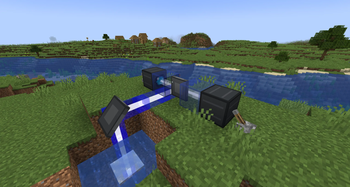
Spectrum is an engineering and optical mod for Minecraft (Fabric, 1.21.1) that introduces a system for generating, directing, focusing, and splitting beams of light. Build complex optical networks using mirrors, lenses, and filters in 3D space to interact with the world and automate your setups.
💡 Core Mechanics
1. Generation & Detection
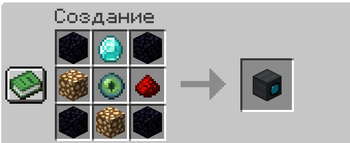
- Beam Emitter: When powered by Redstone, it emits a focused white beam of light with a base intensity of
15. - Beam Receiver: Detects incoming light beams hitting its front face and outputs a Redstone signal. Perfect for wireless Redstone transmission or laser tripwires.
2. Direction & Reflection
- Optical Mirrors (Horizontal & Vertical): Redirect beams.
- Standard Mirror: Reflects light horizontally. Can be rotated in 8 directions (45-degree steps) by right-clicking.
- Double-sided Mirror: Reflects incoming beams from both its front and back sides.
- Vertical Mirror / Double-sided Vertical Mirror: Allows you to bounce beams vertically (up or down).
3. Focus & Splitting (Lenses)
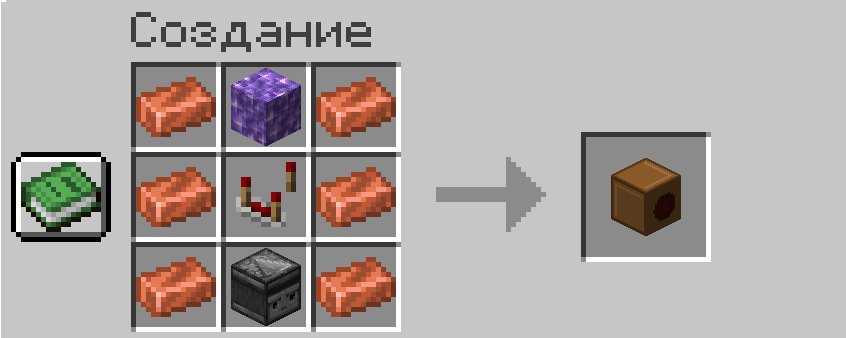
- Converging Lens (Собирательная линза):
- Receives beams from its Left and Right sides and combines them into a single, stronger beam emitted from the front.
- Merging beams sums their intensities (making the laser visually thicker) and blends their colors.
- Supports up to 5 maximum merges for gameplay balance.
- Diverging Lens (Рассеивающая линза):
- Receives a single beam from the back and splits it into two beams (emitted from Left and Right sides) with half of the input intensity.
🌈 Spectral Colors & Filtering
Pass a beam through any of the 16 vanilla stained glass blocks or panes to filter its wavelength and change its color. Filtering absorbs light, reducing the beam's intensity by 1 per glass block.
Each color triggers unique physical effects along the beam path or where it hits:
- 🔴 Red (Heat): Melts ice and snow along its path, sets target blocks on fire, and burns entities.
- 🟢 Green (Life): Turns dirt blocks into grass blocks along its path and acts as Bone Meal on crops/saplings at its endpoint. Heals living entities.
- 🔵 Blue (Cold): Freezes water into ice, solidifies lava into obsidian or cobblestone, and extinguishes fire. Inflicts Slowness on entities.
- ⚪ White (Laser, Intensity $\ge 20$): High-power concentrated beam. Breaks blocks at its endpoint (up to hardness 10) and deals heavy magic damage to entities.
- 🟡 Yellow (Red + Green): Accelerates minecarts.
- 🟣 Purple (Red + Blue): Teleports items and entities forward along the direction of the beam.
- 🔵 Cyan (Green + Blue): Grants Levitation to entities.
⚙️ Requirements & Dependencies
To play Spectrum, make sure you have the following installed:
- Fabric Loader (1.21.1)
- Fabric API
- Fabric Language Kotlin
Verfügbare Versionen
Spectrum: Optical auf dem Server installieren
Server bestellen
Bestelle einen Minecraft Java Server mit mindestens 3 GB RAM (4 GB empfohlen).
fabric Loader setzen
Wähle im Panel unter "Egg" den fabric-Loader und die passende Minecraft-Version (1.21.1).
Mod installieren
Öffne den Mod-Browser im Dashboard und suche nach "Spectrum: Optical". Klicke "Installieren" – fertig! Alternativ: Lade die .jar via SFTP in den /mods Ordner.
Kompatibilität
Mod-Loader
Minecraft-Versionen
1.21.1
Server-seitig
✓ ErforderlichEmpfohlener RAM
4 GB(min. 3 GB)Häufige Fragen
Spectrum: Optical Server crasht beim Start – was tun?
Häufigste Ursache: falsche fabric-Version oder zu wenig RAM. Prüfe im Server-Log (latest.log), ob ein "OutOfMemoryError" oder "Mixin"-Fehler auftritt. Bei Mado Hosting: Stelle sicher, dass mindestens 3 GB RAM zugewiesen sind und der Loader zur Mod-Version passt (1.21.1). Über das Panel kannst du den Loader mit einem Klick wechseln.
Ist Spectrum: Optical mit fabric kompatibel?
Spectrum: Optical unterstützt offiziell fabric für Minecraft 1.21.1. Im Mado Dashboard werden inkompatible Loader-Kombinationen automatisch erkannt.
Server laggt mit Spectrum: Optical – wie optimiere ich die Performance?
Empfohlener RAM: 4 GB (+1 GB pro 8 Spieler). Prüfe mit /spark profiler, ob Spectrum: Optical den meisten Tick-Time verbraucht. Häufige Fixes: Server-View-Distance auf 8-10 reduzieren, bei Forge "performant" oder "starlight" als Zusatz-Mod installieren. Bei Mado Hosting läuft dein Server auf NVMe-SSDs mit dedizierten CPU-Kernen für minimale Latenz.
Ähnliche Mods






Modded Server mieten
Installiere Spectrum: Optical mit nur einem Klick auf deinem Server.