
SpiffyHUD
Addon for FancyMenu to customize the in-game HUD.
Screenshots
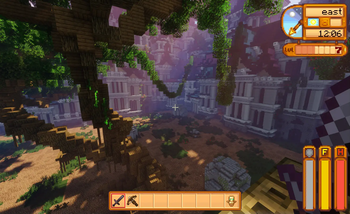
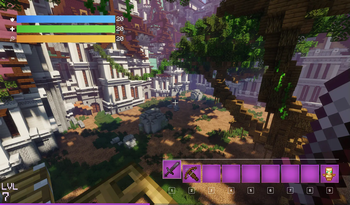
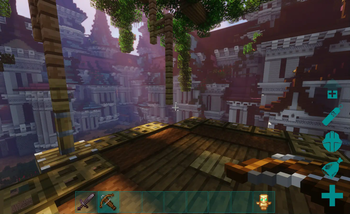
Über diese Mod




SpiffyHUD is an addon for FancyMenu that lets you fully customize Minecraft’s in-game HUD, and it’s super easy to use. You can add new stuff, animations, images, pretty much make it look however you want. Since it’s built on top of FancyMenu, most of the cool things you can do there also work here.
It’s like having full control of your HUD, right at your fingertips. Want it to look cleaner? Fancier? Just straight-up awesome? Spiffy’s got you.
If you want to see everything it can do, check out the documentation. It covers all the basics and even the more advanced stuff, so whether you’re just messing around or going full pro, you’ll find what you need.
For support, tips, and to connect with other users, join the official Discord server.
If you experience crashes or other issues, please check the incompatibility list for mod conflicts!
Copyright
SpiffyHUD Copyright © 2021-2025 Keksuccino.
SpiffyHUD is licensed under DSMSLv3 (DON'T SNATCH MA STUFF LICENSE v3).
See LICENSE.md for more information about the license.
Server Needed?
Looking to play Minecraft with friends but setting up a server is just too time-consuming?
No worries! Simply rent a pre-configured server and start playing in a snap.
Just click the image below and use code **** to enjoy a 25% discount on your first month! You can also click the code itself if your ad blocker hides the banner.
Verfügbare Versionen
SpiffyHUD auf dem Server installieren
Server bestellen
Bestelle einen Minecraft Java Server mit mindestens 3 GB RAM (4 GB empfohlen).
fabric Loader setzen
Wähle im Panel unter "Egg" den fabric-Loader und die passende Minecraft-Version (26.3).
Mod installieren
Öffne den Mod-Browser im Dashboard und suche nach "SpiffyHUD". Klicke "Installieren" – fertig! Alternativ: Lade die .jar via SFTP in den /mods Ordner.
Kompatibilität
Mod-Loader
Minecraft-Versionen
26.3, 26.2, 26.1.2 (+11 weitere)
Server-seitig
~ OptionalEmpfohlener RAM
4 GB(min. 3 GB)Häufige Fragen
SpiffyHUD Server crasht beim Start – was tun?
Häufigste Ursache: falsche fabric-Version oder zu wenig RAM. Prüfe im Server-Log (latest.log), ob ein "OutOfMemoryError" oder "Mixin"-Fehler auftritt. Bei Mado Hosting: Stelle sicher, dass mindestens 3 GB RAM zugewiesen sind und der Loader zur Mod-Version passt (26.3). Über das Panel kannst du den Loader mit einem Klick wechseln.
Ist SpiffyHUD mit fabric und forge und neoforge kompatibel?
SpiffyHUD unterstützt offiziell fabric, forge, neoforge für Minecraft 26.3, 26.2, 26.1.2. Achtung: Forge- und Fabric-Mods sind NICHT untereinander kompatibel – wähle einen Loader und bleibe dabei. Im Mado Dashboard werden inkompatible Loader-Kombinationen automatisch erkannt.
Server laggt mit SpiffyHUD – wie optimiere ich die Performance?
Empfohlener RAM: 4 GB (+1 GB pro 8 Spieler). Prüfe mit /spark profiler, ob SpiffyHUD den meisten Tick-Time verbraucht. Häufige Fixes: Server-View-Distance auf 8-10 reduzieren, bei Forge "performant" oder "starlight" als Zusatz-Mod installieren. Bei Mado Hosting läuft dein Server auf NVMe-SSDs mit dedizierten CPU-Kernen für minimale Latenz.
Ähnliche Mods




![[ETF] Entity Texture Features](https://cdn.modrinth.com/data/BVzZfTc1/af683d206d50b05258d865b0d6e4aa2f2cee12f2_96.webp)

Modded Server mieten
Installiere SpiffyHUD mit nur einem Klick auf deinem Server.