StageBox
A music speaker mod with custom .ogg playback, animated speakers, LED effects, and cable sync.
Screenshots
Über diese Mod
StageBox
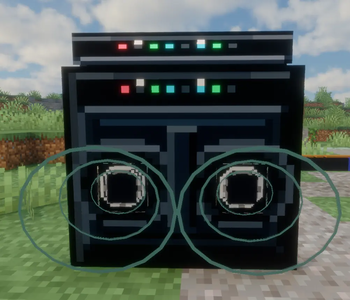
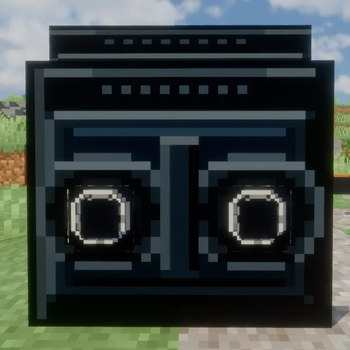
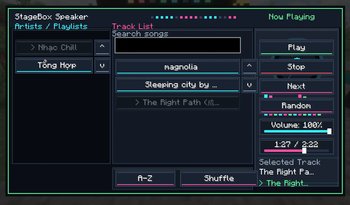
StageBox is a Minecraft speaker mod that adds a portable music speaker with a custom music GUI, LED effects, animated speaker cones, and cable syncing.
Features
- StageBox speaker block
- Custom music playback from local
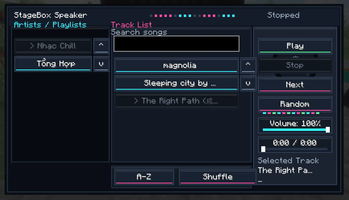
.oggfiles - Music GUI with Play, Stop, Next, Random, and Volume controls
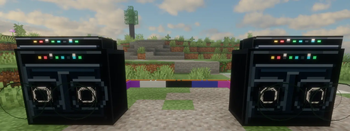
- Animated speaker cones while music is playing
- LED light effects
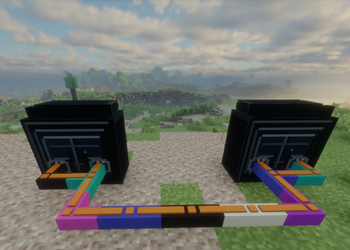
- Power cable system for syncing connected speakers
- Multiple speakers can play independently or sync together with cables
- Crafting recipes for the speaker and power cable
How to add music
- Launch the game once with the mod installed.
- Put your
.oggmusic files into:
config/stagebox/music
You can also organize songs into custom subfolders, for example:
config/stagebox/music/YourPlaylist/your_song.ogg
- Open the StageBox GUI in-game and play your music.
Only .ogg files are supported.
Note
This mod does not include built-in music.
Players can add their own .ogg files.
Vietnamese
StageBox là mod loa nghe nhạc cho Minecraft, thêm block loa có giao diện phát nhạc, đèn LED, màng loa nhún và hệ thống dây điện để đồng bộ nhiều loa.
Tính năng
- Thêm block loa StageBox / Loa Kẹo Kéo
- Phát nhạc từ file
.oggbên ngoài - Giao diện nghe nhạc với Phát, Dừng, Bài tiếp theo, Ngẫu nhiên và Âm lượng
- Màng loa nhún khi phát nhạc
- Hiệu ứng đèn LED
- Dây điện giúp đồng bộ nhiều loa nối với nhau
- Hỗ trợ nhiều loa phát độc lập hoặc đồng bộ bằng dây
- Có công thức chế tạo loa và dây điện
Cách thêm nhạc
- Chạy game một lần sau khi cài mod.
- Bỏ file nhạc
.oggvào thư mục:
config/stagebox/music
Bạn cũng có thể tạo thư mục con tùy chỉnh, ví dụ:
config/stagebox/music/TenPlaylist/bai_nhac.ogg
- Mở GUI StageBox trong game để phát nhạc.
Chỉ hỗ trợ file .ogg.
Lưu ý
Mod không bao gồm sẵn nhạc.
Người chơi có thể tự thêm file nhạc .ogg vào thư mục nhạc của mod.
Support / Contact:
If you need help installing the mod, adding .ogg music files, or reporting bugs, you can contact me by email:
Email: [email protected]
Vietnamese:
Hỗ trợ / Liên hệ:
Nếu bạn cần hướng dẫn cài mod, thêm file nhạc .ogg, hoặc muốn báo lỗi trong quá trình sử dụng, bạn có thể liên hệ qua email:
Email: [email protected]
Verfügbare Versionen
StageBox auf dem Server installieren
Server bestellen
Bestelle einen Minecraft Java Server mit mindestens 3 GB RAM (4 GB empfohlen).
fabric Loader setzen
Wähle im Panel unter "Egg" den fabric-Loader und die passende Minecraft-Version (1.21.1).
Mod installieren
Öffne den Mod-Browser im Dashboard und suche nach "StageBox". Klicke "Installieren" – fertig! Alternativ: Lade die .jar via SFTP in den /mods Ordner.
Kompatibilität
Mod-Loader
Minecraft-Versionen
1.21.1, 1.20.1
Server-seitig
✓ ErforderlichEmpfohlener RAM
4 GB(min. 3 GB)Häufige Fragen
StageBox Server crasht beim Start – was tun?
Häufigste Ursache: falsche fabric-Version oder zu wenig RAM. Prüfe im Server-Log (latest.log), ob ein "OutOfMemoryError" oder "Mixin"-Fehler auftritt. Bei Mado Hosting: Stelle sicher, dass mindestens 3 GB RAM zugewiesen sind und der Loader zur Mod-Version passt (1.21.1). Über das Panel kannst du den Loader mit einem Klick wechseln.
Ist StageBox mit fabric und forge kompatibel?
StageBox unterstützt offiziell fabric, forge für Minecraft 1.21.1, 1.20.1. Achtung: Forge- und Fabric-Mods sind NICHT untereinander kompatibel – wähle einen Loader und bleibe dabei. Im Mado Dashboard werden inkompatible Loader-Kombinationen automatisch erkannt.
Server laggt mit StageBox – wie optimiere ich die Performance?
Empfohlener RAM: 4 GB (+1 GB pro 8 Spieler). Prüfe mit /spark profiler, ob StageBox den meisten Tick-Time verbraucht. Häufige Fixes: Server-View-Distance auf 8-10 reduzieren, bei Forge "performant" oder "starlight" als Zusatz-Mod installieren. Bei Mado Hosting läuft dein Server auf NVMe-SSDs mit dedizierten CPU-Kernen für minimale Latenz.
Ähnliche Mods

![[ETF] Entity Texture Features](https://cdn.modrinth.com/data/BVzZfTc1/af683d206d50b05258d865b0d6e4aa2f2cee12f2_96.webp)
![[EMF] Entity Model Features](https://cdn.modrinth.com/data/4I1XuqiY/6e5bbd0d06b1741bfdab6c0cfab6de8fdaf0064c_96.webp)



Modded Server mieten
Installiere StageBox mit nur einem Klick auf deinem Server.