STAL Alloys
This mod adds new metals and metal alloys into Minecraft that add more variety to tools, armors, decorative blocks, and resources when mining.
Screenshots
Über diese Mod
STAL Alloys
This mod adds new metals and metal alloys into Minecraft that add more variety to tools, armors, decorative blocks, and resources when mining.
Credits and Special Mentions
- Russian translation provided by @Alexander317
Features
The Alloy Smelter
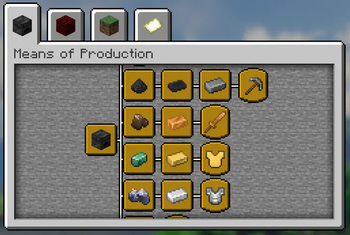
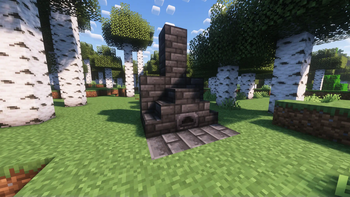
The alloy smelter is a new block entity used to smelt together a combination of two metals to produce a metal alloy. See the Crafting Recipes listed bellow.

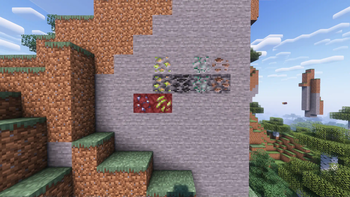
New Ores (and corresponding materials)
There are 5 new ores added to the game that each serve a unique purpose. Most ores have varients in different layers of the overworld or nether.
Click to View
| Chromium | Nickel | Carbon | Zinc | Tin | |
|---|---|---|---|---|---|
| Stone Layer | NO | YES | NO | YES | YES |
| Deepslate Layer | NO | YES | YES | YES | YES |
| The Nether | YES | YES | NO | NO | NO |

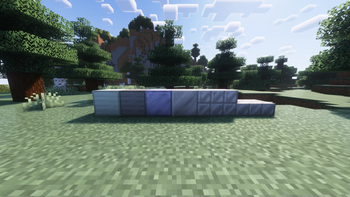
New Decorative Blocks
Click to View

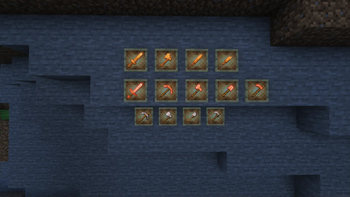
New Tools | Weapons | Armor
Each new metal has a distinct purpose. Some produce tools, others weapons and/or armor.
Click to View


Crafting Recipes
Alloy Smelter

View Smelter Recipes
Copper and Zinc produce Brass

Copper and Tin produce Bronze

Carbon Dust will make Carbon Plates

Iron and Carbon Plates produce Steel

Chromium and Steel produce Stainless Steel

Copper Tools
Click to View


Bronze Weapons
Click to View


Steel Tools
Click to View


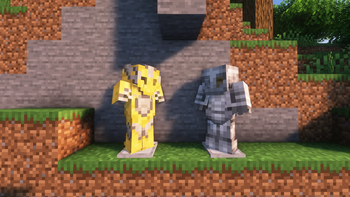
Brass Armor
Click to View


Stainless Steel Armor (must use Smithing Table)
Minecraft 1.20+ Smithing Recipes
Currently these recipes use the Netherite Upgrade Template. It works exactly like it would with Diamond Armor and Netherite except on Netherite Armor and Stainless Steel Ingots.


You can also add trims to Stainless Steel Armor AND Brass Armor!


Minecraft 1.19 Smithing Recipes


Verfügbare Versionen
STAL Alloys auf dem Server installieren
Server bestellen
Bestelle einen Minecraft Java Server mit mindestens 4 GB RAM (6 GB empfohlen).
fabric Loader setzen
Wähle im Panel unter "Egg" den fabric-Loader und die passende Minecraft-Version (1.21.1).
Mod installieren
Öffne den Mod-Browser im Dashboard und suche nach "STAL Alloys". Klicke "Installieren" – fertig! Alternativ: Lade die .jar via SFTP in den /mods Ordner.
Kompatibilität
Mod-Loader
Minecraft-Versionen
1.21.1, 1.21, 1.20.6 (+9 weitere)
Server-seitig
✓ ErforderlichEmpfohlener RAM
6 GB(min. 4 GB)Häufige Fragen
STAL Alloys Server crasht beim Start – was tun?
Häufigste Ursache: falsche fabric-Version oder zu wenig RAM. Prüfe im Server-Log (latest.log), ob ein "OutOfMemoryError" oder "Mixin"-Fehler auftritt. Bei Mado Hosting: Stelle sicher, dass mindestens 4 GB RAM zugewiesen sind und der Loader zur Mod-Version passt (1.21.1). Über das Panel kannst du den Loader mit einem Klick wechseln.
Ist STAL Alloys mit fabric kompatibel?
STAL Alloys unterstützt offiziell fabric für Minecraft 1.21.1, 1.21, 1.20.6. Im Mado Dashboard werden inkompatible Loader-Kombinationen automatisch erkannt.
Server laggt mit STAL Alloys – wie optimiere ich die Performance?
Empfohlener RAM: 6 GB (+1 GB pro 5 Spieler). Prüfe mit /spark profiler, ob STAL Alloys den meisten Tick-Time verbraucht. Häufige Fixes: Server-View-Distance auf 8-10 reduzieren, bei Forge "performant" oder "starlight" als Zusatz-Mod installieren. Bei Mado Hosting läuft dein Server auf NVMe-SSDs mit dedizierten CPU-Kernen für minimale Latenz.
Ähnliche Mods



![[TaCZ] Timeless and Classics Zero](https://cdn.modrinth.com/data/SzzJttH8/fd27766d2bb8390d284696b1dbd358f87e081439_96.webp)


Modded Server mieten
Installiere STAL Alloys mit nur einem Klick auf deinem Server.