
StarHUD
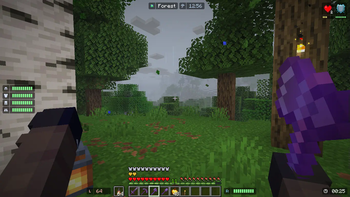
Display fancy HUDs in your game.
Screenshots



Über diese Mod
A Minecraft mod that display HUDs in a more fancy way...

Requires Cloth Config
Features
List of HUD
- Armor Durability HUD
- Coordinate & Nether Coordinate HUD
- Direction and Horizontal Yaw HUD
- Ping HUD
- FPS HUD
- System & In-Game Clock HUD (+ Weather Indicator)
- Biome Indicator HUD (+ Dimension Indicator)
- Inventory HUD (Disabled by default)
- Hand Items Indicator HUD (Durability + Item Count)
- Status Effect HUD
- Day Counter HUD
- Targetted Crosshair HUD
- TPS HUD
- Speed HUD
- Combo HUD
- Reach HUD
- Player Count HUD
- Inventory Space HUD
Others
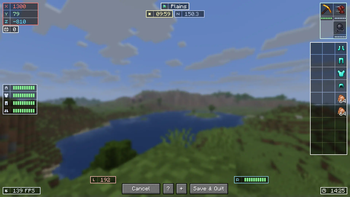
- Drag and Drop HUD Placement
- HUD Snapping
- Automatic HUD Screen Alignment
- Multiple HUD Display Mode (Icon, Info, or Both)
- Customizable Data Collection Interval (For faster performance)
- HUD Screen Alignment Placement
- HUD Growing direction
- Grouping System
- Conditional Positioning
Configuring the HUD
Edit HUD Screen
- Press RIGHT SHIFT to Open this screen.
- Help (indicated by '?') will give you a list of keybinds.
- More Options (indicated by '+') will give you advanced HUD positioning.

- Press 'G' or Group / Ungroup HUDs.
- Set the gap between each child element on group hud for spaced layout.

Configuration Screen
- You need Mod Menu To access the configuration screen.
- Modify the General Setting to your liking.
- add a Condition Rule if your HUD is being overlapped by Minecraft's HUDs.
- Toggle HUD
Performance Concern
Yes, this mod DOES reduce your FPS. Worst case, if EVERY HUD is rendered, you will have 60% FPS loss.
I highly recommend using ImmediatelyFast for faster HUD Performance (the HUD can be 1.5x faster).
Worst to Best HUD Performance
- Inventory HUD (the more items the worse)
- Status Effect HUD (The more effects the worse)
- Targetted Crosshair HUD
- Durability HUD that uses item as it's icon
- The rest of the HUD
Performance Tips
Combine Background on Group HUD (set Group Background: On)


(16 Draw Calls -> 3 Draw Calls)Set "Icon to Info Gap": 0 or lower


(4 Draw Calls -> 3 Draw Calls)Set "Draw Background Rounded": False

(3 Draw Calls -> 1 Draw Call)Set a Condition for your HUD to only render in a specific condition, disabling them dynamically.
Disable any HUD you rarely / never used.
For Support or Suggestion you may go to Discord or Github.
CREDITS
Color Hunt and Atom Material Icons: Color Inspirations
MCC Island and Origin Realms: HUD Inspirations
Status Effect Bars and Simple HUD Enchanced: Status Effect HUD Inspiration
Jade and WTHIT: Targetted Crosshair HUD Inspiration
MiniHUD: TPS Tracking Implementation (Code)
Verfügbare Versionen
StarHUD auf deinem Client installieren
Mod-Loader lokal installieren
Installiere fabric für deine lokale Minecraft-Version.
Passende Datei herunterladen
Wähle die StarHUD-Datei für fabric und Minecraft 26.3.
Mod installieren
Lege die .jar-Datei in deinem lokalen .minecraft/mods-Ordner ab und starte Minecraft neu. Eine Installation auf dem Server ist nicht nötig.
Kompatibilität
Mod-Loader
Minecraft-Versionen
26.3, 26.2, 26.1.2 (+14 weitere)
Server-seitig
✗ Nicht unterstütztEmpfohlener RAM
4 GB(min. 3 GB)Häufige Fragen
Muss StarHUD auf dem Minecraft Server installiert werden?
Nein. Modrinth kennzeichnet StarHUD serverseitig als nicht unterstützt. Installiere die Mod nur im lokalen Minecraft-Mods-Ordner. Dein Server kann unverändert bleiben, sofern die Mod-Seite keine zusätzliche Abhängigkeit nennt.
Welche Version und welchen Loader braucht StarHUD?
Nutze eine Datei für fabric, forge, neoforge und exakt deine Minecraft-Version. Unterstützte Versionen sind unter anderem 26.3, 26.2, 26.1.2. Loader-Dateien sind nicht untereinander austauschbar.
StarHUD funktioniert nicht – was kann ich prüfen?
Prüfe zuerst Minecraft-Version, Loader-Version und erforderliche Abhängigkeiten. Lege die .jar-Datei im lokalen .minecraft/mods-Ordner ab und entferne ältere Duplikate. Da die Mod clientseitig ist, löst mehr Server-RAM dieses Problem nicht.
Ähnliche Mods




![[ETF] Entity Texture Features](https://cdn.modrinth.com/data/BVzZfTc1/af683d206d50b05258d865b0d6e4aa2f2cee12f2_96.webp)

Minecraft Server für deine Gruppe
StarHUD bleibt auf deinem Client. Hoste dazu eine kompatible Welt für deine Mitspieler.