STRAYED FATES: Forsaken
A collection of detailed abandoned Vanilla-friendly structures
Screenshots
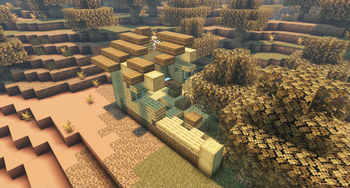
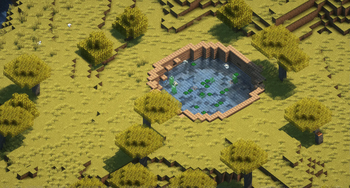
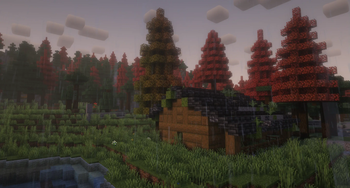
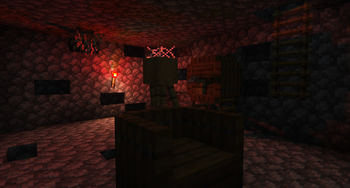
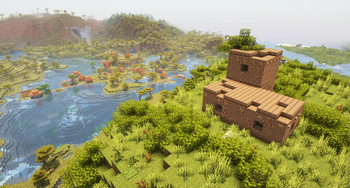
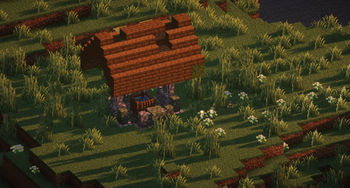
Über diese Mod
Find the traces of the people that were there before you.




This project adds rare, semi-vanilla style abandoned structures to the Overworld, inspired by pre-industrial revolution buildings from around the globe; With no eccentric loot, no swarms of mobs, only the beauty of the scars time left on civilization.
STRAYED FATES: Forsaken uses a multitude of variants, alongside complex processors, varied decorations and well-thought uses of features, with the goal of making each time you stumble onto a structure a once in a playthrough discovery.
Content
The main theme of the STRAYED FATES projects is abandoned buildings and their ambience, telling a story through near barrenness.
Each major update will be themed and have its fair amount of new structures, while minor updates might include new variants or structure sets, and possibly mod compatibilities, alongside fixes & tweaks. The current version includes:
Homes
Structure sets : 9
- Oak: 11+(11x14*) variants
- Spruce: 9 variants
- Western: 9 variants
- Snowy: 9+(9x14*) variants
- Desert: 9 variants
- Bricks: 9+(9x14*) variants
- Mud: 9 variants
- Oriental: 9 variants
- Turf: 9 variants
*Cellar
Wells
Structure sets : 5
- Rustic: 61732~* variants
- Spruce: 15433* variants
- Oak: 15433* variants
- Birch: 15433* variants
- Dark Oak: 15433* variants
- Oriental: 979* variants
- Mud: 15 variants
- Pit: 8 variants
- Cobble: 4 variants
- Mud: 4 variants
- Pump: 23 variants
- Cobble: 9 variants
- Mud: 9 variants
- Bamboo: 5 variants
- Washhouse: 5 variants
*Calculated on the number of necessary jigsaw pieces variants that can be combined
FAQ
The term "project" refers to the Datapacks/Mods of STRAYED FATES, the term "update" refers to named major updates of one of the projects.
GENERAL
Can this be used in Vanilla and or on a server?
All projects use the Vanilla custom structure system to generate and no modded blocks. It can be used completely server side, meaning you can use it on your own in Singleplayer or install it on your server without other players needing to install it. Any mod support will simply not apply if you don't have the mods.
What's the difference between the Datapack version and the Mod version?
Content wise, none. The only difference is that the Datapack has to be applied per world while the mod applies to any world of the instance.
Can I safely uninstall or install the project.s on an existing world?
Yes, you will just stop or start finding structures only in newly generated chunks.
Is it compatible with [...]?
Those projects follow the Vanilla/Fabric/Forge/Neoforge biome tags system to choose which Vanilla/Custom biomes allow for the spawning of the structures. Meaning it is compatible with any worldgen Datapacks or Mods using those tags correctly and any other Datapacks or Mods. If unsure, try it and see.
Does it support [...] mod?
All supported mods of a project and their content are listed on their downloads pages. We do not take requests.
Can I update safely?
You are able to update the projects anytime one is available, however the changes will only be seen in newly generated chunks and structures. Meaning that fully pregenerated worlds will not see the changes.
How do I tell if it's working?
The Datapack has to be loaded and applied to the world while Mod should automatically apply to all worlds of the instance. In both cases, you can use /datapack list to see if the project is there. You can also use /locate structure #project:any or/locate structure #project:update
and see if you're able to locate the structure.
Where do I find the [...] structure?
The point of the projects is not to find all the structures, but if for some reason you wish to know where to find each one, check their respective file in data/project/tags/worldgen/biome/has_structure/homes/ to learn in which biomes they can appear. Ultimately you could also use /locate structure project:update/ in game, or use jacobsjo's map website to find where each structures are located in your seed.
Will there be any backports?
No.
CONFIGURATION
There is no options directly available for the projects, to configure it, you have to open the .zip or .jar(to open a .jar, rename it .zip, then rename it .jar once you're done) using programs like 7zip or WinRar.
Note that any update might reset your changes.
We will not offer support on modified versions of the project nor allow for them to be shared as per the license.
Alternatively, you can make a Datapack consisting of only the modified basic datapack code and necessary .mcmeta file which will override the desired project. This prevent you from breaking the silence incase you're making a modpack; Or use Structurify.
Frequency
To change the frequency/rarity of structures, head to \data\project\worldgen\structure_set, and open the desired .json. You can then modify the frequency, a value between 1 and 0 corresponding to the chances a structure has to spawn when meeting the other values, the spacing, the average distance in chunks the structures of that group will have from each other, and the separation, which is the minimum chunks the structures of that group will have from each other.
Disabling
Update
To disable the structures of an update from spawning in your world, head to \data\project\worldgen\structure_set, find the update .json you wish to disable, then delete it or add a - at the start of it's name to disable it. We recommend to also delete or disable the corresponding function in \data\project\functions.
Set
To disable a structure group in one of the updates, open the corresponding \data\project\worldgen\structure_set\update.json file, select the module ( { } ) the structure is labeled in, alongside the comma after it, then delete it and save.
Piece
To disable a piece of a structure, head to the corresponding .json file in \data\project\worldgen\template_pool\update\ select the module ( { } ) the structure and its weight is labeled in, alongside the comma after it, then delete it and save.
Logos by OopsOnlyDelta
Verfügbare Versionen
STRAYED FATES: Forsaken auf dem Server installieren
Server bestellen
Bestelle einen Minecraft Java Server mit mindestens 4 GB RAM (6 GB empfohlen).
datapack Loader setzen
Wähle im Panel unter "Egg" den datapack-Loader und die passende Minecraft-Version (1.21.4).
Mod installieren
Öffne den Mod-Browser im Dashboard und suche nach "STRAYED FATES: Forsaken". Klicke "Installieren" – fertig! Alternativ: Lade die .jar via SFTP in den /mods Ordner.
Kompatibilität
Mod-Loader
Minecraft-Versionen
1.21.4, 1.21.3, 1.21.2 (+9 weitere)
Server-seitig
✓ ErforderlichEmpfohlener RAM
6 GB(min. 4 GB)Häufige Fragen
STRAYED FATES: Forsaken Server crasht beim Start – was tun?
Häufigste Ursache: falsche datapack-Version oder zu wenig RAM. Prüfe im Server-Log (latest.log), ob ein "OutOfMemoryError" oder "Mixin"-Fehler auftritt. Bei Mado Hosting: Stelle sicher, dass mindestens 4 GB RAM zugewiesen sind und der Loader zur Mod-Version passt (1.21.4). Über das Panel kannst du den Loader mit einem Klick wechseln.
Ist STRAYED FATES: Forsaken mit datapack und fabric und forge und neoforge und quilt kompatibel?
STRAYED FATES: Forsaken unterstützt offiziell datapack, fabric, forge, neoforge, quilt für Minecraft 1.21.4, 1.21.3, 1.21.2. Achtung: Forge- und Fabric-Mods sind NICHT untereinander kompatibel – wähle einen Loader und bleibe dabei. Im Mado Dashboard werden inkompatible Loader-Kombinationen automatisch erkannt.
Server laggt mit STRAYED FATES: Forsaken – wie optimiere ich die Performance?
Empfohlener RAM: 6 GB (+1 GB pro 5 Spieler). Prüfe mit /spark profiler, ob STRAYED FATES: Forsaken den meisten Tick-Time verbraucht. Häufige Fixes: Server-View-Distance auf 8-10 reduzieren, bei Forge "performant" oder "starlight" als Zusatz-Mod installieren. Bei Mado Hosting läuft dein Server auf NVMe-SSDs mit dedizierten CPU-Kernen für minimale Latenz.
Ähnliche Mods




Modded Server mieten
Installiere STRAYED FATES: Forsaken mit nur einem Klick auf deinem Server.