
Sulkan
Native Vulkan shaders for Minecraft 26.2. Client-side Fabric mod powered by Sodium, with a built-in shader pack and support for native Sulkan packs.
Screenshots
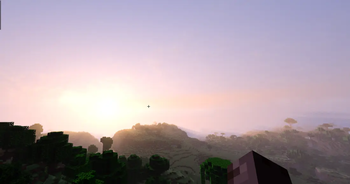
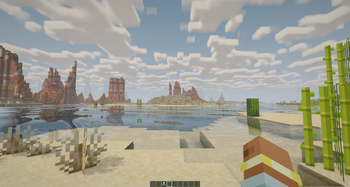
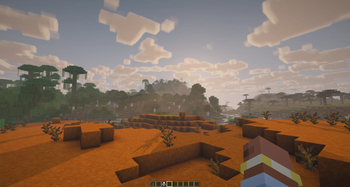
Über diese Mod
Sulkan
Sulkan is a client-side Fabric mod that adds native shader support to Minecraft's Vulkan renderer.
Built on Sodium, Sulkan provides a dedicated Vulkan shader pipeline, a built-in shader pack, and support for native Sulkan shader packs. It is designed for Minecraft 26.2 and requires a Vulkan-capable GPU and driver.
Features
- Native shader rendering on Minecraft's Vulkan backend
- Built-in Sulkan Realistic shader pack
- Shadows, ambient occlusion, water, clouds, atmosphere, bloom, and FXAA
- In-game shader settings and quality controls
- Support for native Sulkan shader packs
- Vulkan 1.2 shader compilation
- Client-side Fabric mod built on Sodium
Requirements
- Minecraft Java Edition 26.2
- Fabric Loader 0.18.4 or newer
- Fabric API 0.155.0 or newer for Minecraft 26.2
- Sodium 0.9.1 or newer for Minecraft 26.2
- Java 25 or newer
- A Vulkan-capable GPU with up-to-date drivers
Sulkan is client-side only and should not be installed on a dedicated server.
Installation
- Install Fabric for Minecraft 26.2.
- Install the matching versions of Fabric API and Sodium.
- Download Sulkan from Modrinth or CurseForge.
- Place the Sulkan JAR in your client's
modsfolder. - Launch Minecraft and open Video Settings → Shaders.
The built-in Sulkan Realistic pack is included with the mod and does not need to be installed separately.
Shader packs
Sulkan uses its own native shader-pack format. External packs must include a sulkan.json manifest and can be installed as a folder or ZIP directly inside the game's shaders/ directory.
See the shader-pack documentation before creating or installing a native Sulkan pack.
Unmodified Iris and OptiFine shader packs are not supported.
Compatibility
Sulkan is designed for Minecraft's Vulkan renderer and the Fabric/Sodium stack. Mods that depend on OpenGL behavior, replace the renderer, or make direct OpenGL calls may be incompatible.
Sodium is required and is not bundled with Sulkan.
If Minecraft falls back to OpenGL, Sulkan pauses its shader effects and explains the situation on the title screen. Driver updates, GPU selection, or Vulkan support may affect whether the renderer starts successfully.
Links
Reporting issues
Before reporting a problem, test with only Fabric API, Sodium, and Sulkan installed.
Please include:
- Minecraft, Fabric Loader, Fabric API, Sodium, and Sulkan versions
- GPU and driver version
- Operating system
- Full client log or crash report
- Steps to reproduce the issue
Verfügbare Versionen
Sulkan auf deinem Client installieren
Mod-Loader lokal installieren
Installiere fabric für deine lokale Minecraft-Version.
Passende Datei herunterladen
Wähle die Sulkan-Datei für fabric und Minecraft 26.3.
Mod installieren
Lege die .jar-Datei in deinem lokalen .minecraft/mods-Ordner ab und starte Minecraft neu. Eine Installation auf dem Server ist nicht nötig.
Kompatibilität
Mod-Loader
Minecraft-Versionen
26.3, 26.2, 26.2-pre-3 (+4 weitere)
Server-seitig
✗ Nicht unterstütztEmpfohlener RAM
4 GB(min. 3 GB)Häufige Fragen
Muss Sulkan auf dem Minecraft Server installiert werden?
Nein. Modrinth kennzeichnet Sulkan serverseitig als nicht unterstützt. Installiere die Mod nur im lokalen Minecraft-Mods-Ordner. Dein Server kann unverändert bleiben, sofern die Mod-Seite keine zusätzliche Abhängigkeit nennt.
Welche Version und welchen Loader braucht Sulkan?
Nutze eine Datei für fabric und exakt deine Minecraft-Version. Unterstützte Versionen sind unter anderem 26.3, 26.2, 26.2-pre-3. Loader-Dateien sind nicht untereinander austauschbar.
Sulkan funktioniert nicht – was kann ich prüfen?
Prüfe zuerst Minecraft-Version, Loader-Version und erforderliche Abhängigkeiten. Lege die .jar-Datei im lokalen .minecraft/mods-Ordner ab und entferne ältere Duplikate. Da die Mod clientseitig ist, löst mehr Server-RAM dieses Problem nicht.
Ähnliche Mods


Minecraft Server für deine Gruppe
Sulkan bleibt auf deinem Client. Hoste dazu eine kompatible Welt für deine Mitspieler.