
TabTPS
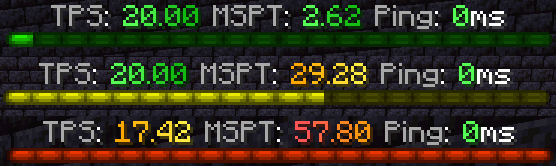
Monitor your server's performance in the tab menu, boss bar, and action bar
Screenshots
Über diese Mod
TabTPS 
Minecraft server mod/plugin to show TPS, MSPT, and other information in the tab menu, boss bar, and action bar.
Current supported platforms:
- Paper
- Sponge 8+
- Fabric (requires Fabric API)
- NeoForge
Features
Live information displays
Configure what information will be shown using display configs (
/plugins/TabTPS/display-configs/)- Each display config has a permission associated, and players with that permission will use that display config.
- The default display config uses the permission
tabtps.defaultdisplay, and allows for using all three display types. - Only one display config can be assigned to each player, even if they have permission for multiple. Set priorities for different display configs in the main config (
plugins/TabTPS/main.conf)
- The default display config uses the permission
- Each display config has a permission associated, and players with that permission will use that display config.
Configure colors for displays using theme configs (
/plugins/TabTPS/themes/)
Tab menu
- Command:
/tabtps toggle tab 
Action bar
- Command:
/tabtps toggle actionbar 
Boss bar
- Command:
/tabtps toggle bossbar 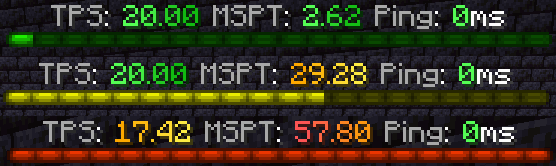
Commands
Improved TPS command
- Command:
/tickinfoor/mspt - Permission required:
tabtps.tps 
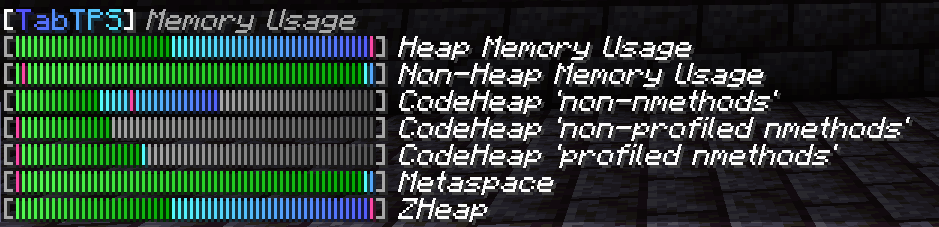
Memory command
- Command:
/memory,/mem, or/ram - View information about the current memory pools of the server jvm.
- Note: the output and usefulness of this command varies depending on the type of garbage collection used, garbage collection settings, and many other factors.
- Permission required:
tabtps.tps 
Ping command
- Commands:
/ping,/ping [username], or/pingall - View the ping of yourself, or another user.
/pingallwill show a summary of all connected player's pings. - Permissions:
tabtps.pingto view your own ping,tabtps.ping.othersto view other users ping and the ping summary. 

Reload command
- Command:
/tabtps reload - Permission required:
tabtps.reload
Verfügbare Versionen
TabTPS auf dem Server installieren
Server bestellen
Bestelle einen Minecraft Java Server mit mindestens 3 GB RAM (4 GB empfohlen).
fabric Loader setzen
Wähle im Panel unter "Egg" den fabric-Loader und die passende Minecraft-Version (26.3).
Mod installieren
Öffne den Mod-Browser im Dashboard und suche nach "TabTPS". Klicke "Installieren" – fertig! Alternativ: Lade die .jar via SFTP in den /mods Ordner.
Kompatibilität
Mod-Loader
Minecraft-Versionen
26.3, 26.2, 26.1.2 (+29 weitere)
Server-seitig
✓ ErforderlichEmpfohlener RAM
4 GB(min. 3 GB)Häufige Fragen
TabTPS Server crasht beim Start – was tun?
Häufigste Ursache: falsche fabric-Version oder zu wenig RAM. Prüfe im Server-Log (latest.log), ob ein "OutOfMemoryError" oder "Mixin"-Fehler auftritt. Bei Mado Hosting: Stelle sicher, dass mindestens 3 GB RAM zugewiesen sind und der Loader zur Mod-Version passt (26.3). Über das Panel kannst du den Loader mit einem Klick wechseln.
Ist TabTPS mit fabric und neoforge und paper und sponge kompatibel?
TabTPS unterstützt offiziell fabric, neoforge, paper, sponge für Minecraft 26.3, 26.2, 26.1.2. Im Mado Dashboard werden inkompatible Loader-Kombinationen automatisch erkannt.
Server laggt mit TabTPS – wie optimiere ich die Performance?
Empfohlener RAM: 4 GB (+1 GB pro 8 Spieler). Prüfe mit /spark profiler, ob TabTPS den meisten Tick-Time verbraucht. Häufige Fixes: Server-View-Distance auf 8-10 reduzieren, bei Forge "performant" oder "starlight" als Zusatz-Mod installieren. Bei Mado Hosting läuft dein Server auf NVMe-SSDs mit dedizierten CPU-Kernen für minimale Latenz.
Ähnliche Mods




![[ETF] Entity Texture Features](https://cdn.modrinth.com/data/BVzZfTc1/af683d206d50b05258d865b0d6e4aa2f2cee12f2_96.webp)

Modded Server mieten
Installiere TabTPS mit nur einem Klick auf deinem Server.