
Tailormade
A Minecraft mod that allows you to design original skins using an in-game editor and attach them directly to your armor.
Screenshots
Über diese Mod

Tailormade
Customize your clothing freely with the Tailormade Mod! This mod allows you to design original skins using an in-game editor and attach them directly to your armor.
Notice: This mod is still in its early alpha stages, so it may contain bugs or unexpected behaviors.
Please back up your worlds just in case!
Any bug reports and suggestions to improve the mod are always welcome!
Features
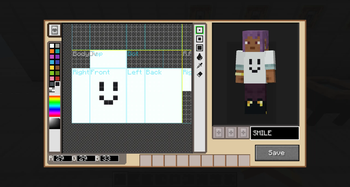
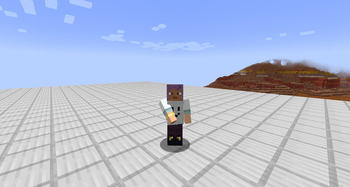
- In-Game Clothing Design: Instantly replace the appearance of your armor with skins designed entirely in-game.
- Style Meets Substance: Change only the visual look of your gear while keeping all the vanilla stats and perks of your armor!
- Easy Reversibility: By simply using a Bleach, you can strip the custom texture away and revert it back to standard armor.
Added Items
- Hat Pattern: A clothing pattern used to edit the skin layer for your head.
- Shirt Pattern: A clothing pattern used to edit the skin layer for your torso and arms.
- Pants Pattern: A clothing pattern used to edit the skin layer for your legs.
- Shoes Pattern: A clothing pattern used to edit the skin layer for your feet.
- Bleach: An item to un-dye tailored armor, can be crafted with a Water Bucket, Nether Quartz, and Redstone.
*All patterns can be crafted with a paper and a black dye, and interchangeable for each other.
Added Blocks
🧵 The Crafting Stations
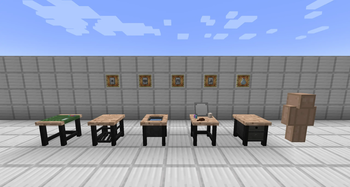
- Design Table: Insert a pattern here to open the custom pixel editor and sketch your design for that specific clothing piece.
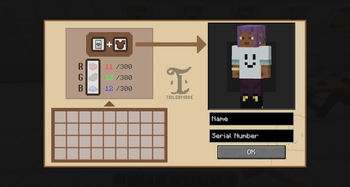
- Tailoring Station: Combine a completed pattern, a matching piece of armor, and the required dyes (Red, Green, Blue) to apply your custom design to the gear.
- Bleaching Counter: Craft a bleach and use this station to safely restore tailored armor to its original, un-dyed form.
👗 Wardrobe & Display
- Dresser: A dedicated design editor for customizing your inner skin layer. This layer will seamlessly render beneath any exposed or cut-out areas of your custom clothing.
- Wardrobe: A specialized GUI block where you can choose and fine-tune your underwear style and color palette.
- Mannequin: A display stand to showcase your original designs.
Verfügbare Versionen
Tailormade auf dem Server installieren
Server bestellen
Bestelle einen Minecraft Java Server mit mindestens 3 GB RAM (4 GB empfohlen).
neoforge Loader setzen
Wähle im Panel unter "Egg" den neoforge-Loader und die passende Minecraft-Version (1.21.1).
Mod installieren
Öffne den Mod-Browser im Dashboard und suche nach "Tailormade". Klicke "Installieren" – fertig! Alternativ: Lade die .jar via SFTP in den /mods Ordner.
Kompatibilität
Mod-Loader
Minecraft-Versionen
1.21.1
Server-seitig
✓ ErforderlichEmpfohlener RAM
4 GB(min. 3 GB)Häufige Fragen
Tailormade Server crasht beim Start – was tun?
Häufigste Ursache: falsche neoforge-Version oder zu wenig RAM. Prüfe im Server-Log (latest.log), ob ein "OutOfMemoryError" oder "Mixin"-Fehler auftritt. Bei Mado Hosting: Stelle sicher, dass mindestens 3 GB RAM zugewiesen sind und der Loader zur Mod-Version passt (1.21.1). Über das Panel kannst du den Loader mit einem Klick wechseln.
Ist Tailormade mit neoforge kompatibel?
Tailormade unterstützt offiziell neoforge für Minecraft 1.21.1. Im Mado Dashboard werden inkompatible Loader-Kombinationen automatisch erkannt.
Server laggt mit Tailormade – wie optimiere ich die Performance?
Empfohlener RAM: 4 GB (+1 GB pro 8 Spieler). Prüfe mit /spark profiler, ob Tailormade den meisten Tick-Time verbraucht. Häufige Fixes: Server-View-Distance auf 8-10 reduzieren, bei Forge "performant" oder "starlight" als Zusatz-Mod installieren. Bei Mado Hosting läuft dein Server auf NVMe-SSDs mit dedizierten CPU-Kernen für minimale Latenz.
Ähnliche Mods

![[ETF] Entity Texture Features](https://cdn.modrinth.com/data/BVzZfTc1/af683d206d50b05258d865b0d6e4aa2f2cee12f2_96.webp)
![[EMF] Entity Model Features](https://cdn.modrinth.com/data/4I1XuqiY/6e5bbd0d06b1741bfdab6c0cfab6de8fdaf0064c_96.webp)



Modded Server mieten
Installiere Tailormade mit nur einem Klick auf deinem Server.