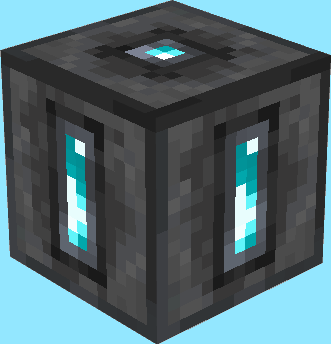
Teleportation Shrines
Linkable Shrines to fulfill all your teleportation needs!
Screenshots
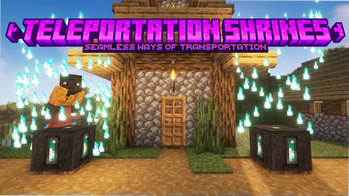
Über diese Mod
Are you tired of building nether portal hubs to connect your friends' and your homes, but in need for a fast and efficient way?
Seems like Teleportation Shrines are exactly what you were looking for!
This datapack adds mystical shrines which can be connected to travel between different places at ease :)
Usage
Teleportation Shrines can be crafted like this:
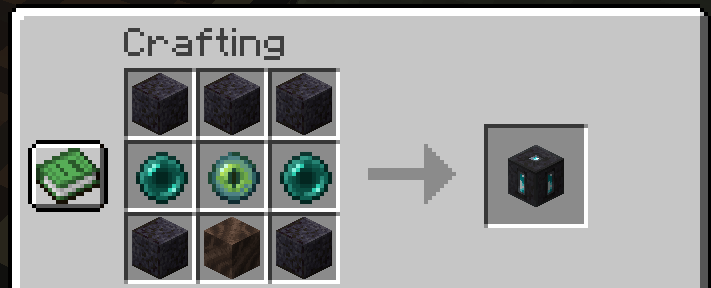
After you place them down you will be able to open their GUI and will be able to see and configure 5 carefully crafted refined types of the vanilla minecraft ores!
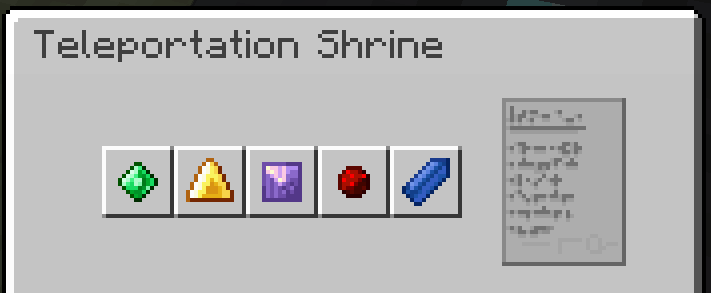
You can click them to select the next one. (Toggling happens in this order: Emerald, Gold, Amethyst, Redstone, Lapis, repeat 🔂)
If two shrines show the same collection of ores in the same order they will be linked - which means you can now teleport yourself from one to the other shrine!
To do so simply stand on top of a linked shrine and sneak for a few seconds. If blue particles start appearing around your character, that means you did everything correctly and will be teleported shortly :)
...however if red flames start appearing around you you might have done something wrong and I'd reccomend stepping off the shrine before it takes you to the wrong place... or causes you to splinch
The shrine you are teleporting to will also show particles to inform people around that someone new is arriving - keep that in mind while invading other people's places... your invisibilty potion won't help you when dabbling in ancient magic
Speaking of ancient magic... our current understanding of it is limited, preventing you from using this way of traveling in dimensions other than the overworld- this may be changed as our knowledge evolves
⚠️ Please note that even with the mod version of this datapack installed, you can not use /give to obtain shrines. Use /loot give @s loot tp_shrines:block/teleportation_shrine instead
Known Bugs
These Bugs are known and should be kept in mind and will be fixed in a future update. To report new bugs please visit this datapack's GitHub page
- trying to put any item into one of the 5 "ore slots" in a Teleportation Shrine will permanently delete it. don't do this.
- none :)
Interested in making your own datapacks? :)
I am part of a small team of people owning Datapack Hub, the perfect discord server for helping you do just that! Wether you are just getting started or have advanced questions, with 1700+ members and our team of verified helpers we got you covered!
(This is 100% a passion project and I don't get paid anything for promoting this :)) 
Need a minecraft server?
Verfügbare Versionen
Teleportation Shrines auf dem Server installieren
Server bestellen
Bestelle einen Minecraft Java Server mit mindestens 3 GB RAM (4 GB empfohlen).
datapack Loader setzen
Wähle im Panel unter "Egg" den datapack-Loader und die passende Minecraft-Version (26.3).
Mod installieren
Öffne den Mod-Browser im Dashboard und suche nach "Teleportation Shrines". Klicke "Installieren" – fertig! Alternativ: Lade die .jar via SFTP in den /mods Ordner.
Kompatibilität
Mod-Loader
Minecraft-Versionen
26.3, 1.21.10, 1.21.9 (+8 weitere)
Server-seitig
✓ ErforderlichEmpfohlener RAM
4 GB(min. 3 GB)Häufige Fragen
Teleportation Shrines Server crasht beim Start – was tun?
Häufigste Ursache: falsche datapack-Version oder zu wenig RAM. Prüfe im Server-Log (latest.log), ob ein "OutOfMemoryError" oder "Mixin"-Fehler auftritt. Bei Mado Hosting: Stelle sicher, dass mindestens 3 GB RAM zugewiesen sind und der Loader zur Mod-Version passt (26.3). Über das Panel kannst du den Loader mit einem Klick wechseln.
Ist Teleportation Shrines mit datapack und fabric und forge und neoforge und quilt kompatibel?
Teleportation Shrines unterstützt offiziell datapack, fabric, forge, neoforge, quilt für Minecraft 26.3, 1.21.10, 1.21.9. Achtung: Forge- und Fabric-Mods sind NICHT untereinander kompatibel – wähle einen Loader und bleibe dabei. Im Mado Dashboard werden inkompatible Loader-Kombinationen automatisch erkannt.
Server laggt mit Teleportation Shrines – wie optimiere ich die Performance?
Empfohlener RAM: 4 GB (+1 GB pro 8 Spieler). Prüfe mit /spark profiler, ob Teleportation Shrines den meisten Tick-Time verbraucht. Häufige Fixes: Server-View-Distance auf 8-10 reduzieren, bei Forge "performant" oder "starlight" als Zusatz-Mod installieren. Bei Mado Hosting läuft dein Server auf NVMe-SSDs mit dedizierten CPU-Kernen für minimale Latenz.
Ähnliche Mods






Modded Server mieten
Installiere Teleportation Shrines mit nur einem Klick auf deinem Server.
Details
- Lizenz
- Creative Commons Attribution Non Commercial No Derivatives 4.0 International
- Server-seitig
- Erforderlich