
Terracart – Terrain Cart
Vanilla-friendly drivable cart, smooth movement, colors, fuel & repairs, HUD, sounds & particles.
Screenshots
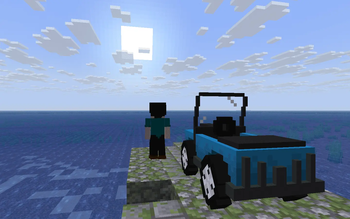
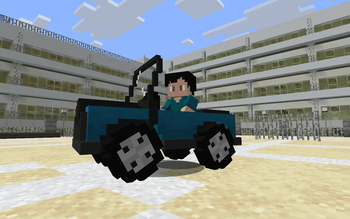
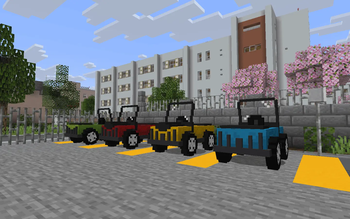
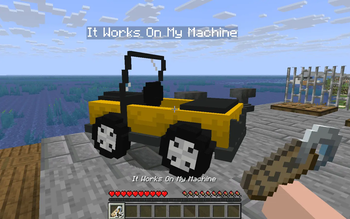
Über diese Mod


Terracart – Terrain Cart (v2.0)
Vanilla-friendly drivable cart — hop in, refuel with coal, repair with iron, choose one of 16 colors, name it with a nametag, and travel around your world.
✨ Features
- Drive: Rideable cart with smooth movement.
- Name Tag Support: Customize your vehicle by giving it a name.
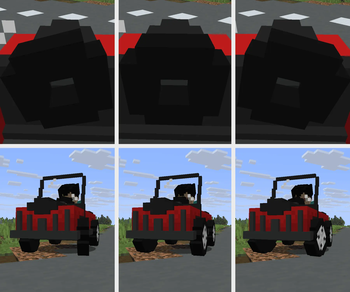
- Model & Animations: High-quality vehicle model featuring full moving, steering, and turning animations.
- Fuel: Consumes fuel only while moving; refuel using coal.
- Repair: Vehicles take damage from hits and crashes; repair them using iron.
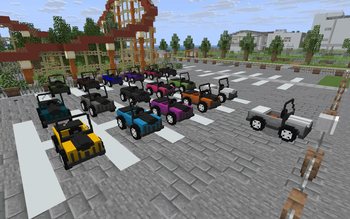
- Colorful: Personalize your ride with one of 16 colors.
- Survival Balance: Designed from the ground up to feel like a natural vanilla survival feature.
- HUD: On-ride HUD-BOX clearly displays your *speed / fuel / health*.
- Sound & Particles: Immersive custom sounds and impact particles for clear gameplay feedback.
- Damage: Run down enemies by dealing impact damage to mobs.
- Vanilla-Friendly: Built to fit perfectly alongside classic Minecraft mechanics.
🎮 How to use
- Craft the Terracart and choose a color (optional) before placing it.
- Smelt a colored cart in a furnace to return it to the default cart item.
- Note: carts do not drop themselves. To change color you must craft a new cart (or smelt before placing).
- Right-click to mount.
- Use normal movement keys to drive.
- Use a name tag to name the vehicle.
- Refuel with coal.
- Repair with iron.
- If the cart is destroyed, collect dropped materials and rebuild.
- Travel around your world and have fun.
🖼️ Gallery
Screenshots taken on the Umihara City map by Shiomate — huge thanks!
Map: Umihara City 海原 — Creator: Shiomate
📌 Notes
- Flashback: Carts will appear stuttering during recorded replay playback.
- Debugify: Enabling the fix for MC-259512 causes the cart to stutter while turning (Debugify right now mistakenly shows the tooltip "Increased input delay when riding an entity", while it should be "Horizontal camera rotation lags when riding").
- A Friendly Reminder: Please drive safe and build a smooth path or track for a better journey!
Verfügbare Versionen
Terracart – Terrain Cart auf dem Server installieren
Server bestellen
Bestelle einen Minecraft Java Server mit mindestens 3 GB RAM (4 GB empfohlen).
fabric Loader setzen
Wähle im Panel unter "Egg" den fabric-Loader und die passende Minecraft-Version (26.3).
Mod installieren
Öffne den Mod-Browser im Dashboard und suche nach "Terracart – Terrain Cart". Klicke "Installieren" – fertig! Alternativ: Lade die .jar via SFTP in den /mods Ordner.
Kompatibilität
Mod-Loader
Minecraft-Versionen
26.3, 26.2, 26.1.2 (+3 weitere)
Server-seitig
✓ ErforderlichEmpfohlener RAM
4 GB(min. 3 GB)Häufige Fragen
Terracart – Terrain Cart Server crasht beim Start – was tun?
Häufigste Ursache: falsche fabric-Version oder zu wenig RAM. Prüfe im Server-Log (latest.log), ob ein "OutOfMemoryError" oder "Mixin"-Fehler auftritt. Bei Mado Hosting: Stelle sicher, dass mindestens 3 GB RAM zugewiesen sind und der Loader zur Mod-Version passt (26.3). Über das Panel kannst du den Loader mit einem Klick wechseln.
Ist Terracart – Terrain Cart mit fabric kompatibel?
Terracart – Terrain Cart unterstützt offiziell fabric für Minecraft 26.3, 26.2, 26.1.2. Im Mado Dashboard werden inkompatible Loader-Kombinationen automatisch erkannt.
Server laggt mit Terracart – Terrain Cart – wie optimiere ich die Performance?
Empfohlener RAM: 4 GB (+1 GB pro 8 Spieler). Prüfe mit /spark profiler, ob Terracart – Terrain Cart den meisten Tick-Time verbraucht. Häufige Fixes: Server-View-Distance auf 8-10 reduzieren, bei Forge "performant" oder "starlight" als Zusatz-Mod installieren. Bei Mado Hosting läuft dein Server auf NVMe-SSDs mit dedizierten CPU-Kernen für minimale Latenz.
Ähnliche Mods






Modded Server mieten
Installiere Terracart – Terrain Cart mit nur einem Klick auf deinem Server.