
TFC Astikor Carts
Adding compatibility between Astikor Carts and TerraFirmaCraft
Screenshots
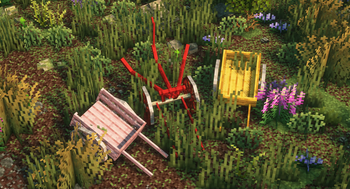
Über diese Mod
It works similarly to the main Astikor Carts mod, but adds new carts for each wood type present in TerraFirmaCraft. This compatibility mod also adds new mechanics to the plow cart, which can now be used to "mow" large quantities of shrubberies, loose rocks and more. This change also makes it possible to efficiently till soil blocks to farmland where there are a lot of plants.
General Config
These settings define how carts interact with animals, items, and players. They control what can be carried and how pulling speed is affected by nutrition, thirst, hunger, and cargo weight.
Animal Cart Settings
maxAnimalSize
The maximum size (in blocks volume) of an animal that can be loaded into the animal cart. Larger animals above this threshold cannot be carried.
Default: 3.0maxPassengerCount
The maximum number of animals the cart can carry simultaneously.
Default: 2canPushIntoPlayers
If enabled, the animal cart can pick up players by being pushed into them.
Default: truecanCarryWaterEntities
If enabled, aquatic creatures (fish, dolphins, whales, etc.) can be picked up by the animal cart.
Default: true
Supply Cart Settings
maxItemSize
The largest item size (inclusive) that can be stored in a supply cart.
Allowed values:TINY,VERY_SMALL,SMALL,NORMAL,LARGE,VERY_LARGE,HUGE
Default: VERY_LARGE
Pulling Behavior
pullingDistanceModifier
Adjusts the tolerance for how far a cart can be pulled before the connection breaks. Higher values allow greater pulling distance/threshold.
Default: 2.0toggleFoodSpeed
Determines whether the player’s nutrition, thirst, and hunger affect cart pulling speed.- When enabled, pulling speed is scaled by the player’s average nutrition × thirst × hunger.
- The formula produces a health factor that modifies speed between 25% (minimum) and 100% (maximum).
- Example: A well-fed, hydrated player pulls carts faster; a starving, thirsty player pulls slower.
Default: true
Cart Inventory Config
These settings control how carts behave in terms of cargo weight limits and inventory size. They let you fine‑tune the balance between realism and convenience.
Weight Thresholds
How Weight Thresholds Interact
The logic:
- Exhausted Threshold: If cargo weight exceeds this value, the player gains the Exhausted effect.
- Overburdened Threshold: If cargo weight exceeds this higher value, the player gains the Overburdened effect.
- Pinned Threshold: If cargo weight exceeds this maximum, the player becomes Pinned and immobilized.
The thresholds act as progressive stages of fatigue based on the estimated cargo mass.
exhaustedThreshold
The mass (in kilograms) at which a player pulling a cart becomes exhausted. At this point, movement slows down significantly.
Default: 400 kgoverburdenedThreshold
The mass at which the player becomes overburdened. Movement is heavily restricted, but not yet immobilized.
Default: 1000 kgpinnedThreshold
The mass at which the player becomes pinned and unable to move at all.
Default: 2000 kg
Example: A VERY_HEAVY HUGE item might weigh ~280 kg. With a pinned threshold of 800 kg, carrying three such items would immobilize the cart puller.
Inventory Sizes
Hand Cart Inventory
- Rows:
handCartInventoryHeight(Default: 2) - Columns:
handCartInventoryWidth(Default: 5)
-> This defines a 2×5 grid (10 slots) for the hand cart.
- Rows:
Supply Cart Inventory
- Rows:
supplyCartInventoryHeight(Default: 5) - Columns:
supplyCartInventoryWidth(Default: 9)
-> This defines a 5×9 grid (45 slots) for the supply cart.
- Rows:
As of version 1.2
Relevant mostly for mod and modpack makers:
- Automatic item and entity registration of any wood types from enum classes that implements TFC's RegistryWood interface! (e.g.: supports mods like ArborFirmaCraft)
- You only need to supply the relevant datapack files (recipes, tags, tfc data, etc.) and assets (textures, item models, lang, etc.)!
Verfügbare Versionen
TFC Astikor Carts auf dem Server installieren
Server bestellen
Bestelle einen Minecraft Java Server mit mindestens 3 GB RAM (4 GB empfohlen).
forge Loader setzen
Wähle im Panel unter "Egg" den forge-Loader und die passende Minecraft-Version (1.21.1).
Mod installieren
Öffne den Mod-Browser im Dashboard und suche nach "TFC Astikor Carts". Klicke "Installieren" – fertig! Alternativ: Lade die .jar via SFTP in den /mods Ordner.
Kompatibilität
Mod-Loader
Minecraft-Versionen
1.21.1, 1.21, 1.20.1 (+1 weitere)
Server-seitig
✓ ErforderlichEmpfohlener RAM
4 GB(min. 3 GB)Häufige Fragen
TFC Astikor Carts Server crasht beim Start – was tun?
Häufigste Ursache: falsche forge-Version oder zu wenig RAM. Prüfe im Server-Log (latest.log), ob ein "OutOfMemoryError" oder "Mixin"-Fehler auftritt. Bei Mado Hosting: Stelle sicher, dass mindestens 3 GB RAM zugewiesen sind und der Loader zur Mod-Version passt (1.21.1). Über das Panel kannst du den Loader mit einem Klick wechseln.
Ist TFC Astikor Carts mit forge und neoforge kompatibel?
TFC Astikor Carts unterstützt offiziell forge, neoforge für Minecraft 1.21.1, 1.21, 1.20.1. Im Mado Dashboard werden inkompatible Loader-Kombinationen automatisch erkannt.
Server laggt mit TFC Astikor Carts – wie optimiere ich die Performance?
Empfohlener RAM: 4 GB (+1 GB pro 8 Spieler). Prüfe mit /spark profiler, ob TFC Astikor Carts den meisten Tick-Time verbraucht. Häufige Fixes: Server-View-Distance auf 8-10 reduzieren, bei Forge "performant" oder "starlight" als Zusatz-Mod installieren. Bei Mado Hosting läuft dein Server auf NVMe-SSDs mit dedizierten CPU-Kernen für minimale Latenz.
Ähnliche Mods






Modded Server mieten
Installiere TFC Astikor Carts mit nur einem Klick auf deinem Server.