
Tierify
Adds reforgable quality tiers to armors, weapons and tools
Über diese Mod
Tierify
Tierify is a flavor of Tiered made with the purpose of fitting my own personal vision, and to fix some issues it had. It is a fork of TieredZ by Globox_Z, which is an MIT licensed Tiered fork.
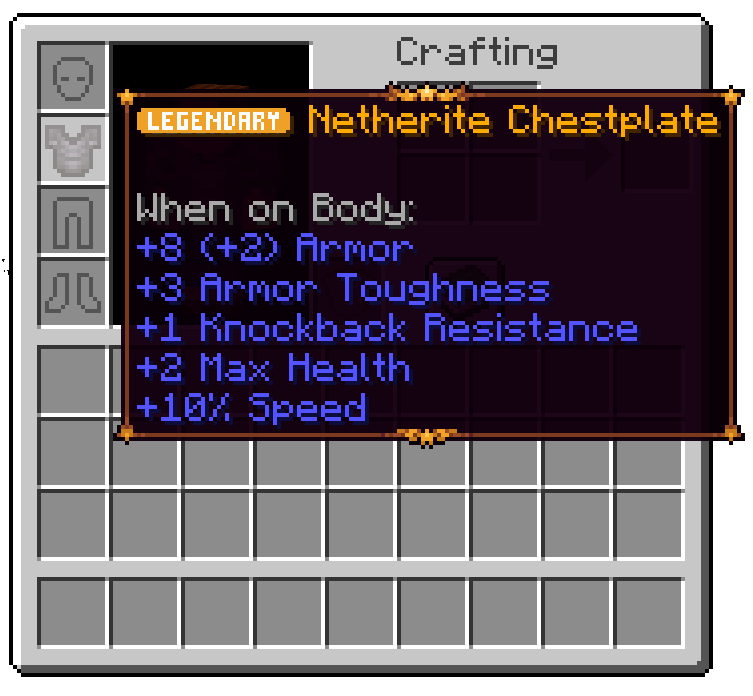
The original mod, Tiered, is inspired by Quality Tools. Every tool you make will have a special modifier, as seen below:
Differences
Tierify expands upon Tiered by changing various things, but keeps its mod id and API packages the same, to make it compatible with preexisting addons.
- Mythic Quality
The "Unique" quality was replaced with a red-themed Mythic quality.
- Plates
Qualities may now be displayed with plates, this is a clientside feature and is configurable, comes enabled by default.
- Reforging Tiers
Reforging doesn't require Amethyst anymore, now instead it uses 3 new ores obtainable- Tier 1: Limestone (Overworld)
Allows reforging tools to Common, Uncommon and Rare qualities. - Tier 2: Pyrite (Nether)
Allows reforging tools to Uncommon, Rare, Epic and Legendary qualities. - Tier 3: Galena (End)
Allows reforging tools to Rare, Epic, Legendary and Mythic qualities.
- Tier 1: Limestone (Overworld)
Installation
Tierify is a mod built for the Fabric Loader. It requires Fabric API & Necronomicon API (and Synitra Connector if on Forge/NeoForge) to be installed separately; all other dependencies are included inside the mod.
Credits
- Draylar1 for making Tiered, the original mod.
- Globox_Z for making TieredZ, a fork of Tiered which Tierify is based upon.
License
Tierify's code is licensed under MIT. You are free to use the code inside this repo as you want as long as you meet the license's conditions.
Newer assets (Such as Limestone, Pyrite and Galena ores) are All Rights Reserved, and you may not use them without explicit permission.
Verfügbare Versionen
Tierify auf dem Server installieren
Server bestellen
Bestelle einen Minecraft Java Server mit mindestens 3 GB RAM (4 GB empfohlen).
fabric Loader setzen
Wähle im Panel unter "Egg" den fabric-Loader und die passende Minecraft-Version (1.20.4).
Mod installieren
Öffne den Mod-Browser im Dashboard und suche nach "Tierify". Klicke "Installieren" – fertig! Alternativ: Lade die .jar via SFTP in den /mods Ordner.
Kompatibilität
Mod-Loader
Minecraft-Versionen
1.20.4, 1.20.3, 1.20.2 (+2 weitere)
Server-seitig
✓ ErforderlichEmpfohlener RAM
4 GB(min. 3 GB)Häufige Fragen
Tierify Server crasht beim Start – was tun?
Häufigste Ursache: falsche fabric-Version oder zu wenig RAM. Prüfe im Server-Log (latest.log), ob ein "OutOfMemoryError" oder "Mixin"-Fehler auftritt. Bei Mado Hosting: Stelle sicher, dass mindestens 3 GB RAM zugewiesen sind und der Loader zur Mod-Version passt (1.20.4). Über das Panel kannst du den Loader mit einem Klick wechseln.
Ist Tierify mit fabric kompatibel?
Tierify unterstützt offiziell fabric für Minecraft 1.20.4, 1.20.3, 1.20.2. Im Mado Dashboard werden inkompatible Loader-Kombinationen automatisch erkannt.
Server laggt mit Tierify – wie optimiere ich die Performance?
Empfohlener RAM: 4 GB (+1 GB pro 8 Spieler). Prüfe mit /spark profiler, ob Tierify den meisten Tick-Time verbraucht. Häufige Fixes: Server-View-Distance auf 8-10 reduzieren, bei Forge "performant" oder "starlight" als Zusatz-Mod installieren. Bei Mado Hosting läuft dein Server auf NVMe-SSDs mit dedizierten CPU-Kernen für minimale Latenz.
Modded Server mieten
Installiere Tierify mit nur einem Klick auf deinem Server.