Tinkers' Levelling Addon
Tinkers' Construct addon that adds tool leveling system.
Screenshots


Über diese Mod

Simple, unofficial addon mod for Tinkers' Construct for modern Minecraft versions. Based on the Tinkers' Tool Leveling addon for Minecraft 1.12.2.
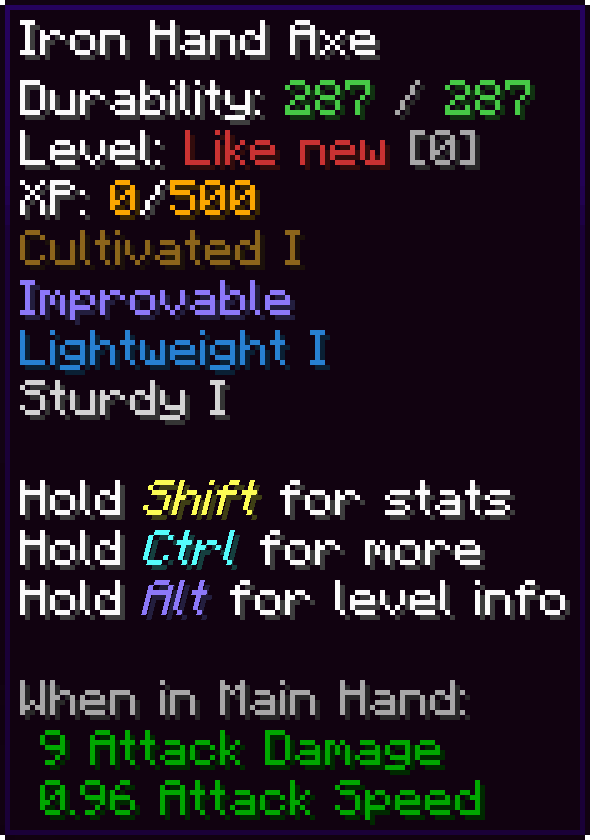
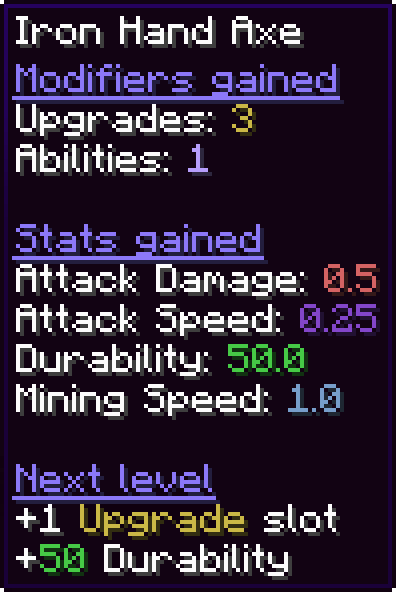
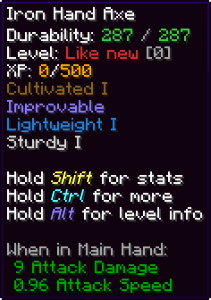
This addon adds a single new modifier for Tinkers' tools and armors - Improvable. Unlike original addon, tool levelling is not available from the start and must be applied to each piece of gear separately. After applying your tools are able to earn XP and level up. XP is earned by performing tool's intended actions like mining, harvesting, dealing damage, etc. On level up additional modifier slot and/or stat is rewarded.
Disclaimer: Since Tinkers' Construct is based around limited amount of modifier slots and stats, this addon completely disrupts its balance!
This is an unofficial addon. Please do not reach out to the Tinkers' Construct developers for support and be sure to mention that this mod is installed if you do have an issue with Tinkers' Construct itself. You can report bugs and crashes related to Tinkers' Levelling Addon here.
Features
- Earn tool XP by performing actions with your tools (mining, harvesting, shearing, attacking, etc.)
- Earn armor XP by taking damage or using Thorns modifier
- Gain 1 free modifier slot and/or stat per level up
- Customize the order of modifier slot and/or stat types gained after each level up (or set it to random)
- Set maximum level (or make it unlimited)
- Adjust level requirements and experience sources
- Customize level up sound and messages
Getting started
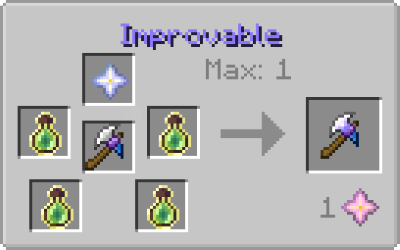
To get started simply apply Improvable modifier to your tool/armor piece. As it's designed to be an endgame modifier, the default recipe is pricey (1x Nether Star, 4x Bottle o' Enchanting) and requires Tinker's Anvil and 1 ability slot (This recipe can be easily changed by simple datapack - examples: 1.16.5, 1.18.2, 1.19.2, 1.20.1).
After that your tool is ready to earn some XP, so go and mine some stuff, cut some trees and kill some mobs!
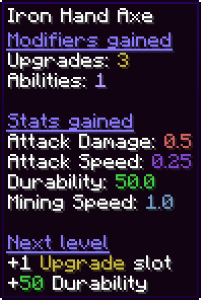
Hold Alt key to display summary of perks gained so far.
License
Code, Textures and binaries of this addon are licensed under the MIT License. Any alternate licenses are noted where appropriate.
You are allowed to use the mod in your modpack.
FAQ
I can't find config files! Where are they?
Server config file is stored in a world/save specific "serverconfig" folder.
For local/singleplayer instances you can find config file in
.minecraft/saves/<world_name>/serverconfig/tinkerslevellingaddon-server.tomlFor server/multiplayer instances you can find config file in
<server_folder>/world/serverconfig/tinkerslevellingaddon-server.tomlClient config file is stored in your local instance's "config" folder in
.minecraft/config/tinkerslevellingaddon-client.toml
Can you port this mod to Fabric to work with Hephaestus?
- No. I have no plans to port this mod to Fabric.
Credits
- 'Chime' level up sound and most level up messages are from original addon - Tinkers' Tool Leveling (MIT license)
- 'Snare Drum' level up sound - Army Rank Up 2 by PearceWilsonKing (Pixabay License)
- 'Yay' level up sound - CHILDREN YAY! - SOUND EFFECT
Verfügbare Versionen
Tinkers' Levelling Addon auf dem Server installieren
Server bestellen
Bestelle einen Minecraft Java Server mit mindestens 3 GB RAM (4 GB empfohlen).
forge Loader setzen
Wähle im Panel unter "Egg" den forge-Loader und die passende Minecraft-Version (1.20.1).
Mod installieren
Öffne den Mod-Browser im Dashboard und suche nach "Tinkers' Levelling Addon". Klicke "Installieren" – fertig! Alternativ: Lade die .jar via SFTP in den /mods Ordner.
Kompatibilität
Mod-Loader
Minecraft-Versionen
1.20.1, 1.19.2, 1.18.2 (+1 weitere)
Server-seitig
✓ ErforderlichEmpfohlener RAM
4 GB(min. 3 GB)Häufige Fragen
Tinkers' Levelling Addon Server crasht beim Start – was tun?
Häufigste Ursache: falsche forge-Version oder zu wenig RAM. Prüfe im Server-Log (latest.log), ob ein "OutOfMemoryError" oder "Mixin"-Fehler auftritt. Bei Mado Hosting: Stelle sicher, dass mindestens 3 GB RAM zugewiesen sind und der Loader zur Mod-Version passt (1.20.1). Über das Panel kannst du den Loader mit einem Klick wechseln.
Ist Tinkers' Levelling Addon mit forge und neoforge kompatibel?
Tinkers' Levelling Addon unterstützt offiziell forge, neoforge für Minecraft 1.20.1, 1.19.2, 1.18.2. Im Mado Dashboard werden inkompatible Loader-Kombinationen automatisch erkannt.
Server laggt mit Tinkers' Levelling Addon – wie optimiere ich die Performance?
Empfohlener RAM: 4 GB (+1 GB pro 8 Spieler). Prüfe mit /spark profiler, ob Tinkers' Levelling Addon den meisten Tick-Time verbraucht. Häufige Fixes: Server-View-Distance auf 8-10 reduzieren, bei Forge "performant" oder "starlight" als Zusatz-Mod installieren. Bei Mado Hosting läuft dein Server auf NVMe-SSDs mit dedizierten CPU-Kernen für minimale Latenz.
Ähnliche Mods



![[TaCZ] Timeless and Classics Zero](https://cdn.modrinth.com/data/SzzJttH8/fd27766d2bb8390d284696b1dbd358f87e081439_96.webp)


Modded Server mieten
Installiere Tinkers' Levelling Addon mit nur einem Klick auf deinem Server.