Tinkers' Mechworks
Tinkers' Mechworks is a mod that adds various redstone machines.
Screenshots
Über diese Mod
Tinkers' Mechworks is a mod that adds various redstone machines originally created by mDiyo.
This is a complete rewrite of Tinkers' Mechworks and thus not all features have been yet reimplemented.
Requires Slimeknights Library Mod: Mantle
Slime Knights
You can find us on Discord: discord.gg/njGrvuh
License
Most code is licensed under the MIT License.
Textures and binaries are licensed under Creative Commons 3.
Any alternate licenses are noted where appropriate.
Modpacks
Feel free to use the mod in any modpacks. You are allowed to use it, you do not need to ask for permission, in fact permission requests will usually be ignored. When using the mod, please use the Modrinth/Curse/Curseforge download and do not rehost the files.
Any modpack which uses Tinkers' Mechworks takes full responsibility for user support queries.
For anyone else, we only support official builds from Modrinth/Curse/Curseforge, not custom built jars. We also do not take bug reports for outdated builds of Minecraft.
Features
World Generation
Mechworks adds copper and aluminum ores that generate in the overworld, these ores are used to craft items throughout the mod.
If aluminum brass is available, it is used instead. E.g. this mod will provide copper and aluminum for Tinkers' Construct that you can use to make aluminum brass using the smeltery.
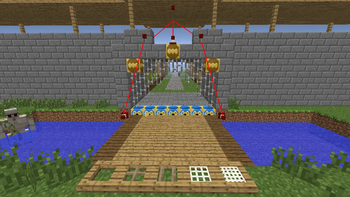
Drawbridge
Place and retract any kind of block, including ones not normally movable with pistons. They also hold their own inventory as items, meaning you can place drawbridges with drawbridges!
Firestarter
Sets the block in front of it on fire when given a redstone signal, and can optionally extinguish it when power is removed
Credits
Tinkers' Mechworks >= 1.14
- fuj1n - Developer/Maintainer
- mDiyo - Original Author
Tinkers' Mechworks <= 1.7.10
- pillbox - Signaling buses
- Gyro - Filters
- mDiyo - Drawbridges
Verfügbare Versionen
Tinkers' Mechworks auf dem Server installieren
Server bestellen
Bestelle einen Minecraft Java Server mit mindestens 3 GB RAM (4 GB empfohlen).
forge Loader setzen
Wähle im Panel unter "Egg" den forge-Loader und die passende Minecraft-Version (1.16.5).
Mod installieren
Öffne den Mod-Browser im Dashboard und suche nach "Tinkers' Mechworks". Klicke "Installieren" – fertig! Alternativ: Lade die .jar via SFTP in den /mods Ordner.
Kompatibilität
Mod-Loader
Minecraft-Versionen
1.16.5, 1.16.4, 1.16.3 (+6 weitere)
Server-seitig
✓ ErforderlichEmpfohlener RAM
4 GB(min. 3 GB)Häufige Fragen
Tinkers' Mechworks Server crasht beim Start – was tun?
Häufigste Ursache: falsche forge-Version oder zu wenig RAM. Prüfe im Server-Log (latest.log), ob ein "OutOfMemoryError" oder "Mixin"-Fehler auftritt. Bei Mado Hosting: Stelle sicher, dass mindestens 3 GB RAM zugewiesen sind und der Loader zur Mod-Version passt (1.16.5). Über das Panel kannst du den Loader mit einem Klick wechseln.
Ist Tinkers' Mechworks mit forge kompatibel?
Tinkers' Mechworks unterstützt offiziell forge für Minecraft 1.16.5, 1.16.4, 1.16.3. Im Mado Dashboard werden inkompatible Loader-Kombinationen automatisch erkannt.
Server laggt mit Tinkers' Mechworks – wie optimiere ich die Performance?
Empfohlener RAM: 4 GB (+1 GB pro 8 Spieler). Prüfe mit /spark profiler, ob Tinkers' Mechworks den meisten Tick-Time verbraucht. Häufige Fixes: Server-View-Distance auf 8-10 reduzieren, bei Forge "performant" oder "starlight" als Zusatz-Mod installieren. Bei Mado Hosting läuft dein Server auf NVMe-SSDs mit dedizierten CPU-Kernen für minimale Latenz.
Ähnliche Mods




Modded Server mieten
Installiere Tinkers' Mechworks mit nur einem Klick auf deinem Server.