
tntOptimizer
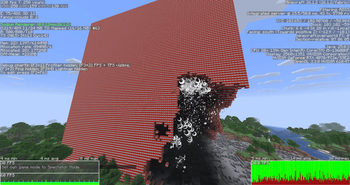
We all love exploding vilagers but we hate the lag it gives. This mod fixes the tnt lag mainly serversided and a bit on the client
Screenshots
Über diese Mod
What does this mod do?
This mod improves TNT performance
The goal is to reduce lag while keeping TNT behavior as close to vanilla as possible.
How close to vanilla is it?
I tried to keep the mod as close to vanilla as possible. However, because the number of active TNT entities is limited, there is a small chance that some edge cases will behave slightly differently.
How does it work
It works by limiting the amount of tnt rendered client side to 75
Also limis the amount of explosion particles the client renders to 100
On the server side of the mod we limit more things:
- we limit how much tnt is active at once
- we limit how much tnt explodes at the same tick
- we merge close tnt into 1 to waste less calculations
- we cache explotion calculations so we do less calculations
Will it break my TNT cannons?
Most TNT cannons should continue to work normally.
However, if your cannon relies on more than 250 TNT entities being active at the same time, it may not function correctly.
So yes, this will almost certainly break an orbital strike cannon.
Verfügbare Versionen
tntOptimizer auf dem Server installieren
Server bestellen
Bestelle einen Minecraft Java Server mit mindestens 3 GB RAM (4 GB empfohlen).
fabric Loader setzen
Wähle im Panel unter "Egg" den fabric-Loader und die passende Minecraft-Version (26.2).
Mod installieren
Öffne den Mod-Browser im Dashboard und suche nach "tntOptimizer". Klicke "Installieren" – fertig! Alternativ: Lade die .jar via SFTP in den /mods Ordner.
Kompatibilität
Mod-Loader
Minecraft-Versionen
26.2, 26.1.2
Server-seitig
~ OptionalEmpfohlener RAM
4 GB(min. 3 GB)Häufige Fragen
tntOptimizer Server crasht beim Start – was tun?
Häufigste Ursache: falsche fabric-Version oder zu wenig RAM. Prüfe im Server-Log (latest.log), ob ein "OutOfMemoryError" oder "Mixin"-Fehler auftritt. Bei Mado Hosting: Stelle sicher, dass mindestens 3 GB RAM zugewiesen sind und der Loader zur Mod-Version passt (26.2). Über das Panel kannst du den Loader mit einem Klick wechseln.
Ist tntOptimizer mit fabric kompatibel?
tntOptimizer unterstützt offiziell fabric für Minecraft 26.2, 26.1.2. Im Mado Dashboard werden inkompatible Loader-Kombinationen automatisch erkannt.
Server laggt mit tntOptimizer – wie optimiere ich die Performance?
Empfohlener RAM: 4 GB (+1 GB pro 8 Spieler). Prüfe mit /spark profiler, ob tntOptimizer den meisten Tick-Time verbraucht. Häufige Fixes: Server-View-Distance auf 8-10 reduzieren, bei Forge "performant" oder "starlight" als Zusatz-Mod installieren. Bei Mado Hosting läuft dein Server auf NVMe-SSDs mit dedizierten CPU-Kernen für minimale Latenz.
Ähnliche Mods






Modded Server mieten
Installiere tntOptimizer mit nur einem Klick auf deinem Server.