
Modrinth · Fabric, Forge, NeoForge
HT's TreeChop auf deinem Minecraft Server
HT's TreeChop läuft auf Minecraft Servern mit Fabric oder Forge oder NeoForge. Bestell deinen Server, stell den Loader im Panel ein und installiere die Mod mit einem Klick im Mod-Browser.
Take down trees chop-by-chop instead of block-by-block.
- Downloads
- 5.5M
- Autor
- hammertater
- Loader
- Fabric, Forge, NeoForge
- Minecraft
- 1.12.2 – 1.21.1
- Aktualisiert
- –
Screenshots
So sieht HT's TreeChop aus
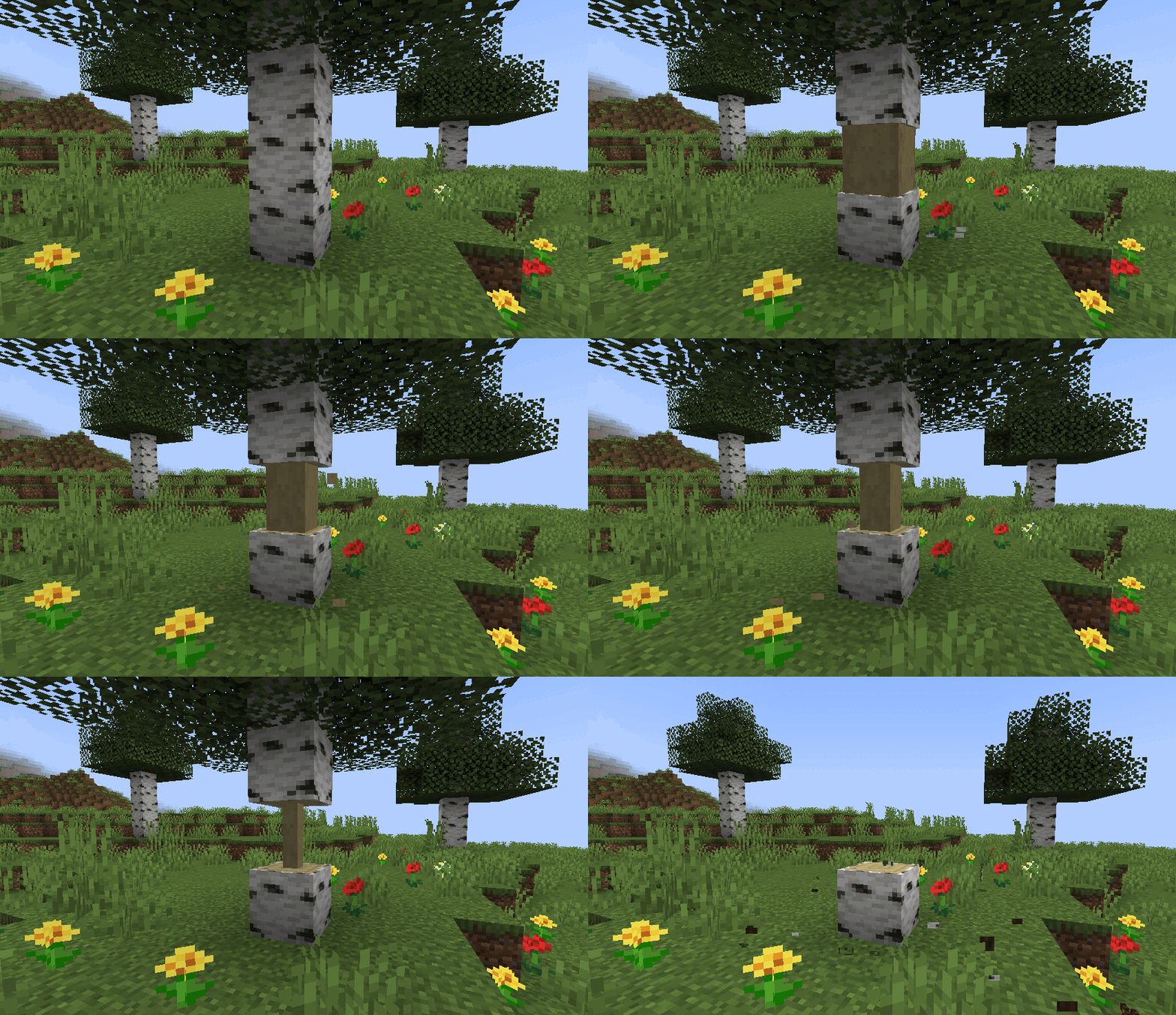


Bilder: HT's TreeChop auf Modrinth, vom Projektteam veröffentlicht.
Einrichtung
HT's TreeChop auf dem Server installieren
Server und Spieler brauchen denselben Loader und dieselbe Minecraft-Version. Sichere die Welt, bevor du Mods hinzufügst oder aktualisierst.
- 01
Konfigurieren
4 GB RAM sind vorausgewählt. Laufzeit und Add-ons wählst du selbst, bezahlt wird per Kreditkarte oder PayPal.
- 02
Loader einstellen
Stell im Panel die Serversoftware auf Fabric oder Forge oder NeoForge und wähl die passende Minecraft-Version, zum Beispiel 1.21.1.
- 03
Mod installieren
Such im Mod-Browser nach „HT's TreeChop“ und installiere die Version für deinen Loader. Alternativ lädst du die .jar per SFTP in den Ordner mods. Erforderliche Abhängigkeiten stehen auf der Projektseite.
- 04
Verbinden
Alle Spieler installieren HT's TreeChop in derselben Version lokal und verbinden sich über die Serveradresse aus dem Panel.
- Auf dem Server
- Erforderlich
- Auf dem Client
- Erforderlich
- Loader
- Fabric, Forge, NeoForge
- Minecraft
- 1.21.1, 1.21, 1.20.1 +13 weitere
- Lizenz
- MIT License
Das Panel
Mods installieren, Fehler finden.
Echte Screenshots aus dem Mado Panel. Beides ist bei jedem Minecraft Server enthalten.
Mod-Browser
Modrinth und CurseForge direkt im Panel.
Der Browser filtert nach deiner Minecraft-Version. Mods installierst du mit einem Klick, ohne .jar-Dateien hochzuladen.

KI-Crash-Analyse
Wenn ein Mod crasht, liest die Analyse das Log.
Mods scheitern oft an einer falschen Loader-Version, Java-Version oder fehlenden Abhängigkeit. Die Analyse nennt eine wahrscheinliche Ursache und einen Lösungsvorschlag.

Versionen
Veröffentlichte Versionen
Nimm die Datei, die zu Loader und Minecraft-Version deines Servers passt. Server und Spieler brauchen dieselbe Version.
HT's TreeChop · Modrinth- HT's TreeChop 0.19.3a3. März 2025Minecraft 1.21, 1.21.1 · Fabric
- HT's TreeChop 0.19.32. März 2025Minecraft 1.21, 1.21.1 · NeoForge
- HT's TreeChop 0.19.127. Juli 2024Minecraft 1.19.2 · Forge
- HT's TreeChop 0.19.127. Juli 2024Minecraft 1.19.2 · Fabric
- HT's TreeChop 0.19.09. März 2024Minecraft 1.20.1 · Fabric
Originalbeschreibung des Projektautors
TreeChop
Allows trees to be chopped down by repeatedly breaking a single block. The whole tree will only break after a certain number of chops, and bigger trees require more chops. Inspired by mods like Treecapitator.
Cool features:
- Doesn't get too loud when breaking big trees
- Works on mushrooms and fungi
- Intelligently breaks leaves
- Compatible with most modded trees
Things to consider when lumberjacking:
- Chopping trees doesn't require an axe, but will take a while without one
- Chopping different blocks of the same tree will all contribute to bringing down the tree
- Players can work together to chop down those big trees
- Bigger trees require more total chops, but fewer chops per block*
- Hold "sneak" when breaking a log block to break it normally
*By default, the number of chops required to fell a tree is computed logarithmically. Some example numbers are below. The number of chops can also be configured to scale linearly with the number of blocks to, for example, require one chop per block, or one chop per tree. More information can be found here.
| Tree blocks | Chops required |
|---|---|
| 1 | 1 |
| 3 | 3 |
| 5 | 4 |
| 10 | 7 |
| 20 | 12 |
| 50 | 19 |
| 100 | 25 |
Compatibility:
Special support for the following mods:
- (1.18.2) Tinker's Construct: broad axes perform extra chops. All axes perform more chops with "expanded" upgrades.
- (1.18.2+) Silent Gear: saws perform extra chops
- (1.18.2+) Project MMO: chopping grants woodcutting XP
- (1.18.2+) Jade, WTHIT, TheOneProbe: show number of log blocks in trees and the number of chops needed to fell.
Known issues:
- (1.18.2 and earlier) Multi Mine: choppable blocks need to be added to Multi Mine's blacklist. This should be fixed for 1.19+ versions. See #106.
- Some modded trees leave floating blocks when felled. See #44.
Want to make your mod compatible with TreeChop? See the wiki.
FAQ:
1. How do I turn off chopping?
Press n to open TreeChop's in-game settings, then toggle off the "chopping" setting. A key can also be bound to toggle chopping without opening the settings screen; go to Options > Controls and find the section labeled "HT's TreeChop".
2. How do I keep chopping off and only turn it on while sneaking?
By default, sneaking inverts your current chop setting, so just toggle chopping off (press n to access the settings screen) so that chopping will be enabled by sneaking.
3. How do I keep chopping even when sneaking?
Press n to open TreeChop's in-game settings, then toggle off the "Sneaking inverts chopping" setting.
4. How do I keep from chopping my house down?
There's a setting to disable chopping if the "tree" is not connected to leaves. Press n to open TreeChop's in-game settings, then toggle "trees must have leaves".
5. I started chopping my house down. How do I stop?
If you find yourself chopping a block when you just wanted to break it normally, try breaking the block while sneaking, or toggle off chopping (press n to access the settings screen).
6. I was chopping something and the game crashed! What's up with that?
Probably the item you used to chop the tree doesn't play nice with TreeChop. Go to [your minecraft folder]/config/treechop-common.toml and add the item's registry name to choppingToolsBlacklist, or ask the server owner to, and then maybe let me know about the conflict and I'll try to fix it.
7. Why can't I chop anymore?
Maybe chopping is turned off; press n to open TreeChop's in-game settings, then toggle on the "chopping" setting. If chopping is enabled and changing tools doesn't help, then there might be a conflict with another mod. If you send me a recent log, I'll try to fix it.
8. Why do some trees leave behind floating leaves when felled?
Either
a) it's a modded tree and its leaves are not set up properly. Let me know what type of tree is misbehaving, and I'll politely inform the mod owners.
b) there are too many leaves! You can increase the max number of leaves by going to [your minecraft folder]/config/treechop-common.toml and increasing maxLeavesBlocks.
9. Why do some trees leave behind floating logs when felled?
Either
a) it's a modded tree and is weirdly shaped. Let me know, and I'll try to make TreeChop do a better job of detecting that type of tree.
b) the tree is too big! You can increase the max tree size by going to [your minecraft folder]/config/treechop-common.toml and increasing maxTreeBlocks.
10. How do I disable mushroom and fungus chopping?
Go to [your minecraft folder]/config/treechop-common.toml and change
blockTagForDetectingLogs = "treechop:choppables"
to
blockTagForDetectingLogs = "treechop:choppables_except_mushrooms"
If you want more control over which blocks can be chopped, you have to make your own datapack and fiddle with the block tags (see https://minecraft.gamepedia.com/Tag for more info).
12. Why am I not seeing the [fill in the blank] feature?
Only the newest version of Minecraft 1.16 is fully supported. Some older versions, especially 1.12.2, lack some of the fancier features.
11. Can I include this in a modpack?
Yes!
Sample configs:
treechop-common.toml
[permissions]

	[permissions.choppingEnabled]
		canBeFalse = true
		canBeTrue = true

	[permissions.fellingEnabled]
		canBeFalse = true
		canBeTrue = true

	[permissions.sneakBehavior]
		canBeNone = true
		canBeInvertFelling = true
		canBeInvertChopping = true

	[permissions.treeMustHaveLeaves]
		canBeFalse = true
		canBeTrue = true

	[permissions.chopInCreativeMode]
		canBeFalse = true
		canBeTrue = true

[general]
	#If false, log items will be destroyed when chopping
	dropLootForChoppedBlocks = true

[treeDetection]
	#Maximum number of log blocks that can be detected to belong to one tree
	#Range: 1 ~ 8096
	maxTreeBlocks = 320
	#Maximum number of leaves blocks that can destroyed when a tree is felled
	#Range: 1 ~ 8096
	maxLeavesBlocks = 1024
	#Destroy leaves when a tree is felled
	breakLeaves = true
	#Non-decayable leaves are ignored when detecting leaves
	ignorePersistentLeaves = true
	#Maximum distance from log blocks to destroy non-standard leaves blocks (e.g. mushroom caps) when felling
	#Range: 0 ~ 16
	maxBreakLeavesDistance = 7

	[treeDetection.logs]
		#Blocks that should be considered choppable
		#Specify using registry names (mod:block), tags (#mod:tag), and namespaces (@mod)
		blocks = ["#treechop:choppables", "#minecraft:logs", "#forge:mushroom_stems"]
		#Blocks that should never be chopped, even if included in the list above
		#Specify using registry names (mod:block), tags (#mod:tag), and namespaces (@mod)
		exceptions = ["minecraft:bamboo"]

	[treeDetection.leaves]
		#Blocks that should be considered leaves
		#Specify using registry names (mod:block), tags (#mod:tag), and namespaces (@mod)
		blocks = ["#treechop:leaves_like", "#minecraft:leaves", "#minecraft:wart_blocks", "#forge:mushroom_caps", "minecraft:shroomlight"]
		#Blocks that should never be considered leaves, even if included in the list above
		#Specify using registry names (mod:block), tags (#mod:tag), and namespaces (@mod)
		exceptions = []

[chopCounting]
	#Method to use for computing the number of chops needed to fell a tree
	#Allowed Values: LINEAR, LOGARITHMIC
	algorithm = "LOGARITHMIC"
	#How to round the number of chops needed to fell a tree; this is more meaningful for smaller trees
	#Allowed Values: DOWN, NEAREST, UP
	rounding = "NEAREST"
	#Felling a tree can require more chops than the number of blocks in the tree
	canRequireMoreChopsThanBlocks = false

	#See https://github.com/hammertater/treechop/#logarithmic
	[chopCounting.logarithmic]
		#Determines the number of chops required to fell a tree; higher values require more chops for bigger trees
		#Range: 0.0 ~ 10000.0
		a = 10.0

	#See https://github.com/hammertater/treechop/#linear
	[chopCounting.linear]
		#The number of chops per block required to fell a tree; if chopsPerBlock = 0.5, it will take 50 chops to fell a 100 block tree
		#Range: 0.0 ~ 7.0
		chopsPerBlock = 1.0
		#The base number of chops required to fell a tree regardless of its size
		#Range: -10000.0 ~ 10000.0
		baseNumChops = 0.0

[compatibility]
	#Better chopping behavior for block with the #forge:mushroom_stems tag
	mushroomStems = true
	#https://www.curseforge.com/minecraft/mc-mods/carry-on
	#https://modrinth.com/mod/carry-on
	#Small fixes.
	carryOn = true
	#https://www.curseforge.com/minecraft/mc-mods/project-mmo
	#https://modrinth.com/mod/project-mmo
	#Award woodcutting XP for chopping.
	projectMMO = true
	#https://www.curseforge.com/minecraft/mc-mods/the-one-probe
	#https://modrinth.com/mod/the-one-probe
	#Shows the number of chops required to fell a tree and what loot will drop.
	theOneProbe = true

	[compatibility.general]
		#Prevent chopping when right-clicking blocks
		preventChoppingOnRightClick = false
		#Prevent infinite loops when chopping; fixes crashes when using modded items that break multiple blocks
		preventChopRecursion = true
		#Only chop when using the correct tool for drops, if any (does nothing in vanilla, but some mods add tool requirements to logs
		choppingRequiresCorrectToolForDrops = true
		#Only chop when using a tool that increases block breaking speed (such as axes for logs)
		choppingRequiresFastBreakingTool = true

		[compatibility.general.blacklist]
			#Whether the listed items should be blacklisted or whitelisted
			#Allowed Values: BLACKLIST, WHITELIST
			blacklistOrWhitelist = "BLACKLIST"
			#List of item registry names (mod:item), tags (#mod:tag), and namespaces (@mod) for items that should not chop when used to break a log
			#- Items in this list that have special support for TreeChop will not be blacklisted; see https://github.com/hammertater/treechop/blob/main/docs/compatibility.md#blacklist
			items = ["#tconstruct:modifiable/harvest", "botania:terra_axe", "mekanism:atomic_disassembler", "@lumberjack", "practicaltools:iron_greataxe", "practicaltools:golden_greataxe", "practicaltools:diamond_greataxe", "practicaltools:netherite_greataxe"]

		#The chop settings used by non-player entities, such as robots and machine blocks
		[compatibility.general.fakePlayerChopSettings]
			#Use with caution! May cause conflicts with some mods, e.g. https://github.com/hammertater/treechop/issues/71
			choppingEnabled = false
			#Felling only matters if chopping is enabled; probably best to leave this on
			fellingEnabled = true
			treesMustHaveLeaves = true

	[compatibility.API]
		#Log information about TreeChop API usage. May be useful for debugging mod compatibility issues.
		verbose = false

	[compatibility.silentgear]
		#https://www.curseforge.com/minecraft/mc-mods/tinkers-construct
		#https://modrinth.com/mod/tinkers-construct
		#Makes saws do more chops.
		enabled = true
		#Number of chops a saw should perform on a single block break
		#Range: 1 ~ 10000
		sawChops = 5

	[compatibility.tinkersConstruct]
		#https://www.curseforge.com/minecraft/mc-mods/tinkers-construct
		#https://modrinth.com/mod/tinkers-construct
		#Makes AOE tools do more chops.
		enabled = true
		#Number of chops that tree breaking tools (like broad axes) should perform on a single block break
		#Range: 1 ~ 10000
		treeBreakingTools = 5
		#Number of chops that wood breaking tools (like hand axes) should perform on a single block break
		#Range: 1 ~ 10000
		woodBreakingTools = 1
		#The chop count multiplier for each level of the expanded upgrade
		#Range: 1.0 ~ 10000.0
		expandedMultiplier = 2.0

[mod]
	#Set to false to disable TreeChop without having to uninstall the mod
	enabled = true
	#Let TreeChop print to the log
	printDebugInfo = false
treechop-client.toml
[chopping]
	#Default setting for whether or not the user wishes to chop (can be toggled in-game)
	choppingEnabled = true
	#Default setting for whether or not the user wishes to fell tree when chopping (can be toggled in-game)
	fellingEnabled = true
	#Default setting for the effect that sneaking has on chopping (can be cycled in-game)
	#Allowed Values: NONE, INVERT_CHOPPING, INVERT_FELLING
	sneakBehavior = "INVERT_CHOPPING"
	#Ignore trees without connected leaves (can be toggled in-game)
	treesMustHaveLeaves = true
	#Enable chopping in creative mode (even when false, sneaking can still enable chopping) (can be toggled in-game)
	chopInCreativeMode = false

[visuals]
	#Visually replace the interior sides of logs with a chopped texture instead of bark
	removeBarkOnInteriorLogs = true

	[visuals.choppingIndicator]
		#Show an on-screen indicator when a block will be chopped instead of broken (can be toggled in-game)
		enabled = true
		#Horizontal location of the indicator relative to the player's crosshairs; positive values move the indicator to the right
		#Range: -256 ~ 256
		xOffset = 16
		#Vertical location of the indicator relative to the player's crosshairs; positive values move the indicator down
		#Range: -256 ~ 256
		yOffset = 0

[settingsScreen]
	#Show in-game options for enabling and disable felling (can be toggled in-game)
	showFellingOptions = true
	#Show chat confirmations when using hotkeys to change chop settings (can be toggled in-game)
	showFeedbackMessages = true
	#Show tooltips in the settings screen (can be toggled in-game)
	showTooltips = true
HT's TreeChop Server crasht beim Start – was tun?
Häufige Ursachen: Loader- oder Minecraft-Version passen nicht zur Mod-Datei, eine Abhängigkeit fehlt oder der RAM reicht nicht. Such im Log (latest.log) nach „OutOfMemoryError“, „Mixin“ oder fehlenden Mods. Bei Mado wertet die KI-Crash-Analyse das Log aus und schlägt eine Ursache vor. Loader und Version änderst du im Panel.
Mit welchem Loader läuft HT's TreeChop?
Laut Modrinth unterstützt HT's TreeChop Fabric, Forge, NeoForge für Minecraft 1.21.1, 1.21, 1.20.1. Forge- und Fabric-Dateien sind nicht untereinander austauschbar: Wähl einen Loader für Server und Clients.
Wie viel RAM braucht ein Server mit HT's TreeChop?
Als Orientierung 3–4 GB für einen Server mit dieser Mod. Das ist eine Schätzung, keine gemessene Mindestanforderung. Weitere Mods, viele Spieler und große Sichtweiten brauchen mehr. Ob eine Mod die Tick-Zeit belastet, siehst du mit dem spark-Profiler.
Ähnliche Mods
Beliebte Mods aus derselben Kategorie
 Server-fähig

VeinMiner
von Miraculixx
Mine the whole vein on mining a single ore/block. Make the tedious mining experience to something satisfying and fun! FTB Ultimine alternative
 Server-fähig

Geckolib
von Gecko
A 3D animation library for entities, blocks, items, armor, and more!
 Nur Client

VeinMiner Hotkey
von Miraculixx
Veinminer Addon - Use a hotkey to veinmine with a dynamic crosshair & block highlighting
 Server-fähig

Fzzy Config
von fzzyhmstrs
Config API with automatic GUIs, powerful validation options, server-client sync, and more!
Bereit für deinen Server mit HT's TreeChop?
4 GB RAM ab 8,00 € im Monat. 35 % auf den 1. Monat mit MADO35.