
Uncraft Everything
Crafted wrong item? Uncraft everything with this mod!
Screenshots
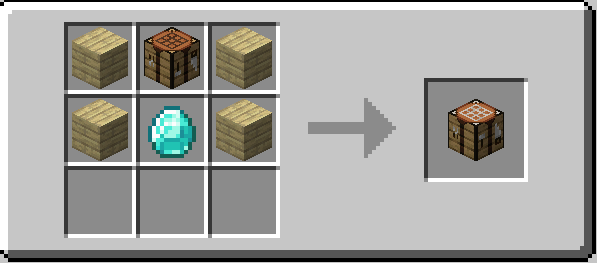
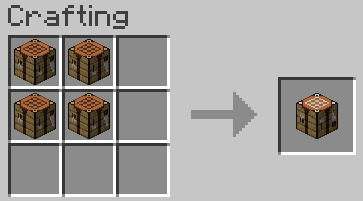
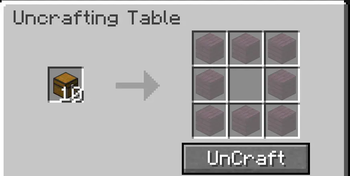
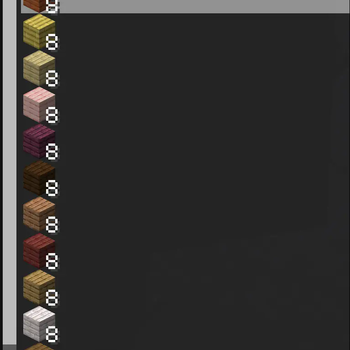
Über diese Mod
♻️ Uncraft Everything
A powerful utility mod that lets players reverse the crafting process — and reclaim their resources.
🧱 What This Mod Does
Uncraft Everything adds a uncrafting mechanic to Minecraft, allowing players to take crafted items and break them back down into their original components.
Whether you accidentally crafted the wrong item, need to recycle old tools (With full durability), or want to get value out of loot, this mod gives you an intuitive way to recover materials — all while maintaining balance.
Features:
- ✅ Supports vanilla and modded items
Configs:
- Experience Point for Uncrafting
- Prevent certain items from Uncrafting
Modify in /config/uncrafteverything_common.toml
💡 Why Download This?
In survival gameplay, every resource matters. With Uncraft Everything, you can:
- 🪓 Recover materials from unused or extra tools, armor, and blocks
- 🏹 Undo accidental crafts and wasted resources
- ♻️ Improve inventory management and reduce item clutter
- 🧩 Build modpacks with more player agency and creativity
This mod is perfect for tech-based, RPG, skyblock, hardcore, or builder-focused packs — or just everyday Minecraft survival.
📥 Installation & Setup
Mod Loaders: Fabric and NeoForge are supported.
- Download and install your preferred mod loader.
- Place
Uncraft Everythingin your/modsfolder. - Launch the game — you're ready to go!
⚙️ How It Works
Base Functionality:
- Place a crafted item into the Uncrafting Table.
🖥 Compatibility
- ✅ 100% vanilla compatible
- ✅ Works with most modded items (standard crafting recipes)
- ✅ Multiplayer and server-compatible
🐛 Bug Reports & Contributions
Have a bug to report, feature request, or translation to contribute?
Please open an issue or submit a PR on the Github issue tracker
🚧 Important Notes
- ❌ Enchanted items will not return enchanted book.
- 🪓 Damaged tools unable to uncraft.
- 🔒 Balance-focused: The goal is utility, not duplication exploits.
- 🧩 Designed for survival, challenge, and tech gameplay — not cheat mode.
Verfügbare Versionen
Uncraft Everything auf dem Server installieren
Server bestellen
Bestelle einen Minecraft Java Server mit mindestens 3 GB RAM (4 GB empfohlen).
fabric Loader setzen
Wähle im Panel unter "Egg" den fabric-Loader und die passende Minecraft-Version (26.3).
Mod installieren
Öffne den Mod-Browser im Dashboard und suche nach "Uncraft Everything". Klicke "Installieren" – fertig! Alternativ: Lade die .jar via SFTP in den /mods Ordner.
Kompatibilität
Mod-Loader
Minecraft-Versionen
26.3, 26.2, 26.2-snapshot-7 (+31 weitere)
Server-seitig
✓ ErforderlichEmpfohlener RAM
4 GB(min. 3 GB)Häufige Fragen
Uncraft Everything Server crasht beim Start – was tun?
Häufigste Ursache: falsche fabric-Version oder zu wenig RAM. Prüfe im Server-Log (latest.log), ob ein "OutOfMemoryError" oder "Mixin"-Fehler auftritt. Bei Mado Hosting: Stelle sicher, dass mindestens 3 GB RAM zugewiesen sind und der Loader zur Mod-Version passt (26.3). Über das Panel kannst du den Loader mit einem Klick wechseln.
Ist Uncraft Everything mit fabric und forge und neoforge kompatibel?
Uncraft Everything unterstützt offiziell fabric, forge, neoforge für Minecraft 26.3, 26.2, 26.2-snapshot-7. Achtung: Forge- und Fabric-Mods sind NICHT untereinander kompatibel – wähle einen Loader und bleibe dabei. Im Mado Dashboard werden inkompatible Loader-Kombinationen automatisch erkannt.
Server laggt mit Uncraft Everything – wie optimiere ich die Performance?
Empfohlener RAM: 4 GB (+1 GB pro 8 Spieler). Prüfe mit /spark profiler, ob Uncraft Everything den meisten Tick-Time verbraucht. Häufige Fixes: Server-View-Distance auf 8-10 reduzieren, bei Forge "performant" oder "starlight" als Zusatz-Mod installieren. Bei Mado Hosting läuft dein Server auf NVMe-SSDs mit dedizierten CPU-Kernen für minimale Latenz.
Ähnliche Mods






Modded Server mieten
Installiere Uncraft Everything mit nur einem Klick auf deinem Server.