
VanillaHUD
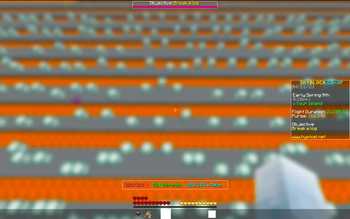
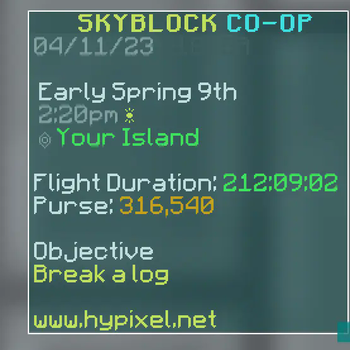
A mod that modifies various vanilla HUD elements, such as the bossbar, action bar, and sidebar.
Screenshots

Über diese Mod
VanillaHUD


Adds in a load of customization to a few native UI elements such as the bossbar, scoreboard, etc.
Features
- Boss bar customization
- Actionbar customization
- Scoreboard customization
- Title / subtitle customization
- Hotbar customization
- Tablist customization
- Scrollable tooltips
And, all elements can be customized with
- Toggle
- Scale
- Text color
- Text type
- Show in chat, debug (F3), GUIs
- Background (with rounded corners, borders, color customization)
Bossbar specific customization:
- Whether to render text
- Whether to render bar
- Position of bar
- Title and brackets for bossbar name
Actionbar specific customization:
- Whether to use the jukebox rainbow color
- Title and brackets for action bar
Scoreboard / sidebar specific customization:
- Whether to show score points
- Some servers use the numbers for legitimate purposes, and it makes no sense to hide the numbers in those scenarios. VanillaHUD lets you keep the numbers if the numbers are not consecutive.
- Whether to keep scoreboard title
Tablist specific customization:
- Whether to enable animations when opening / closing tab
- How many players show in tab
- Whether tab should be opened via toggle / key press
- Whether to show header / footer
- Whether the user should show at the top
- Whether to show the player's head or ping
- Whether ping should be displayed as a number or an icon
- Whether to hide ping if it is 0 or 1
Links and support
- Did you run into a bug? Open a bug report
- Service interruptions? Checkout Polyfrost Status
- Feeling social? Join our discord community
Verfügbare Versionen
VanillaHUD auf deinem Client installieren
Mod-Loader lokal installieren
Installiere fabric für deine lokale Minecraft-Version.
Passende Datei herunterladen
Wähle die VanillaHUD-Datei für fabric und Minecraft 26.3.
Mod installieren
Lege die .jar-Datei in deinem lokalen .minecraft/mods-Ordner ab und starte Minecraft neu. Eine Installation auf dem Server ist nicht nötig.
Kompatibilität
Mod-Loader
Minecraft-Versionen
26.3, 26.2, 26.1.2 (+9 weitere)
Server-seitig
✗ Nicht unterstütztEmpfohlener RAM
4 GB(min. 3 GB)Häufige Fragen
Muss VanillaHUD auf dem Minecraft Server installiert werden?
Nein. Modrinth kennzeichnet VanillaHUD serverseitig als nicht unterstützt. Installiere die Mod nur im lokalen Minecraft-Mods-Ordner. Dein Server kann unverändert bleiben, sofern die Mod-Seite keine zusätzliche Abhängigkeit nennt.
Welche Version und welchen Loader braucht VanillaHUD?
Nutze eine Datei für fabric, forge, ornithe und exakt deine Minecraft-Version. Unterstützte Versionen sind unter anderem 26.3, 26.2, 26.1.2. Loader-Dateien sind nicht untereinander austauschbar.
VanillaHUD funktioniert nicht – was kann ich prüfen?
Prüfe zuerst Minecraft-Version, Loader-Version und erforderliche Abhängigkeiten. Lege die .jar-Datei im lokalen .minecraft/mods-Ordner ab und entferne ältere Duplikate. Da die Mod clientseitig ist, löst mehr Server-RAM dieses Problem nicht.
Ähnliche Mods




![[ETF] Entity Texture Features](https://cdn.modrinth.com/data/BVzZfTc1/af683d206d50b05258d865b0d6e4aa2f2cee12f2_96.webp)

Minecraft Server für deine Gruppe
VanillaHUD bleibt auf deinem Client. Hoste dazu eine kompatible Welt für deine Mitspieler.
Details
- Lizenz
- LicenseRef-GPL-3.0-with-Minecraft-Linking-Exception
- Server-seitig
- Nicht unterstützt