
Villager Brain Configuration
A highly optimized server-sided mod that allows full configuration of villager pathfinding malus
Über diese Mod
Villager Brain Config
A lightweight, highly optimized mod that makes villager pathfinding behavior fully configurable
Features
Per-block malus control
Customize how villagers treat different blocks in pathfinding. Blocks are configurable to any malus, block and item tags supportedProfession-based malus
Configure different path preferences per villager profession.Global block penalty caching
Pathfinding results are cached for maximum efficiency across multiple villagersNative modded support
The config file supports any modded blocks or professions
Example Use Cases
- Prevent villagers from walking into trap blocks like campfires or magma
- Make water paths viable for fishermen only
- Design custom village layouts with optimized navigation paths
- Prevent villagers from wandering off paths
- Add personality to each profession type
Pathfinding Visualizations
Planned features
- Per-villager-type rules (eg. plains villagers, taiga villagers)
Performance
Villager Brain Config is designed to be almost invisible in impact or even faster than vanilla
Test case
- 250 villagers
- Each pathing to a unique workstation in a grid
- Compared vanilla to modded using Spark profiler
Results
Vanilla Logic

Modded Logic

Mod total
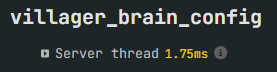
Configuration
All settings are in a villager-brain-config.json file in the config folder.
{
  "walk_on_block_penalties": {
    "minecraft:grass_block": 4.0,
    "minecraft:dirt_path": 0.0,
    "default": 5.0
  },
  "walk_through_block_penalties": {
    "minecraft:lava": -1.0,
    "minecraft:tall_grass": 20,
    "default": 0.0
  },
  "actions_penalties": {
    "jump": 10.0
  },
  "professions": {
    "minecraft:farmer": {
      "walk_on_block_penalties": {
        "minecraft:farmland": 0.0,
        "minecraft:grass_block": 2.0
      }
    },
    "minecraft:fisherman": {
      "walk_on_block_penalties": {
        "minecraft:water": 0.0
      },
      "walk_through_block_penalties": {
        "minecraft:water": 0.0
      }
    }
  },
  "avoids": [
    {
      "block": "minecraft:lava",
      "radius": 3,
      "penalty": -1.0
    }
  ]
}
Verfügbare Versionen
Villager Brain Configuration auf dem Server installieren
Server bestellen
Bestelle einen Minecraft Java Server mit mindestens 3 GB RAM (4 GB empfohlen).
fabric Loader setzen
Wähle im Panel unter "Egg" den fabric-Loader und die passende Minecraft-Version (1.21.8).
Mod installieren
Öffne den Mod-Browser im Dashboard und suche nach "Villager Brain Configuration". Klicke "Installieren" – fertig! Alternativ: Lade die .jar via SFTP in den /mods Ordner.
Kompatibilität
Mod-Loader
Minecraft-Versionen
1.21.8, 1.21.7, 1.21.6 (+5 weitere)
Server-seitig
✓ ErforderlichEmpfohlener RAM
4 GB(min. 3 GB)Häufige Fragen
Villager Brain Configuration Server crasht beim Start – was tun?
Häufigste Ursache: falsche fabric-Version oder zu wenig RAM. Prüfe im Server-Log (latest.log), ob ein "OutOfMemoryError" oder "Mixin"-Fehler auftritt. Bei Mado Hosting: Stelle sicher, dass mindestens 3 GB RAM zugewiesen sind und der Loader zur Mod-Version passt (1.21.8). Über das Panel kannst du den Loader mit einem Klick wechseln.
Ist Villager Brain Configuration mit fabric und neoforge kompatibel?
Villager Brain Configuration unterstützt offiziell fabric, neoforge für Minecraft 1.21.8, 1.21.7, 1.21.6. Im Mado Dashboard werden inkompatible Loader-Kombinationen automatisch erkannt.
Server laggt mit Villager Brain Configuration – wie optimiere ich die Performance?
Empfohlener RAM: 4 GB (+1 GB pro 8 Spieler). Prüfe mit /spark profiler, ob Villager Brain Configuration den meisten Tick-Time verbraucht. Häufige Fixes: Server-View-Distance auf 8-10 reduzieren, bei Forge "performant" oder "starlight" als Zusatz-Mod installieren. Bei Mado Hosting läuft dein Server auf NVMe-SSDs mit dedizierten CPU-Kernen für minimale Latenz.
Ähnliche Mods






Modded Server mieten
Installiere Villager Brain Configuration mit nur einem Klick auf deinem Server.