
Visual Recipe Edit-Create
Visual Recipe Edit-Create is a Create add-on that provides a visual GUI for creating new recipes and editing or disabling certain existing Create recipes. Recipe changes take effect after leaving and re-entering the world.
Screenshots
Über diese Mod
Introduction
Visual Recipe Edit-Create is a Create add-on that provides a visual GUI for creating new recipes and editing or disabling certain existing Create recipes. Recipe changes take effect after leaving and re-entering the world.
Detailed Description
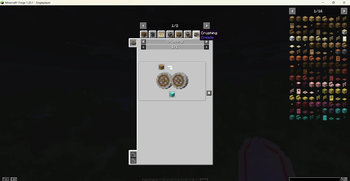
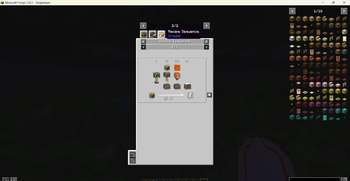
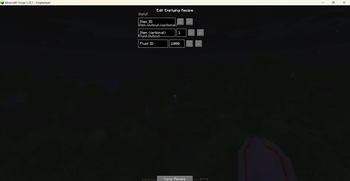
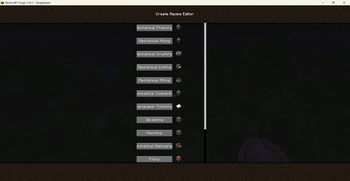
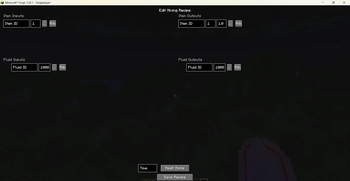
Use /vre create gui to open the main screen and browse all 14 recipe types: Pressing, Mixing, Crushing, Cutting, Milling, Compacting, Sandpaper Polishing, Splashing, Haunting, Deploying, Filling, Emptying, Mechanical Crafting, and Sequenced Assembly. Click any type to enter its dedicated editing page, which offers fields for item inputs, fluid inputs, output items with probabilities, processing time, and heat requirements, along with convenient item/fluid pickers and a tag picker.
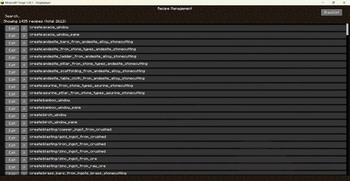
In the Recipe Management screen (/vre create manage), you can search all registered Create recipes and click “Edit” to modify those that are editable. You can also add any recipe to a blacklist to temporarily disable it, and restore blacklisted recipes.
All created or modified recipes are saved as JSON files in the config/visual_recipe_edit_create/ directory.
The mod fully supports both Chinese and English, with the UI language automatically following the game setting.
Commands
/vre create gui – Opens the recipe type selection screen to create new recipes.
/vre create manage – Opens the recipe management screen to edit, disable, or restore existing recipes.
Note
This is a Create add-on; please use it with Create 6.0.8 or later.
Not all vanilla Create recipes support visual editing: pure Create processing recipes (e.g., those under “Mixed Mixing”) can be fully edited, while “Auto‑Stirring” and “Auto‑Brewing” recipes that inherit from crafting/brewing systems do not have dedicated editing pages (you can still disable them in the management screen).
Recipe changes only take effect after leaving and re-entering the current world.
Verfügbare Versionen
Visual Recipe Edit-Create auf dem Server installieren
Server bestellen
Bestelle einen Minecraft Java Server mit mindestens 4 GB RAM (6 GB empfohlen).
forge Loader setzen
Wähle im Panel unter "Egg" den forge-Loader und die passende Minecraft-Version (1.21.1).
Mod installieren
Öffne den Mod-Browser im Dashboard und suche nach "Visual Recipe Edit-Create". Klicke "Installieren" – fertig! Alternativ: Lade die .jar via SFTP in den /mods Ordner.
Kompatibilität
Mod-Loader
Minecraft-Versionen
1.21.1, 1.20.1
Server-seitig
✓ ErforderlichEmpfohlener RAM
6 GB(min. 4 GB)Häufige Fragen
Visual Recipe Edit-Create Server crasht beim Start – was tun?
Häufigste Ursache: falsche forge-Version oder zu wenig RAM. Prüfe im Server-Log (latest.log), ob ein "OutOfMemoryError" oder "Mixin"-Fehler auftritt. Bei Mado Hosting: Stelle sicher, dass mindestens 4 GB RAM zugewiesen sind und der Loader zur Mod-Version passt (1.21.1). Über das Panel kannst du den Loader mit einem Klick wechseln.
Ist Visual Recipe Edit-Create mit forge und neoforge kompatibel?
Visual Recipe Edit-Create unterstützt offiziell forge, neoforge für Minecraft 1.21.1, 1.20.1. Im Mado Dashboard werden inkompatible Loader-Kombinationen automatisch erkannt.
Server laggt mit Visual Recipe Edit-Create – wie optimiere ich die Performance?
Empfohlener RAM: 6 GB (+1 GB pro 5 Spieler). Prüfe mit /spark profiler, ob Visual Recipe Edit-Create den meisten Tick-Time verbraucht. Häufige Fixes: Server-View-Distance auf 8-10 reduzieren, bei Forge "performant" oder "starlight" als Zusatz-Mod installieren. Bei Mado Hosting läuft dein Server auf NVMe-SSDs mit dedizierten CPU-Kernen für minimale Latenz.
Ähnliche Mods




![[ETF] Entity Texture Features](https://cdn.modrinth.com/data/BVzZfTc1/af683d206d50b05258d865b0d6e4aa2f2cee12f2_96.webp)

Modded Server mieten
Installiere Visual Recipe Edit-Create mit nur einem Klick auf deinem Server.