
Visual Recipe Edit-Goety
It provides a visual GUI that allows you to create, edit, and delete new recipes, modify existing Goety recipes, and even define custom ritual types. Changes take effect after executing /reload or rejoining the world.
Screenshots
Über diese Mod
Visual Recipe Edit-Goety is an addon mod for Goety.
It provides a visual GUI that allows you to create, edit, and delete new recipes, modify existing Goety recipes, and even define custom ritual types. Changes take effect after executing /reload or rejoining the world.
Details
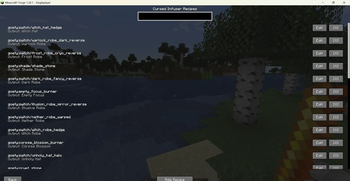
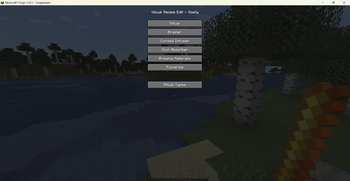
Open the main menu with /vre goety gui to browse all recipe categories:
Rituals, Braziers, Cursed Infuser, Soul Absorber, Brewing, and Pulverize.
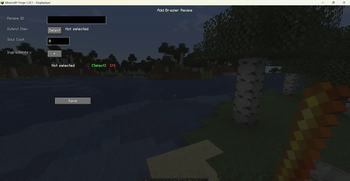
Select any type to enter its dedicated editor, which offers fields tailored to that recipe, such as:
Item inputs / outputs
Soul cost
Processing time
Entity selectors
Tag selectors
Editors come with built-in item, entity, and tag selectors, all supporting search in both English and Chinese.
In the recipe list screen you can search through all registered recipes of that type. Click Edit to modify a recipe, or Delete to remove it (deletion is only allowed for recipes you have created yourself).
All user‑created recipes are saved under:
config/visual_recipe_edit_goety/rituals/data/goety/recipes/
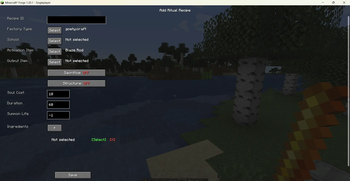
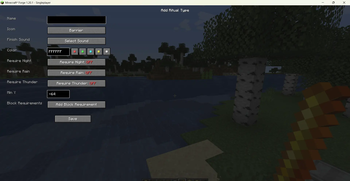
Ritual recipes support choosing a factory type (craft, summon, convert, etc.) and dynamically display the corresponding fields (output item, entity to summon, entity to convert, etc.). Optional conditions such as sacrifice entities or structure requirements can be enabled.
The mod also features a custom ritual type system, allowing you to create new ritual types with:
Custom block requirements
Weather / time restrictions
Y‑level constraints
Custom finish sounds and particle colors
Full Chinese and English support is included – the interface language follows the game’s language setting automatically.
Commands
/vre goety gui – opens the recipe category selection screen, where you can create or manage recipes.
Notes
This is an addon mod for Goety and requires it to be installed.
After adding, editing, or deleting recipes, you must run /reload or re‑enter the world for the changes to take effect.
Verfügbare Versionen
Visual Recipe Edit-Goety auf dem Server installieren
Server bestellen
Bestelle einen Minecraft Java Server mit mindestens 3 GB RAM (4 GB empfohlen).
forge Loader setzen
Wähle im Panel unter "Egg" den forge-Loader und die passende Minecraft-Version (1.20.1).
Mod installieren
Öffne den Mod-Browser im Dashboard und suche nach "Visual Recipe Edit-Goety". Klicke "Installieren" – fertig! Alternativ: Lade die .jar via SFTP in den /mods Ordner.
Kompatibilität
Mod-Loader
Minecraft-Versionen
1.20.1
Server-seitig
✓ ErforderlichEmpfohlener RAM
4 GB(min. 3 GB)Häufige Fragen
Visual Recipe Edit-Goety Server crasht beim Start – was tun?
Häufigste Ursache: falsche forge-Version oder zu wenig RAM. Prüfe im Server-Log (latest.log), ob ein "OutOfMemoryError" oder "Mixin"-Fehler auftritt. Bei Mado Hosting: Stelle sicher, dass mindestens 3 GB RAM zugewiesen sind und der Loader zur Mod-Version passt (1.20.1). Über das Panel kannst du den Loader mit einem Klick wechseln.
Ist Visual Recipe Edit-Goety mit forge kompatibel?
Visual Recipe Edit-Goety unterstützt offiziell forge für Minecraft 1.20.1. Im Mado Dashboard werden inkompatible Loader-Kombinationen automatisch erkannt.
Server laggt mit Visual Recipe Edit-Goety – wie optimiere ich die Performance?
Empfohlener RAM: 4 GB (+1 GB pro 8 Spieler). Prüfe mit /spark profiler, ob Visual Recipe Edit-Goety den meisten Tick-Time verbraucht. Häufige Fixes: Server-View-Distance auf 8-10 reduzieren, bei Forge "performant" oder "starlight" als Zusatz-Mod installieren. Bei Mado Hosting läuft dein Server auf NVMe-SSDs mit dedizierten CPU-Kernen für minimale Latenz.
Ähnliche Mods




![[ETF] Entity Texture Features](https://cdn.modrinth.com/data/BVzZfTc1/af683d206d50b05258d865b0d6e4aa2f2cee12f2_96.webp)

Modded Server mieten
Installiere Visual Recipe Edit-Goety mit nur einem Klick auf deinem Server.