
Vitrail Shaders
OptiFine-format shader packs, on Minecraft's native Vulkan renderer
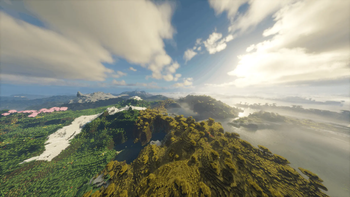
Screenshots


Über diese Mod
OptiFine-format shader packs, on Minecraft's native Vulkan renderer
Minecraft 26.2 ships a native Vulkan renderer alongside the OpenGL one. Every
shader pack that exists was written for OpenGL, and none of them run on it.
Vitrail runs them anyway, unmodified. It reads an OptiFine-format pack out
of shaderpacks/, translates its GLSL once when the pack loads, and hands it to
the compiler the game already embeds. Nothing translates while a frame is drawn.
It started as a question, whether packs written for OpenGL over more than a
decade could run untouched on the renderer that now ships with the game. It is
one person's side project, worked on every day since July, and an early one:
the backend it runs on is marked experimental by the game itself.
It is built the way a lot of software gets built now: AI tools do a real share
of the typing and the debugging, and a human decides, tests against real packs
and against Iris, reviews every line and carries the blame for every bug. What
was taken from Iris and from Kroppeb's stareval is credited file by file in
the project's NOTICE, under the same licence. If any of that matters to you,
now you know. If the mod is useful, there is a coffee link below, and the
issues are where I answer.

Before you install: it is a beta
- The Vulkan backend is experimental, marked so by the game itself: the
setting you have to turn on reads "Prefer Vulkan (Experimental)". - The world goes through your pack: terrain, water, shadows, sky, clouds,
weather, particles, mobs, block entities, the held hand, name plates and
signs. What still comes from the game, the engine names in its log when a
place first draws, and that list shrinks release by release. - Some packs still come out wrong in places, and a wrong picture is worse
than a missing one. The table of packs actually tried starts from
what you see and names the cause. - If what you want today is a finished picture, use Iris on the
OpenGL backend instead. It does that job well, and it is the reference this
engine is checked against, frame against frame.
Bring your own pack
Vitrail is the engine, not the pack, and it can ship none: the packs belong to
their authors and their licences do not allow redistribution. These are the
best known of the packs it draws.
- Bliss
- BSL
- Complementary Reimagined
- Complementary Unbound
- Euphoria Patches
- I Like Vanilla
- Lux
- Mellow
- Photon
- Sildur's Vibrant
- Solas
- Spooklementary
- iterationT (on Bilibili, not on Modrinth or CurseForge)
Every other pack in the table of packs actually tried draws as well,
and the table says how close each one comes to Iris. A pack absent from it is
one I have not loaded, not one that is unsupported.
After you install
- Switch the game to Vulkan and restart it. Video Settings, "Prefer Vulkan
(Experimental)". The backend is picked when the game boots, so it takes effect
on the next launch. - If the frame rate comes up short, there is a slider for it. Video
Settings, on Vitrail's own page, "Render Scale": the world is drawn at 25 to
100 percent of the window and brought back to full size before the interface,
so menus, chat and the F3 screen stay sharp whatever the scale. - Distant Horizons is compatible, and your pack's own DH programs draw its
far terrain. On Fabric, install it like any other mod. On NeoForge its current
release still crashes on the Vulkan renderer (its own texture unwrapper, not
this mod), so install
this build
by hand instead. - Chloride is not needed, and if you run it, five of its settings decide
what reaches your pack: Fast Chests and Fast Beds on the Performance page,
Max Entity Distance, Max Monster Distance and Max Block Entity Distance on
the Entities page. Vitrail names in the log at startup any it finds on.
Client only, one jar for Fabric and NeoForge. Iris can stay installed beside it,
on the Sodium version Iris asks for, which Vitrail runs on too: on Vulkan Vitrail
draws, on OpenGL Iris does, and switching the backend in the video settings
switches engines.
The install guide
has the rest.
Links and credits
If a pack or a mod does not work with Vitrail, please open an
issue. A pack that draws
wrong, a mod that clashes, a crash: every report helps, and if you want to take
part, pull requests are very welcome.
Source, what goes through a pack today, the changelog and the full
compatibility notes are all at
Vitrail-Shaders. It is also on
CurseForge.
LGPL-3.0-only. Parts of the pack loader and of the value catalogue are adapted
from Iris, which is LGPL-3.0 as well, and
the expression grammar is Kroppeb's stareval. What was taken and what was
changed on the way is recorded file by file in the project's NOTICE.
Verfügbare Versionen
Vitrail Shaders auf deinem Client installieren
Mod-Loader lokal installieren
Installiere fabric für deine lokale Minecraft-Version.
Passende Datei herunterladen
Wähle die Vitrail Shaders-Datei für fabric und Minecraft 26.3.
Mod installieren
Lege die .jar-Datei in deinem lokalen .minecraft/mods-Ordner ab und starte Minecraft neu. Eine Installation auf dem Server ist nicht nötig.
Kompatibilität
Mod-Loader
Minecraft-Versionen
26.3, 26.2
Server-seitig
✗ Nicht unterstütztEmpfohlener RAM
4 GB(min. 3 GB)Häufige Fragen
Muss Vitrail Shaders auf dem Minecraft Server installiert werden?
Nein. Modrinth kennzeichnet Vitrail Shaders serverseitig als nicht unterstützt. Installiere die Mod nur im lokalen Minecraft-Mods-Ordner. Dein Server kann unverändert bleiben, sofern die Mod-Seite keine zusätzliche Abhängigkeit nennt.
Welche Version und welchen Loader braucht Vitrail Shaders?
Nutze eine Datei für fabric, neoforge und exakt deine Minecraft-Version. Unterstützte Versionen sind unter anderem 26.3, 26.2. Loader-Dateien sind nicht untereinander austauschbar.
Vitrail Shaders funktioniert nicht – was kann ich prüfen?
Prüfe zuerst Minecraft-Version, Loader-Version und erforderliche Abhängigkeiten. Lege die .jar-Datei im lokalen .minecraft/mods-Ordner ab und entferne ältere Duplikate. Da die Mod clientseitig ist, löst mehr Server-RAM dieses Problem nicht.
Ähnliche Mods




Minecraft Server für deine Gruppe
Vitrail Shaders bleibt auf deinem Client. Hoste dazu eine kompatible Welt für deine Mitspieler.
Details
- Lizenz
- GNU Lesser General Public License v3.0 only
- Server-seitig
- Nicht unterstützt