
VMD Animation Cache
Per-frame cache for SlashBlade MMD animation
Screenshots
Über diese Mod
Overview
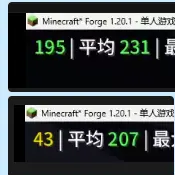
VMD Animation Cache eliminates redundant MMD motion computation in SlashBlade Resharped, giving you ~3.8x FPS improvement (50 → 190 FPS) when SlashBlade entities are on screen.
When SlashBlade renders MMD-based blade animations, VmdAnimation.setupAnim() is called 60–120 times per entity per frame — once for every bone, every time a transform is queried. But the tick and partialTick don't change within a frame. All 120 calls produce identical results, wasting ~20% of the render thread.
This mod adds a tiny per-frame cache: if setupAnim is called again with the same tick and partialTick, the entire MMD pipeline is skipped. 120 calls → 1 call per entity per frame.
Performance
| Scenario | Before | After |
|---|---|---|
| Third-person FPS (SlashBlade visible) | ~50 | ~190 |
Tested on Minecraft 1.20.1, Forge 47, SlashBlade Resharped 1.9.65. Single SlashBlade entity in view.
Requirements
- Minecraft 1.20.1
- Forge 47+
- SlashBlade Resharped 1.9.65
Installation
- Download the jar and drop it into your
mods/folder - Launch the game
Compatibility
Do not use with AntiEntropyCore — both mods inject into the same Mixin target (VmdAnimation) and will conflict.
How It Works
A single Mixin injects at the head of VmdAnimation.setupAnim(). It remembers the last (currentTick, partialTick) pair. Cache hit → method cancelled. Cache miss → update cache, run normally.
Only 32 lines of code. Client-side only. No coremod hacks.
Links
- Source: GitHub
- License: MIT
Verfügbare Versionen
VMD Animation Cache auf deinem Client installieren
Mod-Loader lokal installieren
Installiere forge für deine lokale Minecraft-Version.
Passende Datei herunterladen
Wähle die VMD Animation Cache-Datei für forge und Minecraft 1.20.1.
Mod installieren
Lege die .jar-Datei in deinem lokalen .minecraft/mods-Ordner ab und starte Minecraft neu. Eine Installation auf dem Server ist nicht nötig.
Kompatibilität
Mod-Loader
Minecraft-Versionen
1.20.1
Server-seitig
✗ Nicht unterstütztEmpfohlener RAM
4 GB(min. 3 GB)Häufige Fragen
Muss VMD Animation Cache auf dem Minecraft Server installiert werden?
Nein. Modrinth kennzeichnet VMD Animation Cache serverseitig als nicht unterstützt. Installiere die Mod nur im lokalen Minecraft-Mods-Ordner. Dein Server kann unverändert bleiben, sofern die Mod-Seite keine zusätzliche Abhängigkeit nennt.
Welche Version und welchen Loader braucht VMD Animation Cache?
Nutze eine Datei für forge und exakt deine Minecraft-Version. Unterstützte Versionen sind unter anderem 1.20.1. Loader-Dateien sind nicht untereinander austauschbar.
VMD Animation Cache funktioniert nicht – was kann ich prüfen?
Prüfe zuerst Minecraft-Version, Loader-Version und erforderliche Abhängigkeiten. Lege die .jar-Datei im lokalen .minecraft/mods-Ordner ab und entferne ältere Duplikate. Da die Mod clientseitig ist, löst mehr Server-RAM dieses Problem nicht.
Ähnliche Mods


Minecraft Server für deine Gruppe
VMD Animation Cache bleibt auf deinem Client. Hoste dazu eine kompatible Welt für deine Mitspieler.