
VulkanMod Reforged
Bring Vulkan to Minecraft now on neoforge! (Forge version, backports, other versions coming soon)
Screenshots
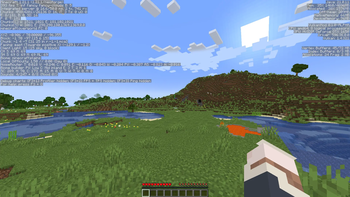
Über diese Mod
Vulkan is a Minecraft performance project that focuses on improving the game’s overall smoothness, stability, and responsiveness. It is designed to give players a cleaner and more optimized experience while keeping the normal Minecraft feel.
Developing and maintaining this project takes time and effort. If you enjoy Vulkan, consider supporting the project and sharing feedback to help improve future updates.
Installation
Requirements
- A supported Minecraft version
- A compatible mod loader
- A device capable of running the project properly
- Latest GPU drivers updates
Steps
- Download the latest Vulkan mod file.
- Move the file into your Minecraft
modsfolder. - Launch Minecraft with the correct mod loader profile.
Performance
Vulkan is built with optimization in mind. It aims to reduce lag, improve responsiveness, and make gameplay feel smoother across supported setups.
Compatibility
Mod compatibility is not guaranteed. Some mods may not work correctly with Vulkan, especially mods that change rendering, visuals, or core client behavior.
Before reporting an issue, make sure your Minecraft version, mod loader, and installed mods are supported.
Community
Need help, want to report a problem, or just want to talk with other users? Join VulkanMod Discord Server for support, updates, and community discussion.
Disclaimer
Vulkan is not an official XCollateral's product (the original VulkanMod creator), credits to him <3
Verfügbare Versionen
VulkanMod Reforged auf deinem Client installieren
Mod-Loader lokal installieren
Installiere neoforge für deine lokale Minecraft-Version.
Passende Datei herunterladen
Wähle die VulkanMod Reforged-Datei für neoforge und Minecraft 1.21.1.
Mod installieren
Lege die .jar-Datei in deinem lokalen .minecraft/mods-Ordner ab und starte Minecraft neu. Eine Installation auf dem Server ist nicht nötig.
Kompatibilität
Mod-Loader
Minecraft-Versionen
1.21.1, 1.20.1
Server-seitig
✗ Nicht unterstütztEmpfohlener RAM
4 GB(min. 3 GB)Häufige Fragen
Muss VulkanMod Reforged auf dem Minecraft Server installiert werden?
Nein. Modrinth kennzeichnet VulkanMod Reforged serverseitig als nicht unterstützt. Installiere die Mod nur im lokalen Minecraft-Mods-Ordner. Dein Server kann unverändert bleiben, sofern die Mod-Seite keine zusätzliche Abhängigkeit nennt.
Welche Version und welchen Loader braucht VulkanMod Reforged?
Nutze eine Datei für neoforge und exakt deine Minecraft-Version. Unterstützte Versionen sind unter anderem 1.21.1, 1.20.1. Loader-Dateien sind nicht untereinander austauschbar.
VulkanMod Reforged funktioniert nicht – was kann ich prüfen?
Prüfe zuerst Minecraft-Version, Loader-Version und erforderliche Abhängigkeiten. Lege die .jar-Datei im lokalen .minecraft/mods-Ordner ab und entferne ältere Duplikate. Da die Mod clientseitig ist, löst mehr Server-RAM dieses Problem nicht.
Ähnliche Mods


Minecraft Server für deine Gruppe
VulkanMod Reforged bleibt auf deinem Client. Hoste dazu eine kompatible Welt für deine Mitspieler.