
WaveMotes
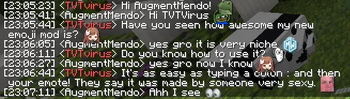
Type :emote: in chat and pick it from a popup, like commands. Client-side rendering + optional Discord emojis. One jar.
Screenshots
Über diese Mod
WaveMotes
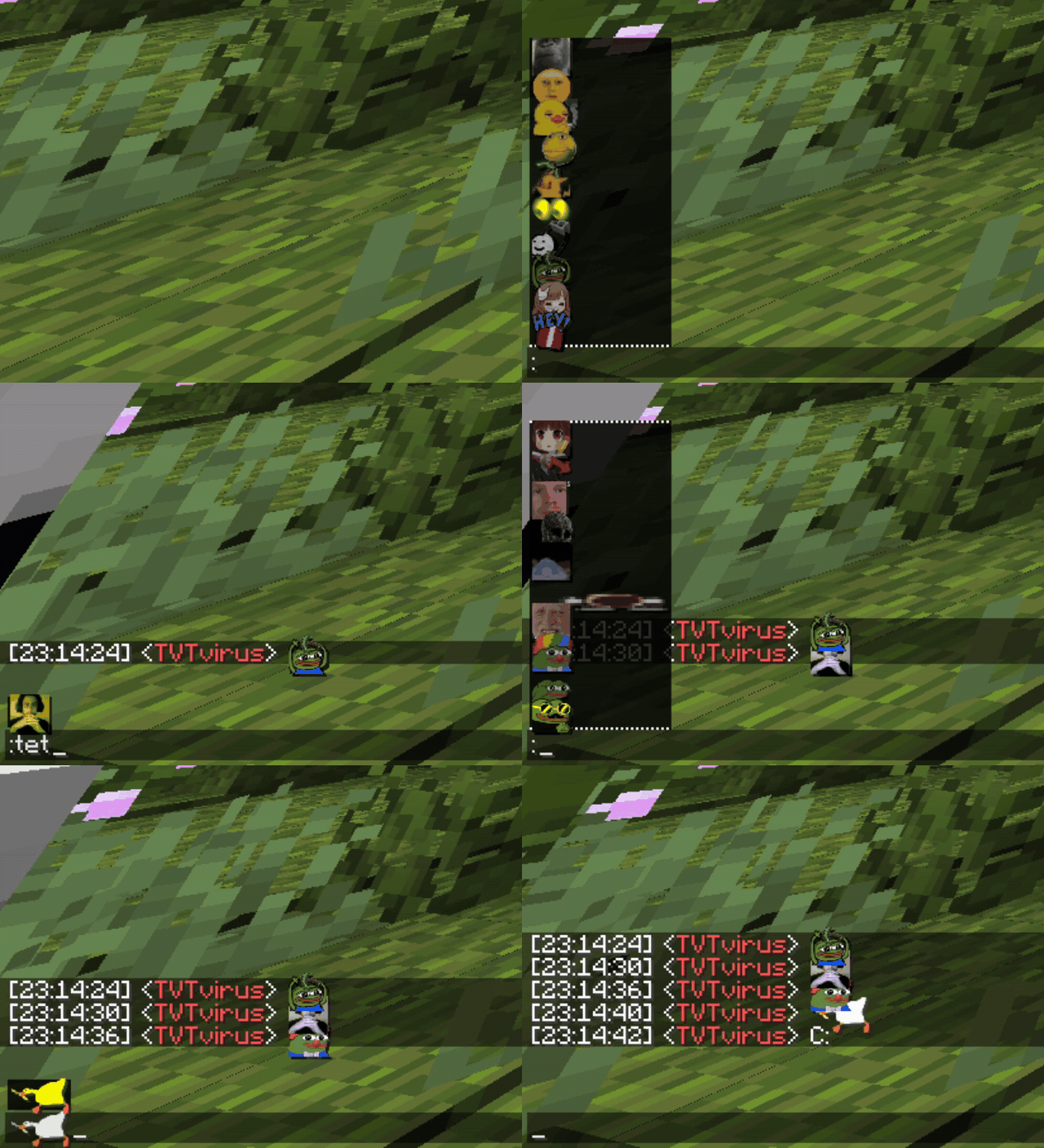
Type : in chat and a popup appears — the same one you get with / commands, but
full of emotes. Pick one and the rendered emote drops straight into your message.
✨ Features
- Popup autocomplete. Type
:, keep typing to filter (:sku→:skull:). Same UX as command suggestions — nothing new to learn. - Renders client-side. The built-in emote textures ship inside the jar, so they show up even when the server doesn't send a resource pack.
- Bigger than text. Emotes are scaled up so they actually read as emotes.
- Optional Discord emojis. 1900+ standard Discord shortcodes, off by default. Turn them all on, or whitelist just the ones you want (e.g. only
:skull:). - In-game config. Tweakeroo-style On/Off switches. Open with
/wmor bind a key. - One jar, no bloat. Only needs Fabric API. No malilib, no YACL.
🎮 How to use
- Type
:in chat → popup opens. - Filter by typing, pick with the mouse or
Tab/Enter. - Configure with
/wm(or bind a key under Options → Controls).
⚙️ Discord emojis
1900+ standard Discord shortcodes, drawn in color in-game with bundled
Twemoji textures. They're off by default to keep the
picker focused on the built-in pack. Enable them all, or whitelist individual ones from the
config screen. A few hundred multi-codepoint ones (most flags, family/ZWJ sequences) render
as their components locally but still travel correctly to Discord.
📏 Emote size
Every emote shares one size, so changing it is a single find-and-replace. The jar is a zip:
open assets/minecraft/font/default.json and change every "height": 16 (bigger = bigger
emotes); "ascent": 11 moves them up/down (rule of thumb: ascent ≈ height − 5). Restart and
done. Building from source? python tools/set_emote_size.py 20.
🖥️ Want everyone to see your emotes?
The client mod renders emotes for you on any server. If you want other players to
see your custom emotes, that needs a server-side setup (resource pack + chat bridge) on a
or Aternos. That server-side piece is part of the CodeW4VE
project.
📦 Requirements
- Minecraft 1.21+
- Fabric Loader
- Fabric API
Built-in emote textures belong to the MineWave community, included with permission. Discord emoji textures from Twemoji (CC-BY 4.0). Mod under MIT.
Verfügbare Versionen
WaveMotes auf dem Server installieren
Server bestellen
Bestelle einen Minecraft Java Server mit mindestens 3 GB RAM (4 GB empfohlen).
fabric Loader setzen
Wähle im Panel unter "Egg" den fabric-Loader und die passende Minecraft-Version (1.21.1).
Mod installieren
Öffne den Mod-Browser im Dashboard und suche nach "WaveMotes". Klicke "Installieren" – fertig! Alternativ: Lade die .jar via SFTP in den /mods Ordner.
Kompatibilität
Mod-Loader
Minecraft-Versionen
1.21.1, 1.21
Server-seitig
✗ Nicht unterstütztEmpfohlener RAM
4 GB(min. 3 GB)Häufige Fragen
WaveMotes Server crasht beim Start – was tun?
Häufigste Ursache: falsche fabric-Version oder zu wenig RAM. Prüfe im Server-Log (latest.log), ob ein "OutOfMemoryError" oder "Mixin"-Fehler auftritt. Bei Mado Hosting: Stelle sicher, dass mindestens 3 GB RAM zugewiesen sind und der Loader zur Mod-Version passt (1.21.1). Über das Panel kannst du den Loader mit einem Klick wechseln.
Ist WaveMotes mit fabric kompatibel?
WaveMotes unterstützt offiziell fabric für Minecraft 1.21.1, 1.21. Im Mado Dashboard werden inkompatible Loader-Kombinationen automatisch erkannt.
Server laggt mit WaveMotes – wie optimiere ich die Performance?
Empfohlener RAM: 4 GB (+1 GB pro 8 Spieler). Prüfe mit /spark profiler, ob WaveMotes den meisten Tick-Time verbraucht. Häufige Fixes: Server-View-Distance auf 8-10 reduzieren, bei Forge "performant" oder "starlight" als Zusatz-Mod installieren. Bei Mado Hosting läuft dein Server auf NVMe-SSDs mit dedizierten CPU-Kernen für minimale Latenz.
Ähnliche Mods

![[ETF] Entity Texture Features](https://cdn.modrinth.com/data/BVzZfTc1/af683d206d50b05258d865b0d6e4aa2f2cee12f2_96.webp)
![[EMF] Entity Model Features](https://cdn.modrinth.com/data/4I1XuqiY/6e5bbd0d06b1741bfdab6c0cfab6de8fdaf0064c_96.webp)



Modded Server mieten
Installiere WaveMotes mit nur einem Klick auf deinem Server.