
WEScreens
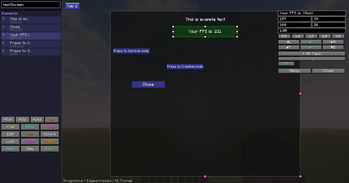
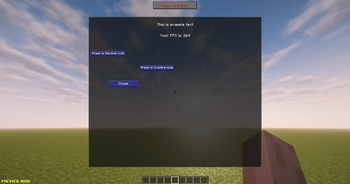
Meet WEScreens - a mod that lets you build functional menus right inside the game without knowing how to code.
Screenshots
Über diese Mod
WEScreens
Create fully customizable in-game GUI screens for Minecraft Forge - without writing Java code.
WEScreens is a visual GUI editor that lets you design interfaces directly inside Minecraft. Create menus, dialogs, shops, quest windows, server information screens, and much more using an intuitive drag-and-drop editor. Save your screens to the world and open them instantly with commands.
⚠️ Alpha Status
WEScreens is currently in alpha stage.
This means the mod is still under active development and may contain bugs, unfinished features, or unexpected behavior.
Please keep in mind:
- Some features may change or be reworked in future updates
- Bugs or crashes may occur in certain cases
- World data compatibility may not be guaranteed between versions
- Performance and stability improvements are ongoing
Feedback and bug reports are appreciated and help improve the mod.
✨ Features
- 🎨 Visual in-game GUI editor
- 🖱️ Drag & drop interface editing
- 📏 Move and resize elements freely
- 🔒 Lock elements to prevent accidental movement
- 📑 Multi-tab interfaces
- 📂 Nested containers with independent tabs
- 📝 Rich text with colors, alignment, and custom scaling
- 🖼️ Display any Minecraft texture
- ⚡ Execute commands with buttons
- 📦 Screens are automatically saved in world data
- 👥 Open screens for specific players using commands
- 🔄 Edit existing screens at any time
🧩 Available Components
- Text
- Images
- Close Buttons
- Command Buttons
- Tab Buttons
- Tab Containers
- Containers
🛠️ Commands
WEScreens provides two simple commands for creating and managing your custom interfaces.
/createscreen <name>
Creates a new screen and opens it in the visual editor./screen <name> <action> [new_name]
Manage an existing screen.Available actions:
open— Open the screen.edit— Open the screen in the editor.rename— Rename the screen (requiresnew_name).delete— Delete the screen permanently.
Example:
/screen MainMenu rename LobbyMenu
🔥 Dynamic Placeholders
Display real-time information inside your interfaces.
Examples:
%playername%%displayname%%health%%food%%xp%%level%%coords%%biome%%dimension%%time%%totalplayers%
...and many more.
📚 Perfect For
- Rules screens
- Quest systems
- Tutorials
- Shops
- Admin panels
- Command hubs
- Factions & clans
🚀 Why WEScreens?
Unlike traditional GUI mods, WEScreens doesn't require creating a new GUI in code every time you need a menu.
Design, edit, and update interfaces directly in-game with a powerful visual editor, making iteration fast and simple while supporting everything from basic menus to complex multi-tab layouts.
Whether you're creating a modpack or adventure map, WEScreens provides a flexible and efficient way to build beautiful Minecraft interfaces.
Verfügbare Versionen
WEScreens auf dem Server installieren
Server bestellen
Bestelle einen Minecraft Java Server mit mindestens 3 GB RAM (4 GB empfohlen).
forge Loader setzen
Wähle im Panel unter "Egg" den forge-Loader und die passende Minecraft-Version (1.20.1).
Mod installieren
Öffne den Mod-Browser im Dashboard und suche nach "WEScreens". Klicke "Installieren" – fertig! Alternativ: Lade die .jar via SFTP in den /mods Ordner.
Kompatibilität
Mod-Loader
Minecraft-Versionen
1.20.1
Server-seitig
✓ ErforderlichEmpfohlener RAM
4 GB(min. 3 GB)Häufige Fragen
WEScreens Server crasht beim Start – was tun?
Häufigste Ursache: falsche forge-Version oder zu wenig RAM. Prüfe im Server-Log (latest.log), ob ein "OutOfMemoryError" oder "Mixin"-Fehler auftritt. Bei Mado Hosting: Stelle sicher, dass mindestens 3 GB RAM zugewiesen sind und der Loader zur Mod-Version passt (1.20.1). Über das Panel kannst du den Loader mit einem Klick wechseln.
Ist WEScreens mit forge kompatibel?
WEScreens unterstützt offiziell forge für Minecraft 1.20.1. Im Mado Dashboard werden inkompatible Loader-Kombinationen automatisch erkannt.
Server laggt mit WEScreens – wie optimiere ich die Performance?
Empfohlener RAM: 4 GB (+1 GB pro 8 Spieler). Prüfe mit /spark profiler, ob WEScreens den meisten Tick-Time verbraucht. Häufige Fixes: Server-View-Distance auf 8-10 reduzieren, bei Forge "performant" oder "starlight" als Zusatz-Mod installieren. Bei Mado Hosting läuft dein Server auf NVMe-SSDs mit dedizierten CPU-Kernen für minimale Latenz.
Ähnliche Mods






Modded Server mieten
Installiere WEScreens mit nur einem Klick auf deinem Server.