
X-Ray World Generation
Not an x-ray mod! A datapack that makes normal worlds only generate air, except for blocks you would commonly see with x-ray.
Screenshots
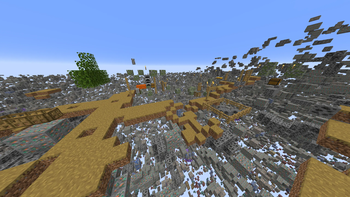
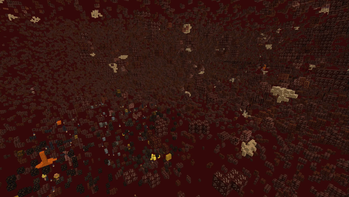
Über diese Mod
X-Ray World Datapack
Have you ever used an X-Ray Resource Pack? Have you wondered "Man, I wonder what it would be like if the entire world was actually like this."
...What do you mean no?
Well, I made a Datapack that does that anyways. The world looks completely normal except for the fact that most of it is missing... Only ores and the shell of structures are left in the world... You'll most likely spawn on a coal ore vein at y=0 in the middle of no where, stuck floating above the void. But hey! At least Diamonds are easy to find, right?
This is not an x-ray mod / How to use:
- This is NOT an X-Ray Mod / Resource Pack. This is a World Generation datapack. It overrides the default world generation to remove terrain.
- To use, install the datapack / mod and create a new world.
- If you are having issues with this, it may be because some issue with porting the datapack as a mod. File a bug report either on my discord or the github page. Include info like mods used, mod loader used, error, version used, etc.
- Custom world options are not supported (superflat, amplified, etc. I may add support in the future).
- This is incompatible with biome mods, and might be incompatible with some terrain mods.
Sponsor: Sparked Host
Check out this pack as well!
Shout out to Apollo for discovering the technique to make this datapack possible!
Verfügbare Versionen
X-Ray World Generation auf dem Server installieren
Server bestellen
Bestelle einen Minecraft Java Server mit mindestens 4 GB RAM (6 GB empfohlen).
datapack Loader setzen
Wähle im Panel unter "Egg" den datapack-Loader und die passende Minecraft-Version (1.21.10).
Mod installieren
Öffne den Mod-Browser im Dashboard und suche nach "X-Ray World Generation". Klicke "Installieren" – fertig! Alternativ: Lade die .jar via SFTP in den /mods Ordner.
Kompatibilität
Mod-Loader
Minecraft-Versionen
1.21.10, 1.21.9, 1.21.8 (+20 weitere)
Server-seitig
✓ ErforderlichEmpfohlener RAM
6 GB(min. 4 GB)Häufige Fragen
X-Ray World Generation Server crasht beim Start – was tun?
Häufigste Ursache: falsche datapack-Version oder zu wenig RAM. Prüfe im Server-Log (latest.log), ob ein "OutOfMemoryError" oder "Mixin"-Fehler auftritt. Bei Mado Hosting: Stelle sicher, dass mindestens 4 GB RAM zugewiesen sind und der Loader zur Mod-Version passt (1.21.10). Über das Panel kannst du den Loader mit einem Klick wechseln.
Ist X-Ray World Generation mit datapack und fabric und forge und neoforge und quilt kompatibel?
X-Ray World Generation unterstützt offiziell datapack, fabric, forge, neoforge, quilt für Minecraft 1.21.10, 1.21.9, 1.21.8. Achtung: Forge- und Fabric-Mods sind NICHT untereinander kompatibel – wähle einen Loader und bleibe dabei. Im Mado Dashboard werden inkompatible Loader-Kombinationen automatisch erkannt.
Server laggt mit X-Ray World Generation – wie optimiere ich die Performance?
Empfohlener RAM: 6 GB (+1 GB pro 5 Spieler). Prüfe mit /spark profiler, ob X-Ray World Generation den meisten Tick-Time verbraucht. Häufige Fixes: Server-View-Distance auf 8-10 reduzieren, bei Forge "performant" oder "starlight" als Zusatz-Mod installieren. Bei Mado Hosting läuft dein Server auf NVMe-SSDs mit dedizierten CPU-Kernen für minimale Latenz.
Ähnliche Mods




Modded Server mieten
Installiere X-Ray World Generation mit nur einem Klick auf deinem Server.