
XP Storage - Trinkets
An extension mod to add Trinkets support to XP Storage
Screenshots
Über diese Mod



NO PORT TO FORGE PLANNED! (but feel free to port it by yourself and link it)
The mod is fully configurable to enable only changes that you like
Description
This mod aims to improve your gameplay with XP Storage and Trinkets, both required of course. In this extension, you can craft Trinkets with the magic gem already present in the main mod: Crystallized Lapis.
This is a short description, full description below.
FAQ
Does it work on a server? Yes, it works on a server. File needed for both client and server
Can I include it in my modpack? Yes, you are free to include this mod into your modpack
For any other things: Feel free to share your experience, problems, enhancement ideas in the Discord server, or directly creating issues on the GitHub
Full description
Recipes
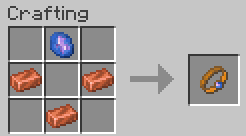
XP Conduit
- 3 Copper Ingots and 1 Crystallized Lapis
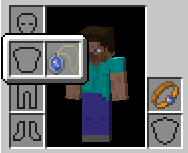
- The XP Conduit is a ring, so you can wear it in both mainhand and offhand ring slots
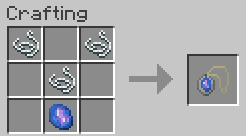
XP Saver
- 3 Strings and 1 Crystallized Lapis.
- The XP Saver is an amulet, so you can wear it in necklace slot
How to...
Use
XP Conduit: When you wear it, 75% of the experience you get will automatically be transferred in XP Book(s) from your inventory. However, this has a cost: each experience transferred use your ring until your ring become fully damaged!
XP Saver: When you wear it, 50% of the experience you had before to die will automatically be transferred in XP Book(s) from your inventory. However, this has a huge cost: each death use your amulet and make it completely damaged!
Repair
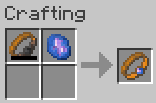
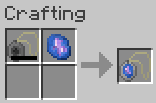
Don't worry! These trinkets don't break, but you'll have to repair them with a new Crystallized Lapis to be able to use their power again. Note that you can repair them even though they're not fully damaged
Verfügbare Versionen
XP Storage - Trinkets auf dem Server installieren
Server bestellen
Bestelle einen Minecraft Java Server mit mindestens 3 GB RAM (4 GB empfohlen).
fabric Loader setzen
Wähle im Panel unter "Egg" den fabric-Loader und die passende Minecraft-Version (1.21.1).
Mod installieren
Öffne den Mod-Browser im Dashboard und suche nach "XP Storage - Trinkets". Klicke "Installieren" – fertig! Alternativ: Lade die .jar via SFTP in den /mods Ordner.
Kompatibilität
Mod-Loader
Minecraft-Versionen
1.21.1, 1.21, 1.20.2 (+4 weitere)
Server-seitig
✓ ErforderlichEmpfohlener RAM
4 GB(min. 3 GB)Häufige Fragen
XP Storage - Trinkets Server crasht beim Start – was tun?
Häufigste Ursache: falsche fabric-Version oder zu wenig RAM. Prüfe im Server-Log (latest.log), ob ein "OutOfMemoryError" oder "Mixin"-Fehler auftritt. Bei Mado Hosting: Stelle sicher, dass mindestens 3 GB RAM zugewiesen sind und der Loader zur Mod-Version passt (1.21.1). Über das Panel kannst du den Loader mit einem Klick wechseln.
Ist XP Storage - Trinkets mit fabric kompatibel?
XP Storage - Trinkets unterstützt offiziell fabric für Minecraft 1.21.1, 1.21, 1.20.2. Im Mado Dashboard werden inkompatible Loader-Kombinationen automatisch erkannt.
Server laggt mit XP Storage - Trinkets – wie optimiere ich die Performance?
Empfohlener RAM: 4 GB (+1 GB pro 8 Spieler). Prüfe mit /spark profiler, ob XP Storage - Trinkets den meisten Tick-Time verbraucht. Häufige Fixes: Server-View-Distance auf 8-10 reduzieren, bei Forge "performant" oder "starlight" als Zusatz-Mod installieren. Bei Mado Hosting läuft dein Server auf NVMe-SSDs mit dedizierten CPU-Kernen für minimale Latenz.
Ähnliche Mods



![[TaCZ] Timeless and Classics Zero](https://cdn.modrinth.com/data/SzzJttH8/fd27766d2bb8390d284696b1dbd358f87e081439_96.webp)


Modded Server mieten
Installiere XP Storage - Trinkets mit nur einem Klick auf deinem Server.