
Zefir's Optimizations
Mod that adds async entity movement using Akka actors
Screenshots
Über diese Mod
Zefir's Optimizations
Zefir's Optimizations is a Fabric mod that adds parallel entity movement using Akka actors. It focuses primarily on separating the movement ticking of mobs and armor stands from the main thread. This can gradually improve the performance on the multi-core server.
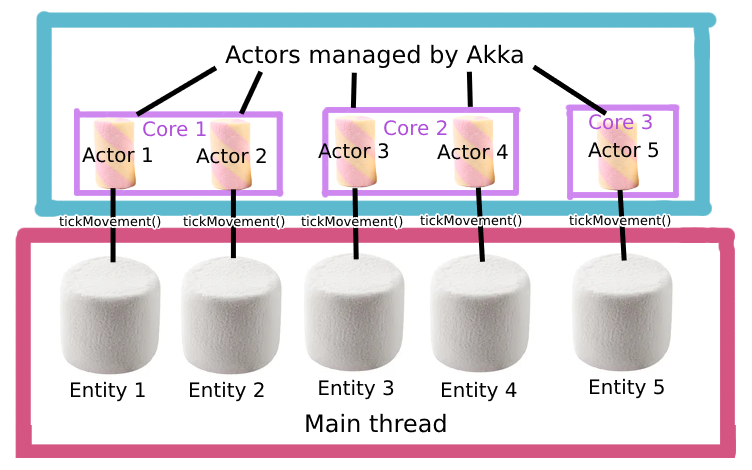
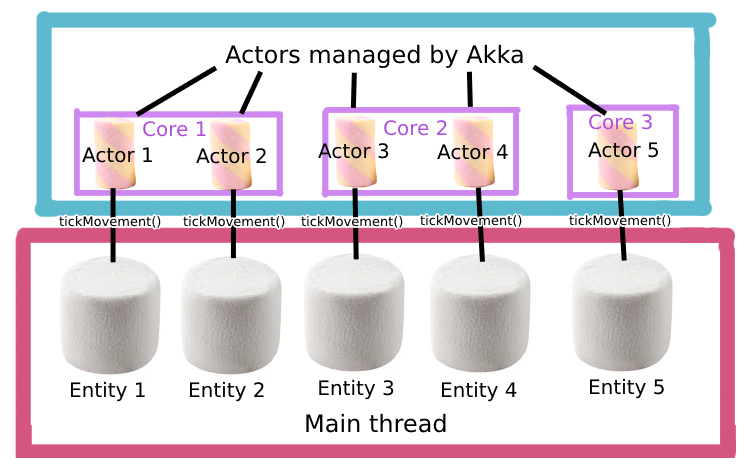
It works by attaching an actor to each MobEntity and ArmorStand and redirecting movement calls and executing them on diffirent thread. For now, only the basic movement logic from Entity and LivingEntity is implemented.
You must to have atleast 2 cores to see the diffirence! The more cores, the better.
How it works
Each mob and armor stand gets its own actor. When it's time for the entity to tick its movement logic, the Async Tick Manager tells the corresponding Entity Actor to do the work. The Entity Actor receives messages to its mailbox and processes them one by one.Some actions, like dealing damage or picking up items, must be done on the main thread for safety reasons. When an Entity Actor needs to do one of these actions, it sends a message to the Main Thread Actor that do the work on main thread.
For now, Entity Actor implements tickMovement() and travel() from LivingEntity and MobEntity (armor stand inherits it form LivingEntity).

It may and will be VERY broken. It can broke your etities, your world and your dog. You have been warned.
Rport any issues in our Discord!
Verfügbare Versionen
Zefir's Optimizations auf dem Server installieren
Server bestellen
Bestelle einen Minecraft Java Server mit mindestens 3 GB RAM (4 GB empfohlen).
fabric Loader setzen
Wähle im Panel unter "Egg" den fabric-Loader und die passende Minecraft-Version (1.21.1).
Mod installieren
Öffne den Mod-Browser im Dashboard und suche nach "Zefir's Optimizations". Klicke "Installieren" – fertig! Alternativ: Lade die .jar via SFTP in den /mods Ordner.
Kompatibilität
Mod-Loader
Minecraft-Versionen
1.21.1, 1.21
Server-seitig
✓ ErforderlichEmpfohlener RAM
4 GB(min. 3 GB)Häufige Fragen
Zefir's Optimizations Server crasht beim Start – was tun?
Häufigste Ursache: falsche fabric-Version oder zu wenig RAM. Prüfe im Server-Log (latest.log), ob ein "OutOfMemoryError" oder "Mixin"-Fehler auftritt. Bei Mado Hosting: Stelle sicher, dass mindestens 3 GB RAM zugewiesen sind und der Loader zur Mod-Version passt (1.21.1). Über das Panel kannst du den Loader mit einem Klick wechseln.
Ist Zefir's Optimizations mit fabric kompatibel?
Zefir's Optimizations unterstützt offiziell fabric für Minecraft 1.21.1, 1.21. Im Mado Dashboard werden inkompatible Loader-Kombinationen automatisch erkannt.
Server laggt mit Zefir's Optimizations – wie optimiere ich die Performance?
Empfohlener RAM: 4 GB (+1 GB pro 8 Spieler). Prüfe mit /spark profiler, ob Zefir's Optimizations den meisten Tick-Time verbraucht. Häufige Fixes: Server-View-Distance auf 8-10 reduzieren, bei Forge "performant" oder "starlight" als Zusatz-Mod installieren. Bei Mado Hosting läuft dein Server auf NVMe-SSDs mit dedizierten CPU-Kernen für minimale Latenz.
Ähnliche Mods





Modded Server mieten
Installiere Zefir's Optimizations mit nur einem Klick auf deinem Server.
Details
- Lizenz
- Creative Commons Attribution Share Alike 4.0 International
- Server-seitig
- Erforderlich