
ZEN's Better Health Bar
Vanilla-friendly NeoForge mod adding clean, customizable health bars to targeted entities, improving readability without changing gameplay.
Screenshots
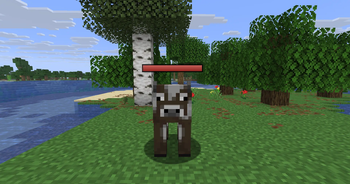
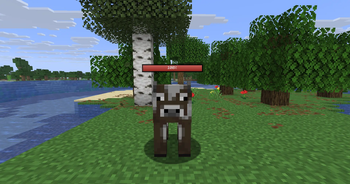
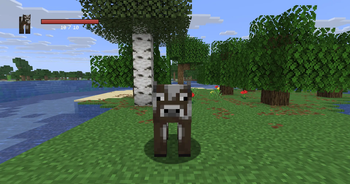
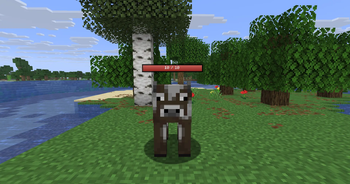
Über diese Mod
❤️ Zen's Better Health Bars
Vanilla-friendly health bars for the entities you target.
Zen's Better Health Bars is a NeoForge mod for Minecraft that adds clean, configurable health bars to combat and exploration without changing vanilla gameplay.
Track the health of mobs and players more clearly with smooth animated bars shown in the HUD, above entities, or both.
🔥 At a Glance
Configurable health bars for targeted entities
HUD, overhead, or combined rendering
HP, percent, or bar-only display
Optional entity names
Preset colors and animated RGB mode
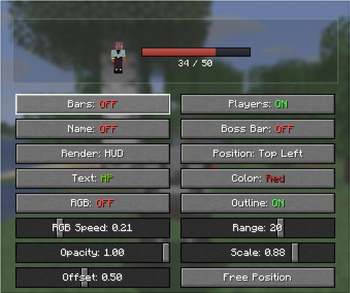
Outline, opacity, scale, range, and offset settings
Free-position editor with live preview
Optional vanilla boss bar hiding
Client-side config saved automatically
Designed to stay clean, readable, and vanilla-friendly
🧠 How It Works
When you look at a living entity, the mod tracks your current target and displays its health in a cleaner and more readable way.
You can choose whether the bar appears in the HUD, above the entity, or both, then customize the style to match your preferred vanilla+ interface.
Everything is visual only: the mod does not change health values, combat rules, or entity behavior.
⚔️ Core Features
📌 Targeted Health Bars
Shows the health of the entity you are currently looking at, keeping information focused and unobtrusive.
🖥️ Flexible Display Modes
Choose between:
HUD only
Above-head only
Both at the same time
📊 Multiple Text Styles
Display health as:
None
HP values
Percent
🎨 Visual Customization
Fine-tune the look with:
Color presets
Animated RGB mode
Outline toggle
Opacity control
Global scale
Distance limit
Head offset
🧍 Optional Names
Show or hide the entity name depending on the style you want.
📍 Free Position Editor
Move the HUD bar wherever you want with a live preview and save your preferred layout.
🐉 Boss Bar Option
Optionally hide the vanilla boss bar for a cleaner screen.
💾 Persistent Configuration
Player settings are saved automatically, so your configuration stays ready even after restarting the game.
⚙️ Configuration
The mod is built to be easy to customize without losing its vanilla feel.
You can adjust:
Render mode
HUD position
Display text mode
Bar color
RGB speed
Opacity
Scale
Distance
Head offset
Outline
Player visibility
Boss bar behavior
🎯 Why Use It
Perfect if you want:
Cleaner combat readability
A lightweight vanilla+ UI improvement
Better mob tracking without changing gameplay
A customizable health bar mod for NeoForge
A client-side solution that stays simple and polished
🧠 Keywords
minecraft health bar mod, targeted health bar minecraft, entity health bar mod, neoforge health bar mod, minecraft hud health bar, overhead health bars minecraft, vanilla plus ui mod, minecraft boss bar alternative, minecraft combat ui mod, minecraft neoforge mod
Verfügbare Versionen
ZEN's Better Health Bar auf dem Server installieren
Server bestellen
Bestelle einen Minecraft Java Server mit mindestens 3 GB RAM (4 GB empfohlen).
neoforge Loader setzen
Wähle im Panel unter "Egg" den neoforge-Loader und die passende Minecraft-Version (26.1.2).
Mod installieren
Öffne den Mod-Browser im Dashboard und suche nach "ZEN's Better Health Bar". Klicke "Installieren" – fertig! Alternativ: Lade die .jar via SFTP in den /mods Ordner.
Kompatibilität
Mod-Loader
Minecraft-Versionen
26.1.2, 1.21.8, 1.21.1
Server-seitig
✗ Nicht unterstütztEmpfohlener RAM
4 GB(min. 3 GB)Häufige Fragen
ZEN's Better Health Bar Server crasht beim Start – was tun?
Häufigste Ursache: falsche neoforge-Version oder zu wenig RAM. Prüfe im Server-Log (latest.log), ob ein "OutOfMemoryError" oder "Mixin"-Fehler auftritt. Bei Mado Hosting: Stelle sicher, dass mindestens 3 GB RAM zugewiesen sind und der Loader zur Mod-Version passt (26.1.2). Über das Panel kannst du den Loader mit einem Klick wechseln.
Ist ZEN's Better Health Bar mit neoforge kompatibel?
ZEN's Better Health Bar unterstützt offiziell neoforge für Minecraft 26.1.2, 1.21.8, 1.21.1. Im Mado Dashboard werden inkompatible Loader-Kombinationen automatisch erkannt.
Server laggt mit ZEN's Better Health Bar – wie optimiere ich die Performance?
Empfohlener RAM: 4 GB (+1 GB pro 8 Spieler). Prüfe mit /spark profiler, ob ZEN's Better Health Bar den meisten Tick-Time verbraucht. Häufige Fixes: Server-View-Distance auf 8-10 reduzieren, bei Forge "performant" oder "starlight" als Zusatz-Mod installieren. Bei Mado Hosting läuft dein Server auf NVMe-SSDs mit dedizierten CPU-Kernen für minimale Latenz.
Ähnliche Mods
![[EMF] Entity Model Features](https://cdn.modrinth.com/data/4I1XuqiY/6e5bbd0d06b1741bfdab6c0cfab6de8fdaf0064c_96.webp)


Modded Server mieten
Installiere ZEN's Better Health Bar mit nur einem Klick auf deinem Server.