
Zoom In
A Zoom In mod with customizations - Zoom in & out with a single keypress -Scroll zoom and more! 4x-Infinite Zoom with scroll
Screenshots
Über diese Mod
A Complete lightweight zoom mod that lets you zoom in with a single keypress.
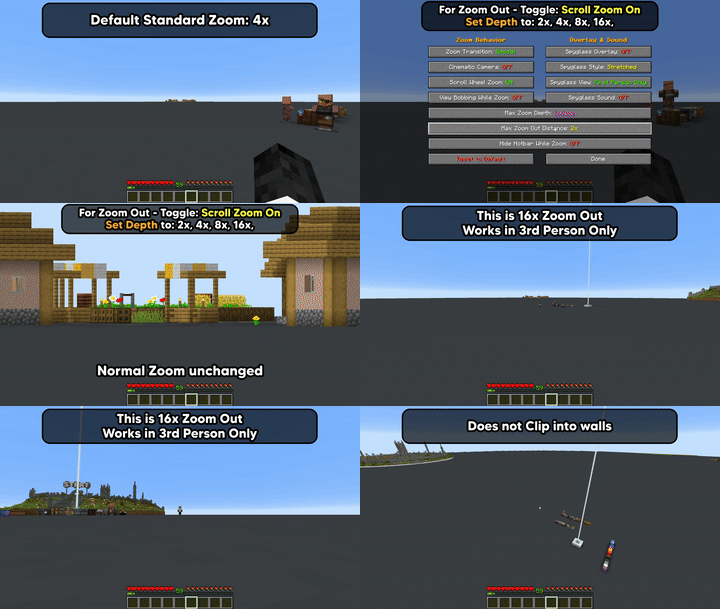
Now includes optional Zoom In & 3rd Person Zoom Out, both off by default.
Now includes Zoom To Max Depth Keybind - Hold Zoom + Keybind to Zoom in/Out to set zoom level.
How to Use
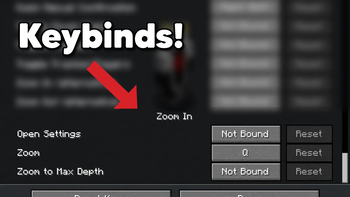
Press Q to zoom in, default 4x (rebindable in Controls > Keybinds)
Zoom To Max Depth Keybind (off by default)
*New v26.2=0.4.5+
Enable Scroll Zoom > Hold Zoom + Max Depth Keybind to zoom in/out to max depth level.

or Open Settings
Enable Scroll Wheel Zoom (off by default) -
hold Q and scroll to zoom in further
Third Person Zoom Out is a separate opt-in (also off by default)
3rd Person: Hold Q and scroll to zoom in & out from player.

Settings Access
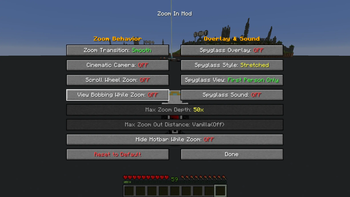
- Set a Settings keybind to access the
Settings Screen - Slash command:
/zoom menuto accessSettings Screen - Open Mod Menu to access the
Settings Screen(Optional)
Options/Settings - Defaults

Zoom Transition - Smooth or Instant
Cinematic Camera - Floaty and smooth, or Instant
Scroll Wheel Zoom - Hold the zoom key and scroll to zoom in further. Off by default - the base 4x zoom-in works exactly the same whether this is on or off.
*Scroll Zoom has relative mouse sensitivity built in, (skipped while Cinematic Camera is on)
Max Zoom Depth - * New in v26.2-0.3.1+ - 10x, 25x, 50x, 100x, Infinite (1000x). Only applies while Scroll Wheel Zoom is on.
Max Zoom Out Distance - *New in v26.2-0.4.3+ - Default (off), 2x, 4x, 8x, 16x. Independent of Max Zoom Depth - set to Default to keep deeper zoom-in without any camera pull-back.
Zoom Out only works in 3rd person perspective.
Defaults to off (Vanilla), even when Scroll Wheel Zoom is enabled.
Hide Hotbar while Zoomed - Toggle to show or hide the Hotbar while zoomed
Disable View Bobbing While Zoom - Toggle view bobbing while zoomed
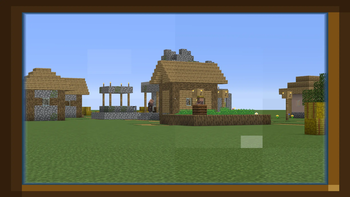
Spyglass Overlay - Classic scope overlay while zoomed
Spyglass Style - Stretched or Framed overlay
Spyglass View - First Person Only or All Perspectives
Spyglass Sound - Plays the spyglass use/stop sound on zoom
Commands
Every command below toggles when run with no argument, or takes an explicit value:
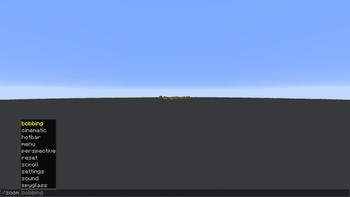
/zoom transition [smooth|instant]/zoom cinematic [on|off]/zoom scroll [on|off]- Scroll Wheel Zoom/zoom maxzoom [10|25|50|100|infinite]- Max Zoom Depth (zoom-in)/zoom zoomout [default|2|4|8|16]- Max Zoom Out Distance (third-person zoom-out)/zoom bobbing [on|off]- View Bobbing While Zoom/zoom hotbar [on|off]- Hide Hotbar While Zoom/zoom spyglass [on|off]- Spyglass Overlay/zoom style [stretched|framed]/zoom perspective [first|all]/zoom sound [on|off]/zoom menu- open the settings screen/zoom reset- reset all settings to default/zoom settings- print all current settings in chat
Credits
Built by ChapmanOfficial
Verfügbare Versionen
Zoom In auf deinem Client installieren
Mod-Loader lokal installieren
Installiere fabric für deine lokale Minecraft-Version.
Passende Datei herunterladen
Wähle die Zoom In-Datei für fabric und Minecraft 26.3.
Mod installieren
Lege die .jar-Datei in deinem lokalen .minecraft/mods-Ordner ab und starte Minecraft neu. Eine Installation auf dem Server ist nicht nötig.
Kompatibilität
Mod-Loader
Minecraft-Versionen
26.3, 26.2, 26.1 (+1 weitere)
Server-seitig
✗ Nicht unterstütztEmpfohlener RAM
4 GB(min. 3 GB)Häufige Fragen
Muss Zoom In auf dem Minecraft Server installiert werden?
Nein. Modrinth kennzeichnet Zoom In serverseitig als nicht unterstützt. Installiere die Mod nur im lokalen Minecraft-Mods-Ordner. Dein Server kann unverändert bleiben, sofern die Mod-Seite keine zusätzliche Abhängigkeit nennt.
Welche Version und welchen Loader braucht Zoom In?
Nutze eine Datei für fabric und exakt deine Minecraft-Version. Unterstützte Versionen sind unter anderem 26.3, 26.2, 26.1. Loader-Dateien sind nicht untereinander austauschbar.
Zoom In funktioniert nicht – was kann ich prüfen?
Prüfe zuerst Minecraft-Version, Loader-Version und erforderliche Abhängigkeiten. Lege die .jar-Datei im lokalen .minecraft/mods-Ordner ab und entferne ältere Duplikate. Da die Mod clientseitig ist, löst mehr Server-RAM dieses Problem nicht.
Ähnliche Mods






Minecraft Server für deine Gruppe
Zoom In bleibt auf deinem Client. Hoste dazu eine kompatible Welt für deine Mitspieler.