Auto Splitters
Automatic splitters that do load balancing of manifold-style production lines for the rest of us.
Beschreibung
Automatic Splitters
This mod adds a new type of splitter called `Auto Splitter` that supports different
output rates for each output and can also automatically balance the output rates in
a network of connected Auto Splitters.
As I don't have any experience in 3D modelling or texturing, the Auto Splitters look
exactly like stock Programmable Splitters.
Alpha version 0.4.x of the mod has EXPERIMENTAL support for multiplayer. It should work,
but is only very lightly tested right now!

Features
- A single Auto Splitter functions like a standard splitter, has the same size and can be mixed
arbitrarily with normal splitters and mergers.
- NEW: You can upgrade existing splitters to Auto Splitters with your build gun.
- Auto Splitters auto-detect all other directly connected Auto Splitters and balance the
output of the resulting network.
- By default, all outputs of the network that are attached to a machine get the same number
of items/min.
- You can enter a fixed number of items/min for some outputs (e.g. because a machine is underclocked),
and the network will adapt to those numbers.
- All numbers are presented in items/min. The rates are based on what you enter as the target input rate for the
first splitter in the network.
- All Auto Splitters show an estimate of the average recent item throughput.
- NEW: Auto Splitters can optionally detect over- and underclocking in downstream factories and adjust
the item rate accordingly. Enable in the mod options.
- NEW: EXPERIMENTAL multiplayer support in 0.4.x!
How To Use
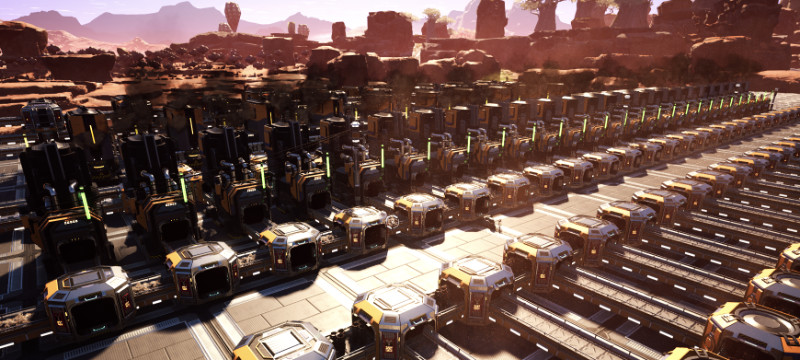
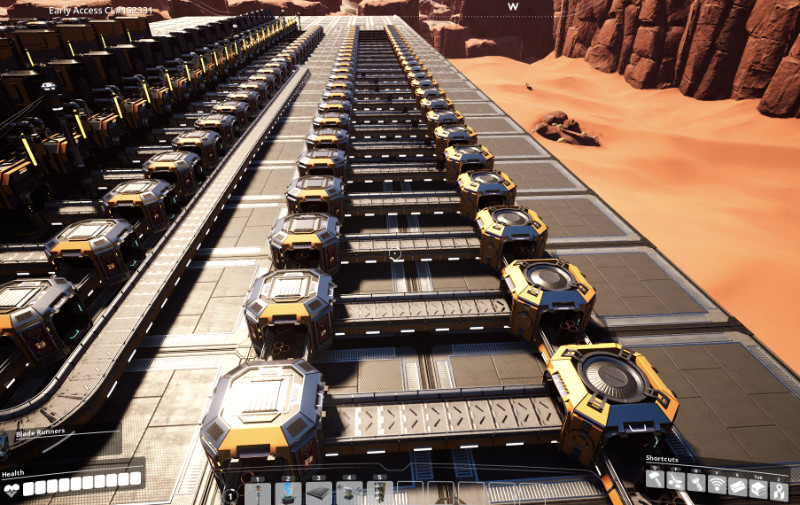
Just build a regular manifold-style distribution line, but replace all of the splitters
with Auto Splitters. If you already have a factory (and who doesn't?), you can also upgrade
your normal splitters to Auto Splitters with the build gun. Feed your manifold and gaze on
in wonder at the instant, perfectly balanced startup of your production line (or the belts
in this demonstration):
For further information about what's happening inside each splitter's brain, you can
interact with it by hitting "E" or whatever you configured for it:

The UI isn't pretty, but it shows you the output rates for each output, whether the
output is in "Auto" mode and whether the next building downstream is another
Auto Splitter (if the output is in auto mode, the total required item rate of that
downstream Auto Splitter will be automatically allocated to its output belt).
You can also see the "cycle progress" and the average item throughput of the splitter
over the last few cycles. In order to distribute the items correctly, the splitter
calculates a "distribution cycle". After completing a full cycle, all outputs will
have received exactly their allocated share of items. The length of the cycle gets
auto-tuned for a balance between performance and update speed.
The automatic algorithm assumes that all active "final" outputs of the Auto Splitter network
require the same number of items per minute. Active final outputs are outputs that
- are not connected to another Auto Splitter and have at least one belt connected
(the Auto Splitter does not check whether that belt leads anywhere useful)
- or are not in "Auto" mode
If some of your machines need more or less items per minute, you can disable the "Auto"
toggle for their output and enter a manual item rate:

FAQ
- After upgrading a splitter, the boxes around the splitters don't go away. What can I do?
That is known bug at the moment. As a workaround, start building some other building like a belt and
then stop building again. The boxes should disappear.
- When I upgrade a splitter that has items coming in, but whose output lines are blocked,
I get some of the items on the line back in my inventory. What's that about?
All splitters have an internal buffer that can hold up to 9 items. When you upgrade the
splitter, the game refunds you those items, as I haven't yet found a way to transfer
them into the new Auto Splitter.
- My input belt isn't completely full. Now the numbers of the splitters are wrong!
That will be fixed in a future update. As a workaround, you can build another Auto Splitter
in front of your normal "top-level" splitter and divert the excess rate to a normal splitter
or merger. That line will then quickly fill up. Blocked lines get ignored by the distribution
algorithm after a few ticks.
- The UI is horrible!
I know, but I first want to finish the functionality. Improvements are on the way! :-)
- Sometimes the splitter does not accept my manually entered output rate. What can I do?
That happens when the splitter cannot find a fair distribution rule for the numbers you
entered using its fixed precision arithmetic. I will add a notification to the UI in a
future version and (maybe) try to make the algorithm a little more "forgiving" by fuzzing
the numbers a little at some point.
- I've upgraded from 0.2.0 and already had some auto splitters placed before the upgrade. Now
my game crashes when loading the save!
Upgrade to 0.3.5 before trying to load the save. If that still doesn't work, go to the mod configuration
menu (in the main menu, click on "Mods" and then on the mod name) and turn on "Remove Conveyors". That will
remove all conveyors attached to auto splitters during the upgrade process, but at least your game won't
crash. You then have to redo the beltwork, unfortunately.
- I've upgraded from 0.2.0 and now all my painstakingly calculated item rates have been reset. For real?
Well, at least your game didn't crash - see above ;). The switch to fixed precision calculations made
it impossible to reliably import the old settings, some sets of numbers were fine, others produced completely
wrong distributions. So instead of having you guess which networks break, I decided to just reset everything
to a known state.
Unlocking
For now, the Auto Splitters are unlocked through an unreasonably cheap tier 1 HUB
milestone to simplify testing. ;-)
This will change in a later version, as well as the very low price of the splitter
itself!
Versions
0.4.0
Multiplayer Support - EXPERIMENTAL
The only new feature in this version is multiplayer support, so stick with 0.3.x for now if you only play singleplayer and don't want to help finding bugs.
#
Changes
- Add multiplayer support. This is only very lightly tested, as I don't play multiplayer myself. If you play with friends, please let me know in the Discord whether the mod works for you and if there are any problems.- New savegame data version required for multiplayer support. Savegames created with 0.4.x will load in 0.3.9, but all Auto Splitters will be removed when loading the save.
- Savegames created with older versions of the mod will be upgraded on first load. This conversion is much less invasive
than the fix required for 0.3.x and should not cause any crashes.
0.3.9
A working close button!
#
Changes
- Make the close button on the interaction widget work correctly.- Add a robust subsystem for tracking mod version changes when loading save games.
- Lots of internal cleanups in preparation for multiplayer support and to make maintenance
easier.
0.3.6 - 0.3.8
Small bugfix releases
0.3.5
Minor quality of life fixes and integration of fixes developed in 0.3.1 - 0.3.4.
#
Changes
- When loading an old save made with AutoSplitters 0.2.0 or older, all existing auto splitters
must be upgraded, which re-attaches the conveyors to the splitters. This version should be much
more robust than 0.3.0 during this process.
- Add a "nuclear" option for 0.2.0 saves that still crash when loading with this version.
When enabled, ALL conveyors attached to auto splitters will be removed, but this should
provide complete protection against crashing. Can be enabled in the mod settings in the main
menu.
- Add support for setting an explicit input rate for Auto Splitters. This makes item/min numbers show correctly
when the input belt is not completely full. Note: The input rate will not actually limit the number of
items/min. processed by the splitter. If you feed it faster, it just works faster!
- Add support for adjusting the output to factories according to their overclocking setting when the corresponding splitter
output is in automatic mode, e.g.: You have a splitter with three smelters, one at 100%
and two overclocked to 150%. With this feature enabled, the overclocked factories will automatically receive
1.5 times as many items, no manual tweaking required. For now, this is not enabled by default, go to the mod configuration
menu to turn it on.
0.3.1 - 0.3.4
Alpha test versions to solve the upgrade problems some people have experienced. Do not install.
0.3.0
This one's a big one! You can now upgrade your existing factories to use Auto Splitters, and the rate display
is a lot more usable.
#
Changes
- Regular Splitters can now be upgraded to Auto Splitters with the build gun. Yay!- The rate calculations are now based on fixed point arithmetic using the items/min metric.
As a result, cycle times should no longer explode when playing with different rates. The number of fractional digits is limited to 3.
- Added awesome icons by Deantendo (Deantendo#4265 on the Modding discord) for the mod, the milestone
and the recipe. Thank you so much!
- The UI now shows (and lets you enter) the items/min for each output. For now, the first splitter
always assumes a completely full belt.
- The UI shows the assumed input rate that is used for the calculations.
- After changing a number, you have to hit Enter to make it effective. If the splitter network cannot
calculate an item distribution based on your number, it will just revert to the old number.
#
Caveats
- There is a known bug, where the boxes around splitters and merge don't disappear after upgrading toan Auto Splitter. As a workaround, start building something else like a belt and exit the build mode again.
- The mod needs to convert auto splitters placed with older versions of the mod when first loading a
save with 0.3.0. That conversion works most of the time, but you might get crashes! The only bulletproof workaround is
- remove the auto splitters while using version 0.2.0 of the mod
- upgrade the mod to 0.3.0
- place the auto splitters again
You can also report the crash on Discord, I might be able to find a workaround with your bug report.
0.2.0
- Fixed positioning of splitters in relation to vanilla splitters and mergers.
0.1.0
- Initial release.
Credits
- logos (mod, milestone, recipe) by Deantendo#4265 - he has made a lot of the awesome logos and UI for many
mods, consider [giving him a tip!](https://www.paypal.com/donate?hosted_button_id=H5NRHB2NFWUPQ)
- The SML and SMR team for giving us such an incredible well-working modding environment
- All of the documentation contributors - that stuff just isn't fun to write, but oh-so-helpful!
- mircearoata for his [Advanced Logistics](https://ficsit.app/mod/21TjhG1mpxxfz2) mod,
which I used for getting the initial mod structure up and running, and from which I
"ethically recycled" the UI widget for the splitter as well as the blueprint logic for
a number input field.
- MarcioHuser for his [https://github.com/MarcioHuser/PowerChecker-SML3](PowerChecker) mod,
from which I copied the initial setup for the C++ side of the mod.
- Coffee Stain for an awesome game! :-)
Versionen
Auto Splitters auf dem Server installieren
Satisfactory Server bestellen
Bestelle einen Satisfactory Server mit mindestens 4 GB RAM (6 GB empfohlen). Bei Multiplayer: +1 GB pro 3 Spieler.
Mod installieren
Öffne den Mod-Manager im Dashboard und suche nach "Auto Splitters". Installations-Dependencies werden automatisch mitinstalliert.
Server neu starten
Starte den Server neu, damit die Mod geladen wird. Spieler müssen die Mod ebenfalls lokal installiert haben.
Häufige Fragen
Auto Splitters funktioniert nicht nach Update – was tun?
Nach einem Satisfactory-Update müssen Mods aktualisiert werden. Prüfe auf ficsit.app, ob Auto Splitters bereits für die neue Game-Version aktualisiert wurde. Bei Mado Hosting: Öffne den Mod-Manager und klicke "Alle aktualisieren". Wenn die Mod noch nicht aktualisiert ist, entferne sie temporär, damit der Server startet.
Auto Splitters verursacht Crashes im Multiplayer – Lösung
Häufigste Ursache: alle Spieler müssen exakt die gleiche Mod-Version installiert haben. Prüfe in den Server-Logs nach "ModMismatch" oder "Version Conflict". Stelle sicher, dass alle Spieler Auto Splitters v0.4.3 und den gleichen SML verwenden. Bei Mado Hosting laufen Satisfactory Server mit 6 GB RAM für stabile Multiplayer-Performance.
Ist Auto Splitters mit anderen Satisfactory Mods kompatibel?
Auto Splitters nutzt den Satisfactory Mod Loader (SML). Generell sind SML-basierte Mods untereinander kompatibel, aber Mods die gleiche Game-Systeme ändern, können Konflikte verursachen. Teste neue Mod-Kombinationen am besten auf einem Backup-Save. Im Mado Dashboard werden bekannte Konflikte automatisch erkannt und du wirst gewarnt.
Auto Splitters Server mieten
Spiele Auto Splitters auf deinem eigenen Satisfactory Server mit Mod-Support.
Mod Informationen
- Ersteller
- SteffenM
- Neueste Version
- v0.4.3
- Erstellt am
- 24. Mai 2021
- Zuletzt aktualisiert
- 8. Oktober 2026
- Quellcode
- GitHub →