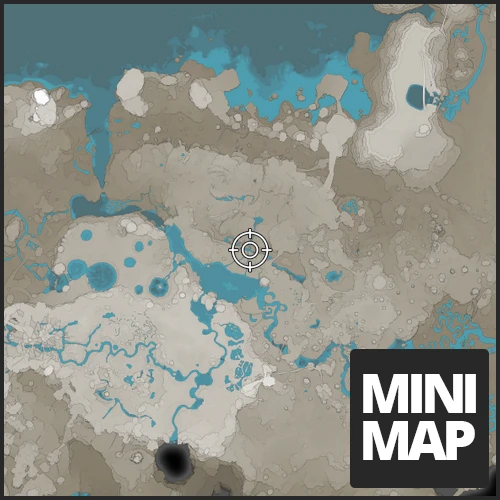
MiniMap
Shows a minimap on your hud
Beschreibung

it's as simple as it gets, it's a minimap in game to display on your HUD
If you have any ideas or feature request join our discord
- https://discord.gg/ds696q4#
===== Support blockout22 =====
<a href="https://paypal.me/blockout22" title=""><img src="https://cdn.discordapp.com/attachments/715598550309797999/739846021768675448/paypal_lg.jpg" alt=""></a><a href="https://www.patreon.com/blockout22" title=""><img src="https://c5.patreon.com/external/logo/become_a_patron_button.png" alt=""></a>
#
===== Support Deantendo =====
<a href="https://www.paypal.com/paypalme/deantendo" title=""><img src="https://cdn.discordapp.com/attachments/715598550309797999/739846021768675448/paypal_lg.jpg" alt=""></a>requires vanilla map to be unlocked in game
<br>
<br>
-
press . ingame to toggle minimap on/off
-access the option by entering any UI in game (e.g. esc menu) and hovering over the minimap
-you can click and drag the minimap to move it's location
-you can zoom in/out by using scroll wheel on the minimap


Mod Review
<a href="https://www.youtube.com/watch?v=QEg7qq_yjj0" title="Mod Review"><img src="https://j.gifs.com/XLGLJk.gif" alt="Mod Review"></a>Change log
<details><summary>Click to View Change Log</summary>1.1.1
- Updated to 1.1 Release1.1.0
- Updated to 1.0 Release1.0.14
- Updated to SML 3.6.01.0.13
- Update to U81.0.12
- Fixed: MiniMap not facing north when rotate with player is turned off1.0.10
- reimplemented configuration of Minimap- improved performance with the cost of slightly lower quality
1.0.9
- Patch which should also work for EXP1.0.8
- Updated to Update 4- Haven't reimplemented everything so only defaults will work
1.0.6
- Zooming is much quicker1.0.5
- MiniMap Locks to North when not rotating1.0.4
- updated UI- MiniMap shows the world rather than just a texture
1.0.3
- Added UI to change MiniMap Settings in game (access the UI by hovering over the MiniMap which you can do so by opening any other menu such as the ESC menu)1.0.2
- Added an option to rotate minimap with player rotation (see next comment for info)- add a bunch of configs which can be changed in the .cfg file found at: Your statisfactory install directory \Epic Games\SatisfactoryEarlyAccess\configs\MiniMap.cfg
</details>
<br>
Known Bugs
<br>
UI and logo design by Deantendo#4265
Versionen
MiniMap auf dem Server installieren
Satisfactory Server bestellen
Bestelle einen Satisfactory Server mit mindestens 4 GB RAM (6 GB empfohlen). Bei Multiplayer: +1 GB pro 4 Spieler.
Mod installieren
Öffne den Mod-Manager im Dashboard und suche nach "MiniMap". Installations-Dependencies werden automatisch mitinstalliert.
Server neu starten
Starte den Server neu, damit die Mod geladen wird. Spieler müssen die Mod ebenfalls lokal installiert haben.
Häufige Fragen
MiniMap funktioniert nicht nach Update – was tun?
Nach einem Satisfactory-Update müssen Mods aktualisiert werden. Prüfe auf ficsit.app, ob MiniMap bereits für die neue Game-Version aktualisiert wurde. Bei Mado Hosting: Öffne den Mod-Manager und klicke "Alle aktualisieren". Wenn die Mod noch nicht aktualisiert ist, entferne sie temporär, damit der Server startet.
MiniMap verursacht Crashes im Multiplayer – Lösung
Häufigste Ursache: alle Spieler müssen exakt die gleiche Mod-Version installiert haben. Prüfe in den Server-Logs nach "ModMismatch" oder "Version Conflict". Stelle sicher, dass alle Spieler MiniMap v1.1.2 und den gleichen SML verwenden. Bei Mado Hosting laufen Satisfactory Server mit 6 GB RAM für stabile Multiplayer-Performance.
Ist MiniMap mit anderen Satisfactory Mods kompatibel?
MiniMap nutzt den Satisfactory Mod Loader (SML). Generell sind SML-basierte Mods untereinander kompatibel, aber Mods die gleiche Game-Systeme ändern, können Konflikte verursachen. Teste neue Mod-Kombinationen am besten auf einem Backup-Save. Im Mado Dashboard werden bekannte Konflikte automatisch erkannt und du wirst gewarnt.
MiniMap Server mieten
Spiele MiniMap auf deinem eigenen Satisfactory Server mit Mod-Support.
Mod Informationen
- Ersteller
- blockout22
- Neueste Version
- v1.1.2
- Erstellt am
- 1. Mai 2020
- Zuletzt aktualisiert
- 7. Oktober 2026
- Quellcode
- GitHub →