
Attributes UI
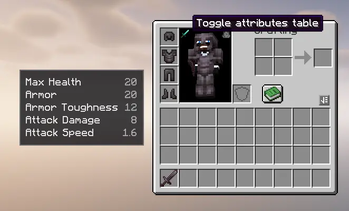
Adds a configurable attributes table to the player inventory, with custom attribute support, display transforms, separators, and an in-inventory toggle.
Screenshots
About this Mod
Attributes UI
Attributes UI is a client-side NeoForge mod that adds a clean, configurable attributes table to the left side of the player inventory.
It is designed for modded setups where players need to see both vanilla and custom attributes without opening extra menus or relying on hardcoded compatibility.
Features
- Shows player attributes directly from the inventory screen
- Supports vanilla and custom modded attributes
- Configurable rows through
config/attributesui-client.toml - Toggle button inside the inventory player model area
- Toggle state persists across inventory reopens and game restarts
- Automatically hides rows when their value is not above the configured threshold
- Supports blank separator rows for grouping sections
- Supports plain numbers and percent-style display
- Supports display-only value transforms with
Deduct,Divide, andMultiply - Client-side only; it does not change actual player attributes
Default Attributes
The default generated config includes:
generic.max_healthgeneric.armorgeneric.armor_toughnessgeneric.attack_damagegeneric.attack_speed
Configuration
After launching the game once, edit:
config/attributesui-client.toml
Each attribute entry is an object:
attributes = [
  { Name = "Max Health", Attribute = "generic.max_health", Deduct = 0.0, Divide = 0.0, Multiply = 0.0, ShowAbove = 0.0, Type = "plain" },
  { Name = "Armor", Attribute = "generic.armor", Deduct = 0.0, Divide = 0.0, Multiply = 0.0, ShowAbove = 0.0, Type = "plain" }
]
Custom Attribute Example
attributes = [
  { Name = "Ability Haste", Attribute = "spell_power:haste", Deduct = 100.0, Divide = 0.0, Multiply = 0.0, ShowAbove = 100.0, Type = "percent" },
  { },
  { Name = "Arcane Spell Power", Attribute = "spell_power:arcane", Deduct = 0.0, Divide = 0.0, Multiply = 0.0, ShowAbove = 1.0, Type = "plain" },
  { Name = "Spell Critical Damage", Attribute = "spell_power:critical_damage", Deduct = 0.0, Divide = 0.0, Multiply = 100.0, ShowAbove = 150.0, Type = "percent" }
]
Config Fields
Name: Display name shown in the tableAttribute: Attribute id to read from the playerDeduct: Subtracts from the shown value onlyDivide: Divides the shown value when greater than0Multiply: Multiplies the shown value when greater than0ShowAbove: Shows the row only when the real attribute value is greater than this numberType:plainorpercent{ }: Adds a blank separator row in the UI
Display Transforms
Transforms are visual only. The mod never changes the real attribute value.
The display value is calculated as:
display = raw - Deduct
if Divide > 0: display = display / Divide
if Multiply > 0: display = display * Multiply
If Type is percent, the mod adds % after the final displayed value.
For example, if a custom attribute returns 105 and the config has Deduct = 100 and Type = "percent", the UI shows 5%.
Compatibility
Attributes UI reads attributes by id, so it can support custom attributes from other mods as long as they are registered as normal Minecraft attributes.
The mod is client-side and intended for NeoForge 1.21.1.
Available Versions
How to Install Attributes UI on Your Server
Order Server
Order a Minecraft Java server with at least 3 GB RAM (4 GB recommended).
Set neoforge Loader
In the panel under "Egg", select the neoforge loader and matching Minecraft version (1.21.1).
Install Mod
Open the mod browser in the dashboard and search for "Attributes UI". Click "Install" – done! Alternatively, upload the .jar via SFTP to the /mods folder.
Compatibility
Mod Loaders
Minecraft Versions
1.21.1
Server-side
✗ UnsupportedRecommended RAM
4 GB(min. 3 GB)Frequently Asked Questions
Attributes UI server crashes on startup – what to do?
Most common cause: wrong neoforge version or insufficient RAM. Check the server log (latest.log) for "OutOfMemoryError" or "Mixin" errors. With Mado Hosting: ensure at least 3 GB RAM is allocated and the loader matches the mod version (1.21.1). You can switch loaders with one click in the panel.
Is Attributes UI compatible with neoforge?
Attributes UI officially supports neoforge for Minecraft 1.21.1. The Mado dashboard automatically detects incompatible loader combinations.
Server lagging with Attributes UI – how to optimize performance?
Recommended RAM: 4 GB (per 8 players). Use /spark profiler to check if Attributes UI consumes the most tick time. Common fixes: reduce server view-distance to 8-10, install "performant" or "starlight" as supplementary mods on Forge. With Mado Hosting, your server runs on NVMe SSDs with dedicated CPU cores for minimal latency.
Similar Mods






Rent Modded Server
Install Attributes UI with just one click on your server.