
Auto Eater
This is a simple client mod to stop worrying about eating all the time, that selects the food and eats it. It detects whenever the foodbar falls a certain threshold, selects food in your hotbar, and starts eating it.
Screenshots


About this Mod
Auto Eater Mod
This is a simple client mod to stop worrying about eating all the time, selecting the food and eating. It detects whenever the foodbar falls below a certain threshold, selects food in your hotbar, and starts eating, and selects back the slot you had. You can add items to a blacklist to prevent eating unwanted items.
Features
Killswitch with hotkey:
Lets you turn Auto Eater on or off instantly by pressing
,without opening the config screen. Useful when you want full manual control for combat, building, or other precise actions.Customizable Food Blacklist:
Prevents specific foods from being eaten automatically. This is useful for rare, valuable, or dangerous foods like golden apples or suspicious stew.
Auto hunger threshold:
The threshold can automatically adapt to your food supply instead of using one fixed hunger value. In
Auto (min)it prefers the least nutritious available food, and inAuto (max)it prefers the most nutritious food.Return to previous selected slot when done:
After auto-eating, the mod switches you back to the hotbar slot you were using before it started.
Auto Eating cancelation with cooldown:
Auto-eating can be canceled by scrolling away or by pressing left click, and the mod then stays inactive for a configurable amount of time. Getting hit also cancels the mod for safety.
Include Inventory:
If no food is available in the hotbar, auto-eater will search through your inventory and pull out food to your last hotbar slot, and auto-eat it.
Want to see a feature implemented? Please make a feaure request.
Config
Configurations are available through the mod menu.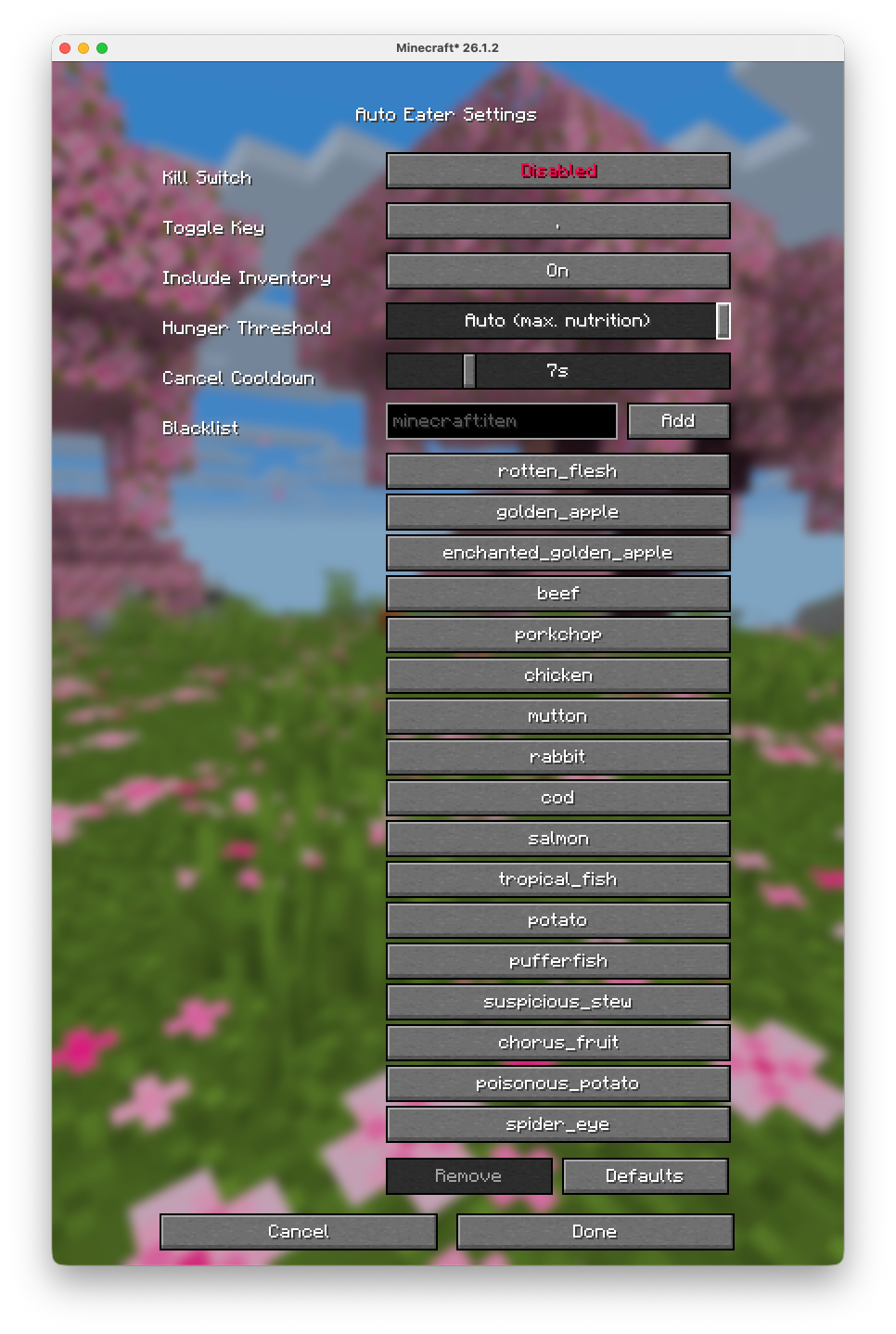
Server Warning
Some servers use plugins that turn your inventory into a UI (for example shops, menus, or other item-based interfaces). In those cases, Auto-Eater can mistakenly try to eat UI items or interfere with menu interactions. On large servers that use that tipe of interfaces (e.g. Hypixel), it is recommended to turn Auto-Eaeter off while using those plugin/UIs.GitHub Source
Available Versions
How to Install Auto Eater on Your Client
Install the Mod Loader Locally
Install fabric for your local Minecraft version.
Download the Matching File
Choose the Auto Eater file for fabric and Minecraft 26.3.
Install Mod
Place the .jar file in your local .minecraft/mods folder and restart Minecraft. No server-side installation is required.
Compatibility
Mod Loaders
Minecraft Versions
26.3, 26.2, 26.1.2 (+7 more)
Server-side
✗ UnsupportedRecommended RAM
4 GB(min. 3 GB)Frequently Asked Questions
Does Auto Eater need to be installed on the Minecraft server?
No. Modrinth marks Auto Eater as unsupported on the server side. Install it only in your local Minecraft mods folder. Your server can remain unchanged unless the mod page lists an additional dependency.
Which version and loader does Auto Eater require?
Use a file for fabric and your exact Minecraft version. Supported versions include 26.3, 26.2, 26.1.2. Files for different loaders are not interchangeable.
Auto Eater is not working – what should I check?
First check the Minecraft version, loader version and required dependencies. Put the .jar file in your local .minecraft/mods folder and remove older duplicates. Because this mod is client-side, adding server RAM will not fix it.
Similar Mods



Minecraft Server for Your Group
Auto Eater stays on your client. Host a compatible world for your group.