
Auto Trade
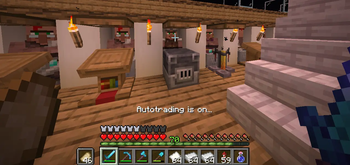
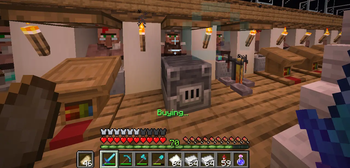
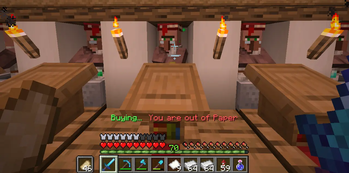
Automatically trade away specified items with one click!
Screenshots

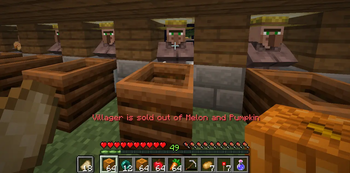
About this Mod
This mod allows you to trade away specified items to villagers with one click without even opening the GUI!
Setup
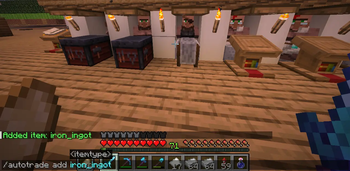
- Do "/autotrade add [item]" to add an item to the pool of items you want to sell. Use a valid Minecraft item such as iron_ingot or melon. The mod will let you know if the item exists in the Minecraft registry.
- Do "/autotrade remove [item]" to remove an item from the sell pool.
- Do "/autotrade list" to list all the items in the pool.
- Use the keybind (Default "V") to change trade modes. (Off/On/Proximity)
Note
In order to get a clean click that doesn't open the GUI, autotrade tricks the server by sending a packet that does't update the user inventory. This means that your items will not visually update until the player opens a container such as a chest, shulker box, furnace, or another villager. This is 100% safe (although I'm sure some server anticheats will flag it) and is intended behavior.
Available Versions
How to Install Auto Trade on Your Client
Install the Mod Loader Locally
Install fabric for your local Minecraft version.
Download the Matching File
Choose the Auto Trade file for fabric and Minecraft 26.3.
Install Mod
Place the .jar file in your local .minecraft/mods folder and restart Minecraft. No server-side installation is required.
Compatibility
Mod Loaders
Minecraft Versions
26.3, 26.2, 26.1.2 (+3 more)
Server-side
✗ UnsupportedRecommended RAM
4 GB(min. 3 GB)Frequently Asked Questions
Does Auto Trade need to be installed on the Minecraft server?
No. Modrinth marks Auto Trade as unsupported on the server side. Install it only in your local Minecraft mods folder. Your server can remain unchanged unless the mod page lists an additional dependency.
Which version and loader does Auto Trade require?
Use a file for fabric and your exact Minecraft version. Supported versions include 26.3, 26.2, 26.1.2. Files for different loaders are not interchangeable.
Auto Trade is not working – what should I check?
First check the Minecraft version, loader version and required dependencies. Put the .jar file in your local .minecraft/mods folder and remove older duplicates. Because this mod is client-side, adding server RAM will not fix it.
Similar Mods




![[ETF] Entity Texture Features](https://cdn.modrinth.com/data/BVzZfTc1/af683d206d50b05258d865b0d6e4aa2f2cee12f2_96.webp)

Minecraft Server for Your Group
Auto Trade stays on your client. Host a compatible world for your group.