
Auto Fishing Deluxe
QOL Fishing - Deluxe Edition
Screenshots
About this Mod
Features:
> Auto-fishing

> Break Protection

> Fishing Rod Swap (On low durability)

> GUI / Inventory Failsafe

> In-Game Push Notifications

> Inventory Preview

> Item-Swap Failsafe

> Mouse un-grabber (Enables Alt + TAB away from the game without loosing focus)

> MouseMovement

> Random Delay, reel / cast (User choice)

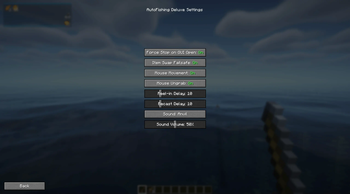
> Settings GUI

> Sound Warning for Failsafes

> ModMenu Integration

> And much more, join Discord for additional details
Dependency
- Fabric-Api
Tutorial
Default Keybinds:
Auto-Fishing: K
Settings: O
First throw the hook, then start the AutoFishing.
More info can be found on the Discord!

Disclaimer
This mod is intended for educational and entertainment purposes only. By downloading and using AutoFishingDeluxe, you acknowledge that the developers of this mod are not responsible for any misuse, violations of server rules, or consequences resulting from its use. Users are solely responsible for ensuring compliance with server policies, community guidelines, and applicable laws. Use at your own risk.
Available Versions
How to Install Auto Fishing Deluxe on Your Client
Install the Mod Loader Locally
Install fabric for your local Minecraft version.
Download the Matching File
Choose the Auto Fishing Deluxe file for fabric and Minecraft 1.21.8.
Install Mod
Place the .jar file in your local .minecraft/mods folder and restart Minecraft. No server-side installation is required.
Compatibility
Mod Loaders
Minecraft Versions
1.21.8, 1.21.7, 1.21.6 (+6 more)
Server-side
✗ UnsupportedRecommended RAM
4 GB(min. 3 GB)Frequently Asked Questions
Does Auto Fishing Deluxe need to be installed on the Minecraft server?
No. Modrinth marks Auto Fishing Deluxe as unsupported on the server side. Install it only in your local Minecraft mods folder. Your server can remain unchanged unless the mod page lists an additional dependency.
Which version and loader does Auto Fishing Deluxe require?
Use a file for fabric and your exact Minecraft version. Supported versions include 1.21.8, 1.21.7, 1.21.6. Files for different loaders are not interchangeable.
Auto Fishing Deluxe is not working – what should I check?
First check the Minecraft version, loader version and required dependencies. Put the .jar file in your local .minecraft/mods folder and remove older duplicates. Because this mod is client-side, adding server RAM will not fix it.
Similar Mods




Minecraft Server for Your Group
Auto Fishing Deluxe stays on your client. Host a compatible world for your group.