
Better Zoom
Smoothly zoom with wheel and hotkeys as much as you want, in a simple way with customizations
About this Mod

Better Zoom v2.9, allows you to zoom smoothly with wheel scrolling and hotkeys. It offers a simple and efficent zoom with customizations. All of that without any mixin/asm, in order to improve the speed.
The goal of this mod is to provide a simple & suitable zoom with both wheel and hotkeys smooth zooming. No fancy or complicated parameters included. It still offers customizations (see screenshots below) on a Configuration GUI while running without any mixin or any additional library.
It's also meant to be simple, compatible but still including all the necessary features, without fancy stuff.

Press "c" by default to toggle zoom. (Configurable keybind)
Press "+"/"-" or scroll with wheel to zoom in/out ( Configurable) - You can also hold these keybinds!
*A new video and logo are being made!

Configuration GUI (Forge 1.20.1 v2.9.0 reference): (open with ' V' keybind by default) and at mods/config..:
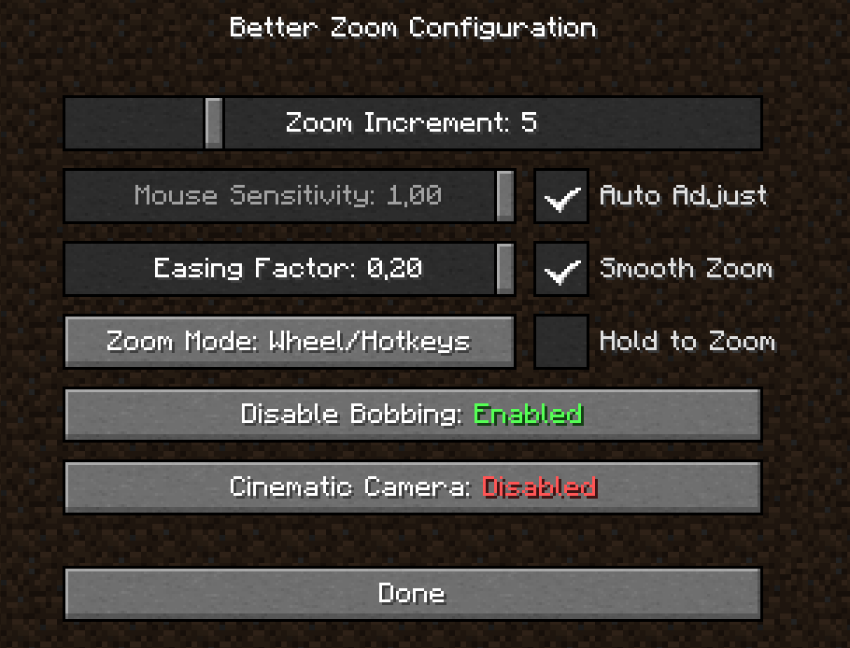
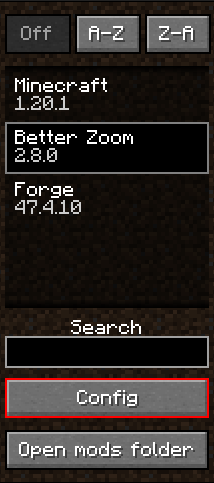
Details:
| Zoom Increment | How much zoom it increments per scroll wheel. (useful to zoom/dezoom very quickly) |
|---|---|
| Mouse Sensitivity | The mouse sensitivity that will be multiplited by when you zoom. (adjust as you need so the camera doesn't move too fast when zooming a lot) |
| Auto Adjust | Adjust the mouse sensitivty automatically according to the zoom level. Less sensitive when Cinematic Camera is on. |
| Smooth Zoom | A real Smooth Fade in/out when zooming |
| Hold to Zoom | Require to hold the zoom keybind in order to keep zooming |
| Easing Factor | Easing factor for the smooth transitions. Lowers = slower/smoother |
| Disable Bobbing | Disable the bob biew/bobbing while zooming |
| Cinematic Camera | Cinematic Camera movements while zooming. Slow and smooth, useful for cinematic animations/videos. Note: it's regulated with Auto-adjust mode, if you want a stronger cinematic feel, disable Auto-adjust and set lower value for Mouse sensitivity |
(Tooltips are avilable ingame for more informations)
Recommended: (What I use :D)
- Zoom Increment: ~5
- Mouse Sensitivity: Auto-adjust
- Easing Factor: 0.20
- Smooth Zoom: enabled
- Hold to Zoom: it depends..
- Zoom Mode: Both (yes, you can use wheel and hotkeys!)
- Disable bobbing: enabled
- Cinematic camera: it depends..
Custom keybinds:
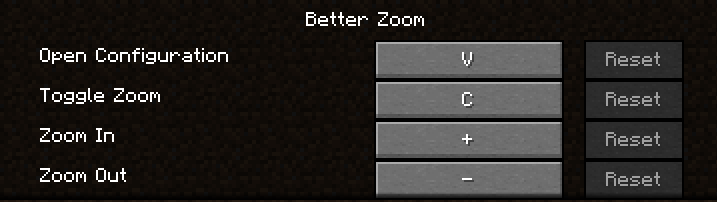
*You can even hold keybinds of zoom in/out

Translations are available for French and English yet. Feel free to suggest better one, or directly add translations on github with a pull request!
Feel free to add the mod in any modpack published on curseforge! This is highly appreciated.
The code is open source: https://github.com/AwesomeHippo/BetterZoom under MIT license
Available Versions
How to Install Better Zoom on Your Client
Install the Mod Loader Locally
Install forge for your local Minecraft version.
Download the Matching File
Choose the Better Zoom file for forge and Minecraft 1.21.1.
Install Mod
Place the .jar file in your local .minecraft/mods folder and restart Minecraft. No server-side installation is required.
Compatibility
Mod Loaders
Minecraft Versions
1.21.1, 1.20.5, 1.20.4 (+3 more)
Server-side
✗ UnsupportedRecommended RAM
4 GB(min. 3 GB)Frequently Asked Questions
Does Better Zoom need to be installed on the Minecraft server?
No. Modrinth marks Better Zoom as unsupported on the server side. Install it only in your local Minecraft mods folder. Your server can remain unchanged unless the mod page lists an additional dependency.
Which version and loader does Better Zoom require?
Use a file for forge, neoforge and your exact Minecraft version. Supported versions include 1.21.1, 1.20.5, 1.20.4. Files for different loaders are not interchangeable.
Better Zoom is not working – what should I check?
First check the Minecraft version, loader version and required dependencies. Put the .jar file in your local .minecraft/mods folder and remove older duplicates. Because this mod is client-side, adding server RAM will not fix it.
Similar Mods




![[ETF] Entity Texture Features](https://cdn.modrinth.com/data/BVzZfTc1/af683d206d50b05258d865b0d6e4aa2f2cee12f2_96.webp)

Minecraft Server for Your Group
Better Zoom stays on your client. Host a compatible world for your group.