
Block Destroy Entity Drop
Makes broken block item drops spawn at the block center and fall straight down instead of flying away with random velocity.
Screenshots
About this Mod
Block Destroy Entity Drop
Block Destroy Entity Drop is a lightweight NeoForge mod for Minecraft 1.21.1 that changes how item entities appear when blocks are broken.
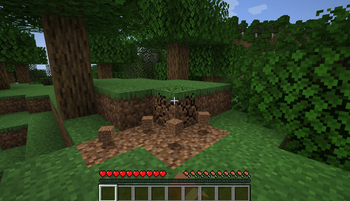
In vanilla Minecraft, drops from broken blocks spawn with a random offset and random motion. This can make items bounce sideways, scatter unpredictably, or fly into hazards such as lava. This mod makes those drops spawn in the exact center of the broken block and start with no random velocity, so they simply fall down under normal gravity.
Features
- Spawns broken block drops at the block center
- Removes random sideways launch velocity from block drops
- Keeps normal item pickup delay behavior
- Keeps normal gravity behavior
- Works server-side for consistent multiplayer behavior
- Does not change unrelated dropped items such as player-thrown items
Compatibility
- Minecraft:
1.21.1 - Mod loader:
NeoForge - Side:
Serverrequired,Clientoptional for singleplayer/local use
How It Works
The mod changes the vanilla block drop spawning behavior. When a block creates an item drop, the item entity is placed at:
x + 0.5, y + 0.5, z + 0.5
Its initial movement is set to:
0, 0, 0
After spawning, Minecraft gravity handles the item normally.
Why Use This?
- Prevents drops from randomly flying into lava or off ledges
- Makes mining and block breaking more predictable
- Helps automation, building, and cleanup feel cleaner
- Keeps the vanilla feel while removing one source of random item movement
Available Versions
How to Install Block Destroy Entity Drop on Your Server
Order Server
Order a Minecraft Java server with at least 3 GB RAM (4 GB recommended).
Set neoforge Loader
In the panel under "Egg", select the neoforge loader and matching Minecraft version (1.21.1).
Install Mod
Open the mod browser in the dashboard and search for "Block Destroy Entity Drop". Click "Install" – done! Alternatively, upload the .jar via SFTP to the /mods folder.
Compatibility
Mod Loaders
Minecraft Versions
1.21.1
Server-side
✓ RequiredRecommended RAM
4 GB(min. 3 GB)Frequently Asked Questions
Block Destroy Entity Drop server crashes on startup – what to do?
Most common cause: wrong neoforge version or insufficient RAM. Check the server log (latest.log) for "OutOfMemoryError" or "Mixin" errors. With Mado Hosting: ensure at least 3 GB RAM is allocated and the loader matches the mod version (1.21.1). You can switch loaders with one click in the panel.
Is Block Destroy Entity Drop compatible with neoforge?
Block Destroy Entity Drop officially supports neoforge for Minecraft 1.21.1. The Mado dashboard automatically detects incompatible loader combinations.
Server lagging with Block Destroy Entity Drop – how to optimize performance?
Recommended RAM: 4 GB (per 8 players). Use /spark profiler to check if Block Destroy Entity Drop consumes the most tick time. Common fixes: reduce server view-distance to 8-10, install "performant" or "starlight" as supplementary mods on Forge. With Mado Hosting, your server runs on NVMe SSDs with dedicated CPU cores for minimal latency.
Similar Mods






Rent Modded Server
Install Block Destroy Entity Drop with just one click on your server.