
Better Questing Tweaker (BQTweaker)
Tweaker mod to change some aspects of BetterQuesting
Screenshots
About this Mod
Current Features:
-Adds a button to the home page of BetterQuesting to toggle quest notifications from being displayed.
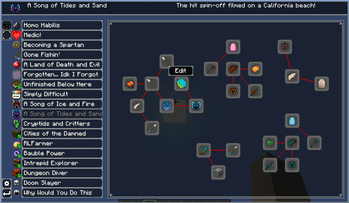
-Redesigns the questline page.
-Adds right-click context menus for adding/editing tasks and opening the questline designer.
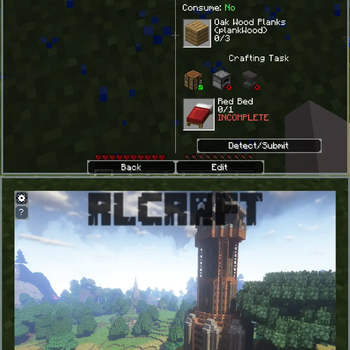
-Wraps tasks of each quest into a single page to allow for scrolling instead of clicking page-to-page.
-Wraps the description and rewards of each quest into a single page to allow for scrolling instead of clicking page-to-page.
-Adds a keybind for quickly returning to the previous page (Backspace by default.)
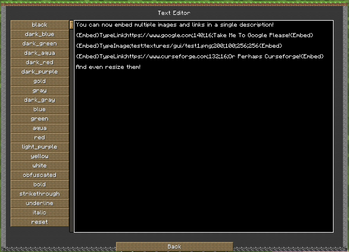
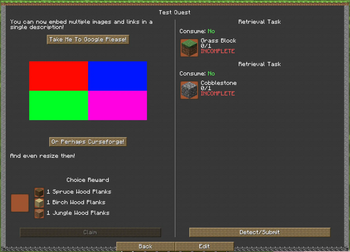
-Adds client-side embedding of links and images into quest descriptions, see below for details.
-Re-adds designer button to questline page.
-Adds patch for compatibility with MoBends to prevent stuttering models in task previews.
-Config allows for everything to be enabled/disabled.
Description Embedding (As of 1.3.0):
-You are able to add embeds (Images and Links) through quest descriptions using this mod.
-This is detected and rendered on the client-side only, and does not modify the BQ Database.
-This means BQ Tweaker can be removed and it will not break your quests.
Embeds are set by specifying an embed type and the embed arguments separated by semi-colons (;), surrounded by {Embed} at the beginning and end:
Image Embed Argument Example:
{Embed}TypeImage;
Link Embed Argument Example:
{Embed}TypeLink;
The embed text will be automatically detected and removed from the description itself.
Multiple embeds of both links and images are allowed, and will be inserted into the description based on where they are placed in the text.
See the images tab for in-game examples.
This mod is currently only required client-side, but shouldn't cause issue if placed on a server.
Some of these features are fairly experimental, if you encounter any bugs please report them to the github.
Need to get in contact with me, or want to support me? Click the badges below:




Available Versions
How to Install Better Questing Tweaker (BQTweaker) on Your Client
Install the Mod Loader Locally
Install forge for your local Minecraft version.
Download the Matching File
Choose the Better Questing Tweaker (BQTweaker) file for forge and Minecraft 1.12.2.
Install Mod
Place the .jar file in your local .minecraft/mods folder and restart Minecraft. No server-side installation is required.
Compatibility
Mod Loaders
Minecraft Versions
1.12.2
Server-side
✗ UnsupportedRecommended RAM
4 GB(min. 3 GB)Frequently Asked Questions
Does Better Questing Tweaker (BQTweaker) need to be installed on the Minecraft server?
No. Modrinth marks Better Questing Tweaker (BQTweaker) as unsupported on the server side. Install it only in your local Minecraft mods folder. Your server can remain unchanged unless the mod page lists an additional dependency.
Which version and loader does Better Questing Tweaker (BQTweaker) require?
Use a file for forge and your exact Minecraft version. Supported versions include 1.12.2. Files for different loaders are not interchangeable.
Better Questing Tweaker (BQTweaker) is not working – what should I check?
First check the Minecraft version, loader version and required dependencies. Put the .jar file in your local .minecraft/mods folder and remove older duplicates. Because this mod is client-side, adding server RAM will not fix it.
Similar Mods




Minecraft Server for Your Group
Better Questing Tweaker (BQTweaker) stays on your client. Host a compatible world for your group.