
Chestpack Backpacks
Simple, vanilla friendly backpacks. Pick up and carry chests!
Screenshots
About this Mod
Chestpack Backpacks
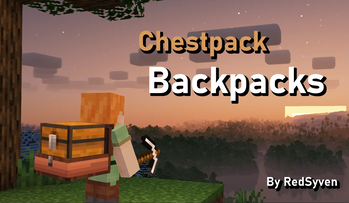
This project adds simple, vanilla friendly backpacks to Minecraft.
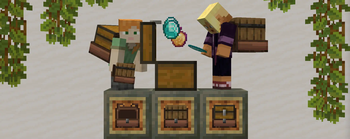
These backpacks, also known as Chestpacks, lets players pick up and carry chests!
Chestpacks offer an intuitive storage solution with early-midgame accessibility.
OVERVIEW
• Recipe: 1 Leather + 1 String + 1 Saddle + 1 Plank
----
• Left-Click a chest with an empty Chestpack to pick it up. Right-Click the ground to place the chest back down.
• The Chestpack can pick up the following containers: trapped chests, barrels, and chests.
• Chest slot full? Don't worry - the Chestpack's still got your back! Since it's an offhand equipment, there's no need to sacrifice protection.
• Built to last - Chestpacks are fireproof!
Burden Mechanic
• Holding more than one loaded chestpack will burden players with their weight!
---- ### Why a Datapack?
This project uses a datapack to ensure:
• No Mods Required ✅: Works on vanilla servers! Friends can join hassle-free. Once the datapack/mod is installed by the host, no client installations are needed.
• Compatability ✅: Will work with practically any mod!
• Lightweight ✅: Minimal performance impact compared to mods.
However, due to limitations of datapacks, there are a couple constraints:
• Creative Mode Pickup ⛔: Chest pickup does not work in Creative Mode. Players have to be in Survival.
• Model Alignment ⛔: Datapacks can’t fully customize entity models. Chestpack models are anchored to the arm; This means it won't align to the player's back during fast movement.
Available Versions
How to Install Chestpack Backpacks on Your Server
Order Server
Order a Minecraft Java server with at least 3 GB RAM (4 GB recommended).
Set datapack Loader
In the panel under "Egg", select the datapack loader and matching Minecraft version (1.21.5).
Install Mod
Open the mod browser in the dashboard and search for "Chestpack Backpacks". Click "Install" – done! Alternatively, upload the .jar via SFTP to the /mods folder.
Compatibility
Mod Loaders
Minecraft Versions
1.21.5, 1.21.4, 1.21.1 (+1 more)
Server-side
✓ RequiredRecommended RAM
4 GB(min. 3 GB)Frequently Asked Questions
Chestpack Backpacks server crashes on startup – what to do?
Most common cause: wrong datapack version or insufficient RAM. Check the server log (latest.log) for "OutOfMemoryError" or "Mixin" errors. With Mado Hosting: ensure at least 3 GB RAM is allocated and the loader matches the mod version (1.21.5). You can switch loaders with one click in the panel.
Is Chestpack Backpacks compatible with datapack and fabric and forge and neoforge and quilt?
Chestpack Backpacks officially supports datapack, fabric, forge, neoforge, quilt for Minecraft 1.21.5, 1.21.4, 1.21.1. Note: Forge and Fabric mods are NOT cross-compatible – pick one loader and stick with it. The Mado dashboard automatically detects incompatible loader combinations.
Server lagging with Chestpack Backpacks – how to optimize performance?
Recommended RAM: 4 GB (per 8 players). Use /spark profiler to check if Chestpack Backpacks consumes the most tick time. Common fixes: reduce server view-distance to 8-10, install "performant" or "starlight" as supplementary mods on Forge. With Mado Hosting, your server runs on NVMe SSDs with dedicated CPU cores for minimal latency.
Similar Mods




Rent Modded Server
Install Chestpack Backpacks with just one click on your server.